Introduction to Agentic AI
Model Context Protocol (MCP)
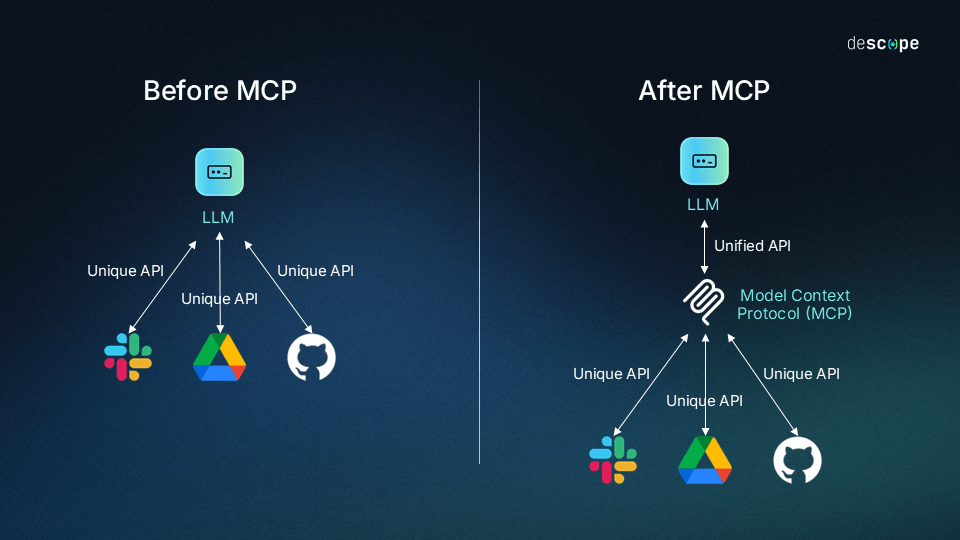
Model Context Protocol why MCP

Model Context Protocol why MCP
- LLM 的困境:
- 知識截止日期(Knowledge Cutoff):訓練資料有日期限制
- 無法存取私有資料(Private Data)
- 工具呼叫(Tool Calling)的碎片化:每個平台都不一樣
- 傳統 Tool Calling vs. MCP:
- 傳統:為每個 Model/API 重新寫
- MCP:一次開發,所有支援 MCP 的 Host通用
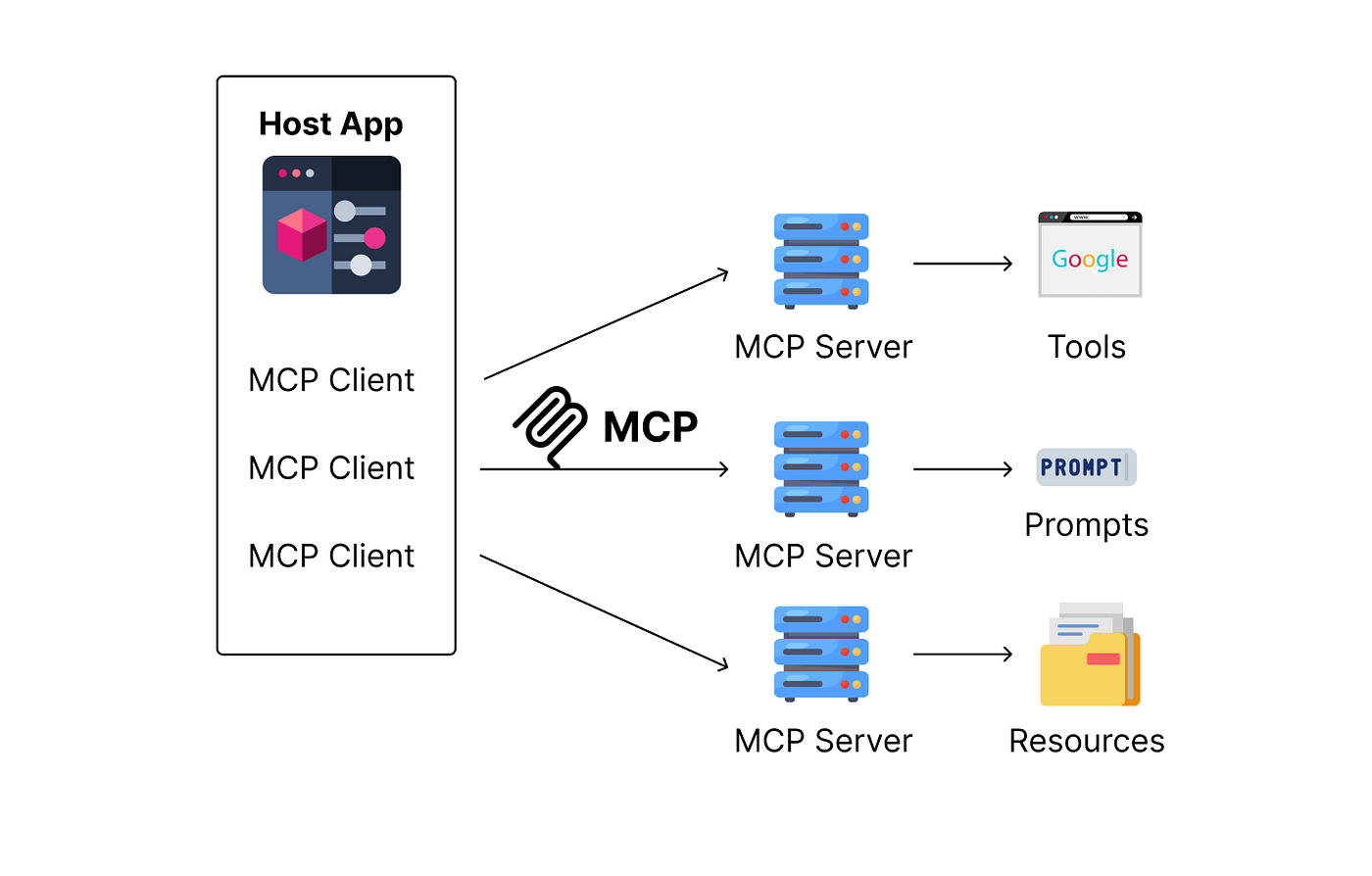
- 核心架構:Client (Host) <-> Server (Resource/Tool) <-> Resource (DB/File/API)
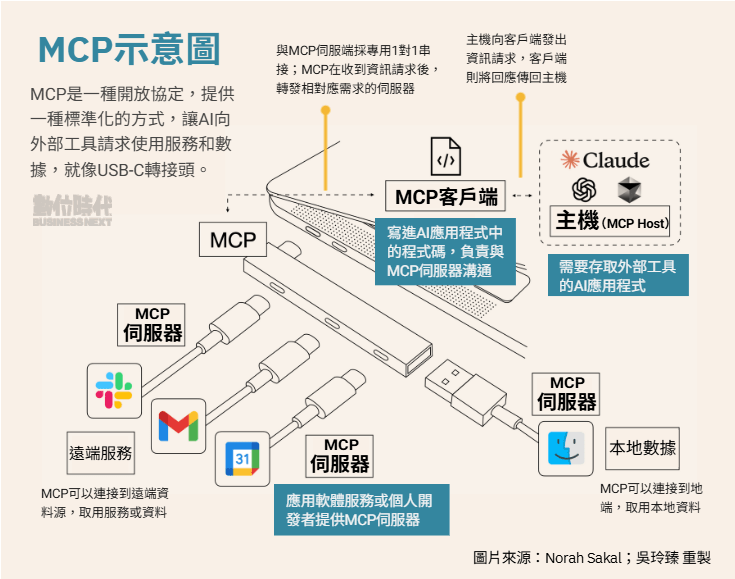
Model Context Protocol MCP
- 2024.11 Anthropic 發佈之開放標準
- 讓LLM可以整合external tools, systems, and data sources
Model Context Protocol MCP
Model Context Protocol component
- MCP Client
AI 助理。當判斷需要外部協助時,它會作為 MCP 用戶端運行。 - MCP Server
可自行建置,或使用現有的軟體。
託管特定的工具或資源(如搜尋文件、存取 API、讀取文件、執行自訂提示的功能)。 - MCP Protocol
MCP 定義Client端如何向伺服器要求資訊或操作,以及伺服器如何回應。可確保相容性和安全性。
Understanding MCP Server
MCP Server: programs that expose specific capabilities to AI applications through MCP
Claude
Understanding MCP Server
檢視Remote MCP Server
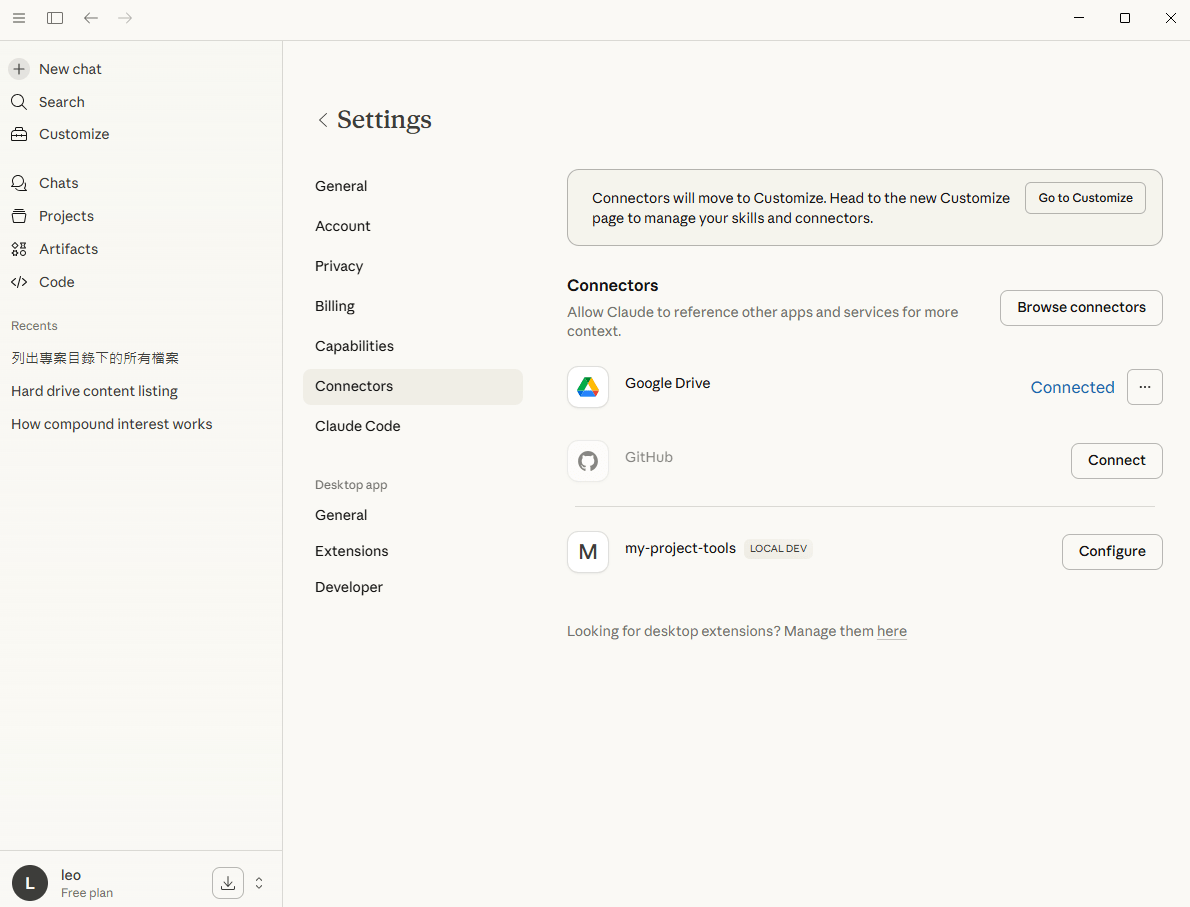
Understanding MCP Server
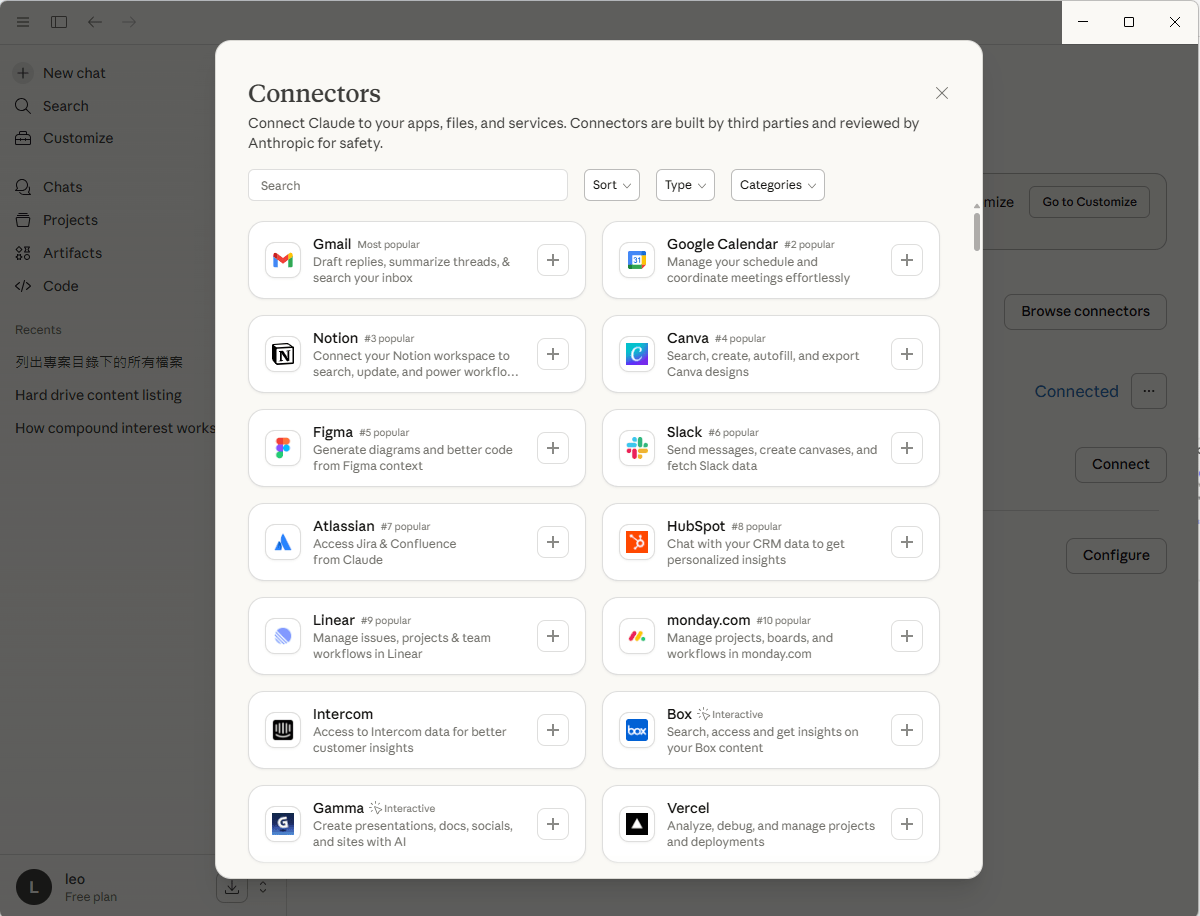
檔案系統
資料庫
行事曆
電子郵件
儲存庫
團隊工具
Building a Local MCP Server
Model Context Protocol local mcp server
# name: mcp_server.py
import os
from mcp.server.fastmcp import FastMCP

# step1: 初始化FastMCP (簡化版SDK)
mcp = FastMCP("Project-Navigator")

@mcp.tool()
def list_code_files(path: str="."):
    """列出指定目錄下所有的 .py 與 .js .ts檔案"""
    files = []
    for root, _, filenames in os.walk(path):  # tuple(root, dirname, filename)
        for f in filenames:
            if(f.endswith(('.py', '.js', '.ts'))):
                files.append(os.path.join(root, f))
    return "\n".join(files)

@mcp.tool()
def read_file_content(filepath: str):
    """讀取特定檔案的程式碼內容"""
    with open(filepath, "r", encoding="utf-8") as f:
        return f.read()

if __name__ == "__main__":
    mcp.run(transport="stdio")
pip install fastmcpmcp_server.py
使用os套件列出指定資料夾下的所有檔案
pip install mcpModel Context Protocol local mcp server
npx @modelcontextprotocol/inspector python mcp_server.py 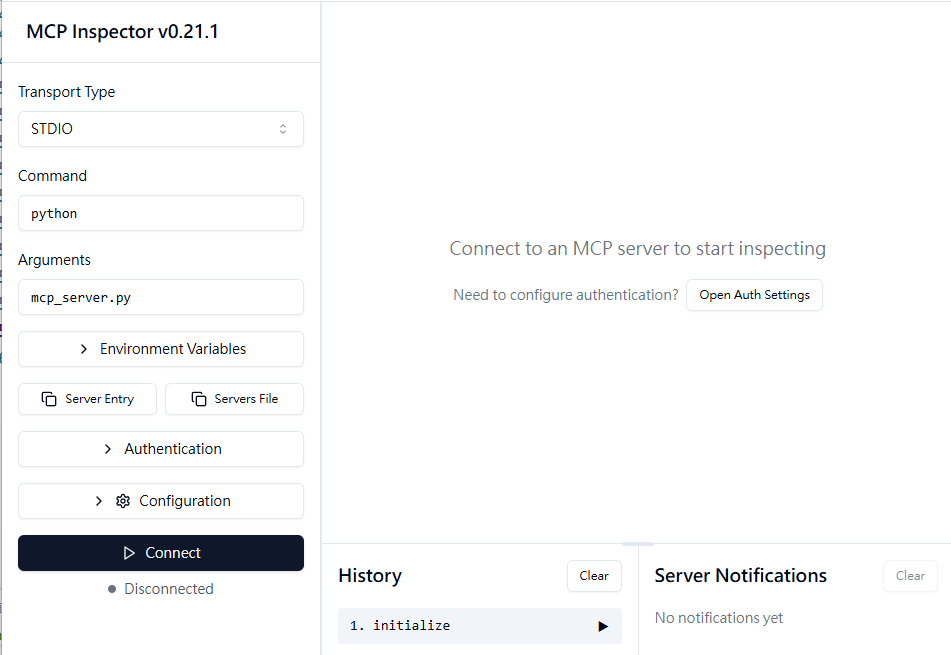
inspector: Visual測試工具,用來檢視 server的capabilities (tools, resources, prompts).
npx需安裝node.js
會自動執行Server程式
測試工具一
Model Context Protocol local mcp server
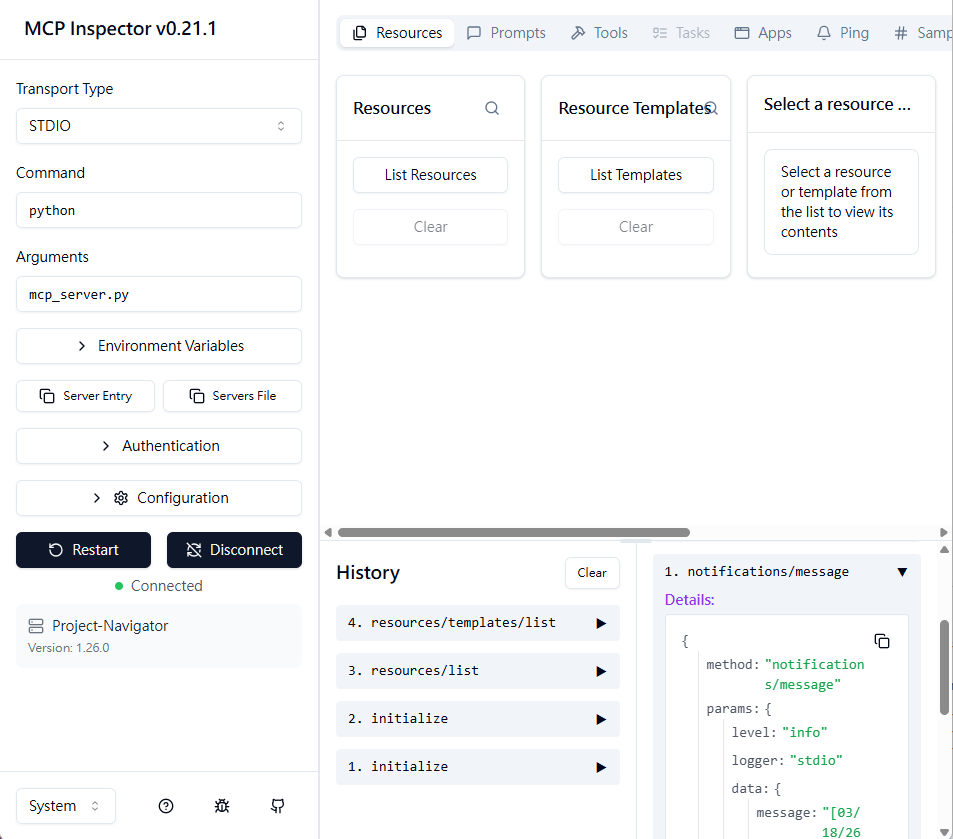
說明
Understanding MCP Server
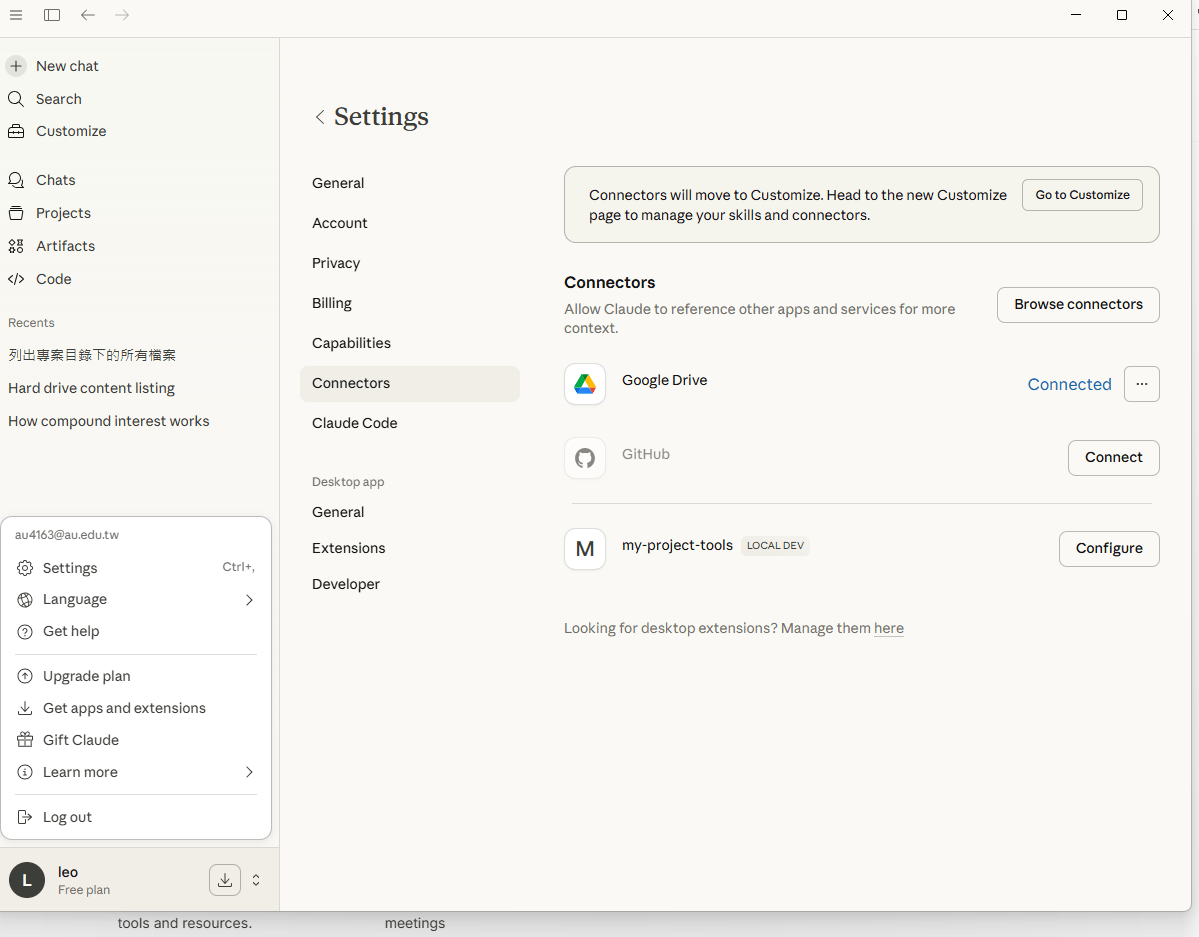
使用Claude進行測試。local MCP Server, need to set properties inside LLM
Claude
測試工具二
Understanding MCP Server
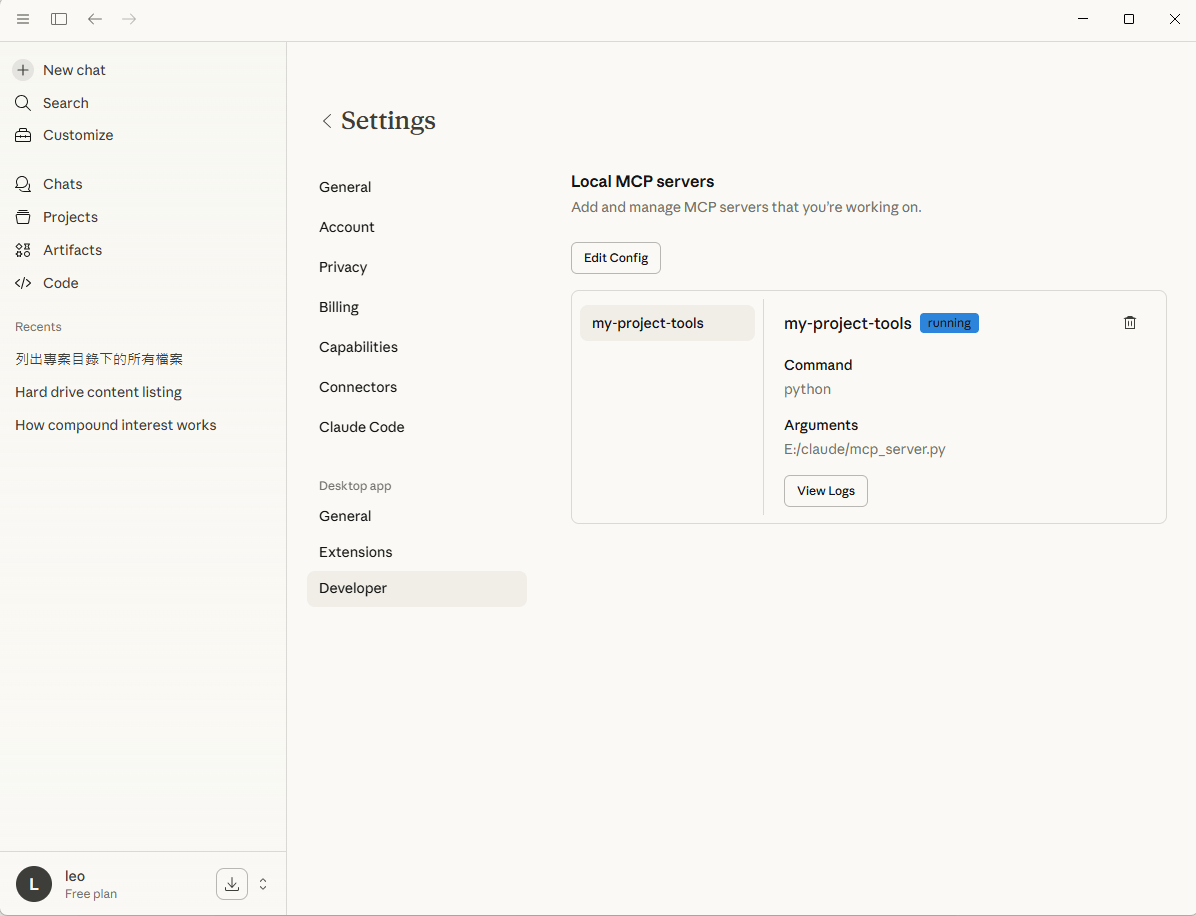
Understanding MCP Server
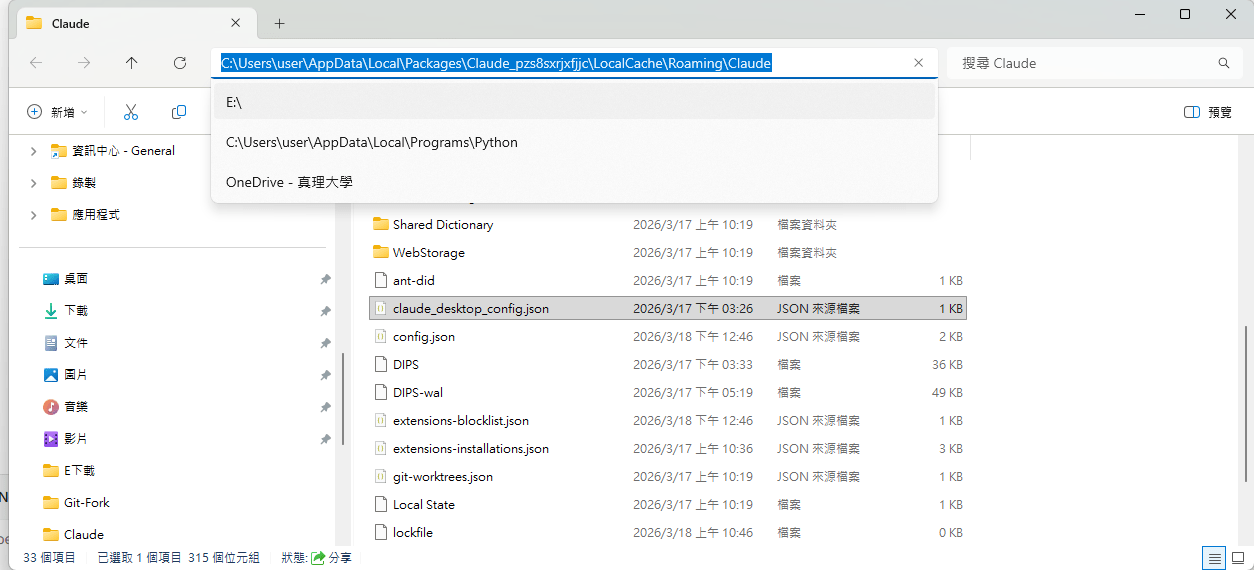
Understanding MCP Server
{
  "mcpServers": {
        "my-project-tools": {
            "command": "python",
            "args": ["E:/claude/mcp_server.py"]
        }
    },
  "preferences": {
    "coworkScheduledTasksEnabled": false,
    "ccdScheduledTasksEnabled": false,
    "sidebarMode": "chat",
    "coworkWebSearchEnabled": true
  }
}
重新啟動Claude後
Understanding MCP Server
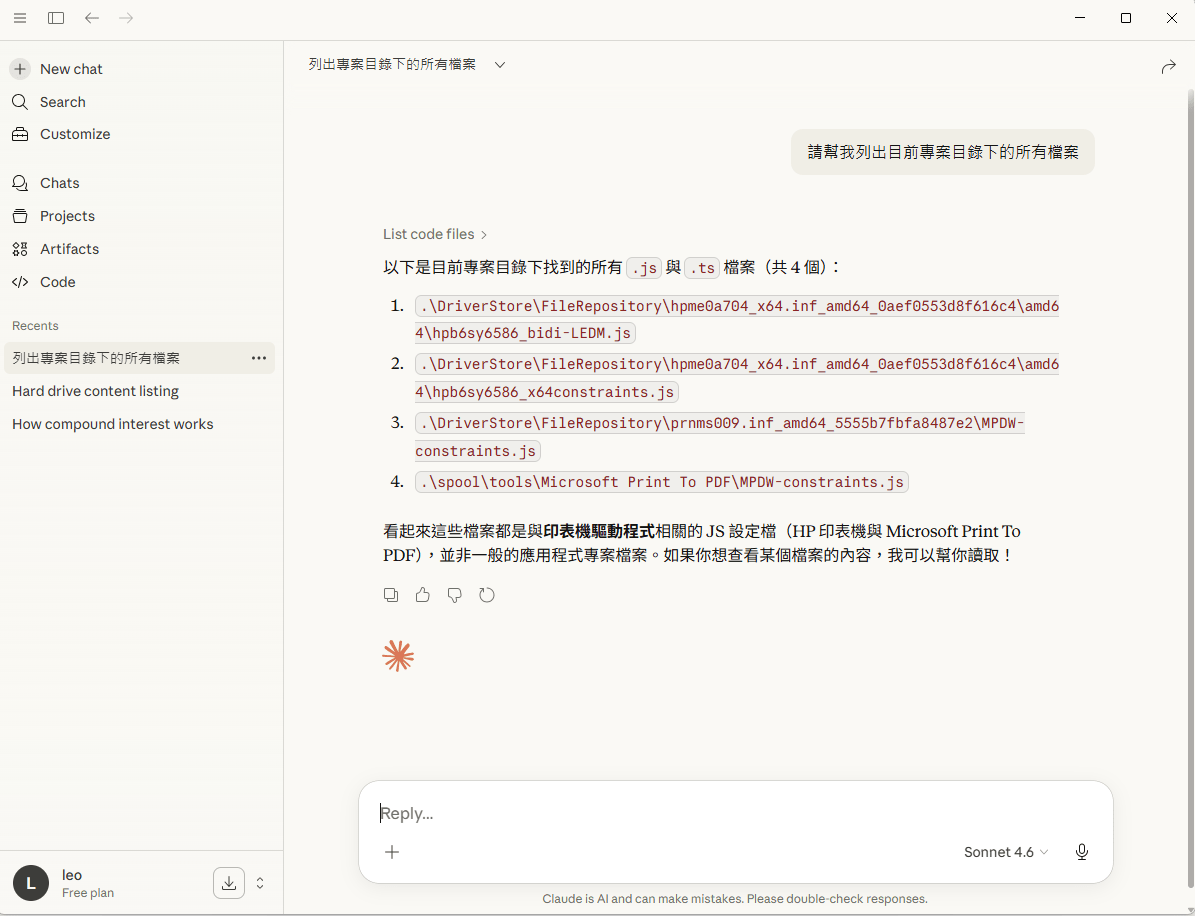
Building Local Client for Servers
Model Context Protocol local mcp server-範例1
# fs_mcp_server.py
from mcp.server.fastmcp import FastMCP
import os

mcp = FastMCP("FS-Explorer")

@mcp.tool()
def list_files(path: str = "."):
    """列出指定路徑下的所有檔案"""
    try:
        return "\n".join(os.listdir(path))
    except Exception as e:
        return f"Error: {str(e)}"

@mcp.tool()
def read_content(file_path: str):
    """讀取檔案內容"""
    with open(file_path, "r", encoding="utf-8") as f:
        return f.read()

if __name__ == "__main__":
    mcp.run()
fs_mcp_server.py
Model Context Protocol local mcp server-範例1
-
FastMCP("FS-Explore") :創建名為FS-Explore( human-readable name)的server
-
@mcp.tool() :decorator 將函式轉為MCP tool
-
docstring :工具描述tool’s description (LLMs 呼叫函式時,作為了解工具之用)
-
Type hints (file_path: str):expected inputs and outputs
-
transport="stdio" mcp.run()的預設值,意指server將透過stdio進行溝通 (perfect for local testing)
關於程式碼:
Model Context Protocol 測試的client端-範例1
# fs_mcp_client.py
import asyncio
from mcp import ClientSession, StdioServerParameters
from mcp.client.stdio import stdio_client

async def run_fs_demo():
    # 1. 指向第一個 Server 範例
    server_params = StdioServerParameters(
        command="python",
        args=["fs_mcp_server.py"],
    )

    print("--- 正在連線至 Filesystem MCP Server ---")

    async with stdio_client(server_params) as (read, write):
        async with ClientSession(read, write) as session:
            # 初始化
            await session.initialize()

            # 展示一:探索目錄 (呼叫 list_files)
            print("\n[步驟 1] 列出目前目錄內容:")
            ls_result = await session.call_tool("list_files", arguments={"path": "."})
            file_list = ls_result.content[0].text
            print(f"Server 回傳:\n{file_list}")

            # 展示二:讀取特定檔案 (呼叫 read_content)
            # 假設目錄裡有 fs_mcp_server.py
            target_file = "fs_mcp_server.py"
            print(f"\n[步驟 2] 讀取檔案內容: {target_file}")

            read_result = await session.call_tool("read_content", arguments={"file_path": target_file})
            content = read_result.content[0].text

            # 只印出前 100 個字元作為展示
            print(f"檔案內容前 100 字:\n{content[:100]}...")

if __name__ == "__main__":
    asyncio.run(run_fs_demo())
fs_mcp_client.py
連線到上面的 Server,先「列出檔案」,再根據檔名「讀取內容」
Model Context Protocol 測試的client端-範例1
關於程式碼:
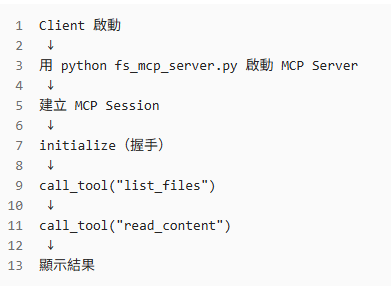
    ...
    # 1. 指向第一個 Server 範例
    server_params = StdioServerParameters(
        command="python",
        args=["fs_mcp_server.py"],
    )
    ...
    async with stdio_client(server_params) as (read, write):
        async with ClientSession(read, write) as session:
            # 初始化
            await session.initialize()
...
# 展示一:探索目錄 (呼叫 list_files)
print("\n[步驟 1] 列出目前目錄內容:")
ls_result = await session.call_tool("list_files", arguments={"path": "."})
file_list = ls_result.content[0].text
print(f"Server 回傳:\n{file_list}")

# 展示二:讀取特定檔案 (呼叫 read_content)
...
print(f"\n[步驟 2] 讀取檔案內容: {target_file}")
read_result = await session.call_tool("read_content", arguments={"file_path": target_file})
content = read_result.content[0].text

# 只印出前 100 個字元作為展示
print(f"檔案內容前 100 字:\n{content[:100]}...")
Model Context Protocol local mcp server-範例2
import subprocess
import os
from mcp.server.fastmcp import FastMCP

# 1. 初始化FastMCP伺服器
mcp = FastMCP("Git-Monitor-Assistant")

# 輔助函式: 執行Shell指令
def run_commmand(command: list, cwd: str="."):
    try:
        result = subprocess.run(
            command,
            capture_output=True,
            text=True,
            check=True,
            cwd=cwd
        )
        return result.stdout
    except subprocess.CalledProcessError as e:
        return f"Error: {e.stderr}"

# 2. 定義工具:獲取Git Diff
@mcp.tool()
def get_git_diff(repo_path: str="."):
    """
    取得指定路徑下目前 Git 儲存庫的未提交變更(diff)。
    此舉有助於了解程式碼改動的內容。
    """
    # 檢查是否為git目錄
    if not os.path.exists(os.path.join(repo_path, ".git")):
        return "錯誤,指定的路徑不是Git儲存庫。"

    # 擷取暫存區與工作區的差異,"HEAD"最後一次commit的狀態
    diff = run_commmand(["git","diff", "HEAD"], cwd=repo_path)
    return diff if diff else "目前沒有任何變更"

# 3. 定義工具:取得Git狀態簡報
@mcp.tool()
def get_git_status(repo_path: str="."):
    """列出目前哪些檔案被修改、刪除或新增。"""
    return run_commmand(["git", "status", "--short"], cwd=repo_path)

# 4.定義工具:執行Commit
@mcp.tool()
def commit_changes(message: str, repo_path: str="."):
    """
    將所有變更加入暫存區並commit。
    參數message應由AI根據diff內容生成。
    """
    try:
        # git add
        run_commmand(["git", "add", "."], cwd=repo_path)
        # git commit -m "..."
        result = run_commmand(["git", "commit", "-m", message], cwd=repo_path)
        return f"commit成功!\n{result}"
    except Exception as e:
        return f"commit失敗:{str(e)}"

if __name__ == "__main__":
    mcp.run(transport="stdio")
git_mcp_server.py
Model Context Protocol 測試的client端-範例2
import asyncio
from mcp import ClientSession, StdioServerParameters
from mcp.client.stdio import stdio_client

async def run_client():
    # 1. 設定 Server 啟動參數 (指向你之前的 git_mcp_server.py)
    server_params = StdioServerParameters(
        command="python",
        args=["git_mcp_server.py"], # 確保路徑正確
    )

    # 2. 建立連線通道 (stdio)
    async with stdio_client(server_params) as (read, write):
        # 3. 初始化 Session
        async with ClientSession(read, write) as session:
            await session.initialize()

            # --- 展示 A: 列出所有可用工具 ---
            tools = await session.list_tools()
            print("\n[可用工具列表]:")
            for tool in tools.tools:
                print(f"- {tool.name}: {tool.description}")

            # --- 展示 B: 實際呼叫工具 (例如 get_git_status) ---
            print("\n[執行 get_git_status...]")
            # 呼叫工具,傳遞參數 (repo_path)
            result = await session.call_tool("get_git_status", arguments={"repo_path": "."})

            # 解析並印出結果
            for content in result.content:
                if content.type == "text":
                    print(f"結果內容:\n{content.text}")

if __name__ == "__main__":
    asyncio.run(run_client())
git_mcp_client.py
連線到上面的 Server,先「列出檔案」,再根據檔名「讀取內容」
Model Context Protocol local mcp server-範例3
from fastmcp import FastMCP
import json

# 1. 初始化 Server
mcp = FastMCP("my-first-server")

# 2. 定義工具
@mcp.tool() # 建議加上括號,這在某些版本較穩健
def get_weather(city: str) -> str:
    """取得指定城市的當前天氣資訊。"""

    # 模擬數據
    weather_data = {
        "new york": {"temp": 72, "condition": "sunny"},
        "london": {"temp": 59, "condition": "cloudy"},
        "tokyo": {"temp": 68, "condition": "rainy"},
    }

    city_lower = city.lower()

    # 實際開發建議:回傳格式化的字串,對 LLM 的理解最友善
    if city_lower in weather_data:
        data = {"city": city, **weather_data[city_lower]}
    else:
        data = {"city": city, "temp": 70, "condition": "unknown"}

    return json.dumps(data, ensure_ascii=False)

# 3. 執行 Server
if __name__ == "__main__":
    # transport="stdio" 是默認值,這樣寫很清楚
    mcp.run(transport="stdio")
my_server.py
Model Context Protocol mcp server
-
FastMCP("my-first-server") creates your server with a name
-
@mcp.tool is the decorator that turns any function into an MCP tool
-
The docstring becomes the tool’s description (LLMs use this to understand when to call it)
-
Type hints (city: str, -> dict) tell MCP the expected inputs and outputs
-
transport="stdio" means the server communicates via standard input/output (perfect for local testing)
關於程式碼:
Model Context Protocol 測試的client端-範例3
import asyncio
from mcp import ClientSession, StdioServerParameters
from mcp.client.stdio import stdio_client

async def run_weather_client():
    # 1. 指向您的 Server 檔案 (假設檔名為 weather_server.py)
    server_params = StdioServerParameters(
        command="python",
        args=["my_server.py"],
    )

    print("--- 正在連線至 Weather MCP Server ---")

    # 2. 建立 stdio 傳輸通道
    async with stdio_client(server_params) as (read, write):
        # 3. 開啟 Session 並初始化協議
        async with ClientSession(read, write) as session:
            await session.initialize()

            # 展示 A: 發現工具
            tools_result = await session.list_tools()
            print(f"\n[發現工具]: {[t.name for t in tools_result.tools]}")

            # 展示 B: 呼叫工具 (查詢 Tokyo)
            city_to_query = "Tokyo"
            print(f"\n[執行查詢]: {city_to_query}...")

            result = await session.call_tool(
                "get_weather",
                arguments={"city": city_to_query}
            )

            # 解析 MCP 回傳的 Content 物件 (通常第一個元素是 Text)
            response_text = result.content[0].text
            print(f"Server 回傳結果:\n{response_text}")

if __name__ == "__main__":
    asyncio.run(run_weather_client())
my_mcp_client.py
Model Context Protocol more tools
from fastmcp import FastMCP
from datetime import datetime

mcp = FastMCP("my-first-server")

@mcp.tool
def get_weather(city: str) -> dict:
    """Get the current weather for a city."""
    weather_data = {
        "new york": {"temp": 72, "condition": "sunny"},
        "london": {"temp": 59, "condition": "cloudy"},
        "tokyo": {"temp": 68, "condition": "rainy"},
    }
    city_lower = city.lower()
    if city_lower in weather_data:
        return {"city": city, **weather_data[city_lower]}
    return {"city": city, "temp": 70, "condition": "unknown"}

@mcp.tool
def get_time(timezone: str = "UTC") -> str:
    """Get the current time in a specified timezone."""
    # Simplified - in production use pytz or zoneinfo
    return f"Current time ({timezone}): {datetime.now().strftime('%H:%M:%S')}"

@mcp.tool
def calculate(expression: str) -> dict:
    """Safely evaluate a mathematical expression."""
    try:
        # Only allow safe math operations
        allowed_chars = set("0123456789+-*/.() ")
        if not all(c in allowed_chars for c in expression):
            return {"error": "Invalid characters in expression"}

        result = eval(expression)  # Safe because we validated input
        return {"expression": expression, "result": result}
    except Exception as e:
        return {"error": str(e)}
if __name__ == "__main__":
mcp.run(transport="stdio")my_server.py
加入新的tool
Model Context Protocol more tools
import asyncio
from mcp import ClientSession, StdioServerParameters
from mcp.client.stdio import stdio_client


def print_mcp_result(result):
    """
    通用的 MCP 回傳解析 helper
    支援 FastMCP 回傳的 text / json
    """
    if not result.content:
        print("Server 沒有回傳內容")
        return

    item = result.content[0]

    if item.type == "json":
        print("Server 回傳 (JSON):")
        print(item.data)
    elif item.type == "text":
        print("Server 回傳 (Text):")
        print(item.text)
    else:
        print(f"未知型別: {item.type}")
        print(item)


async def run_weather_client():
    # 指向你的 FastMCP Server
    server_params = StdioServerParameters(
        command="python",
        args=["weather_server.py"],  # 你的 server 檔名
    )

    print("--- 正在連線至 Weather MCP Server ---")

    async with stdio_client(server_params) as (read, write):
        async with ClientSession(read, write) as session:
            # 初始化 MCP
            await session.initialize()

            # A. 發現工具
            tools_result = await session.list_tools()
            print("\n[發現工具]")
            for tool in tools_result.tools:
                print(f"- {tool.name}")

            # B. 呼叫 get_weather
            print("\n[查詢天氣]")
            weather_result = await session.call_tool(
                "get_weather",
                arguments={"city": "Tokyo"}
            )
            print_mcp_result(weather_result)

            # C. 呼叫 get_time
            print("\n[查詢時間]")
            time_result = await session.call_tool(
                "get_time",
                arguments={"timezone": "Asia/Taipei"}
            )
            print_mcp_result(time_result)

            # D. 呼叫 calculate
            print("\n[計算表達式]")
            calc_result = await session.call_tool(
                "calculate",
                arguments={"expression": "3 * (4 + 5)"}
            )
            print_mcp_result(calc_result)


if __name__ == "__main__":
asyncio.run(run_weather_client())my_mcp_client.py
Model Context Protocol production
# Run the server
if __name__ == "__main__":
mcp.run(transport="http", host="0.0.0.0", port=8000)# Run the server
if __name__ == "__main__":
mcp.run(transport="stdio")my_server.py
my_server.py
測試環境
正式環境
Design Patterns of Agentic AI System
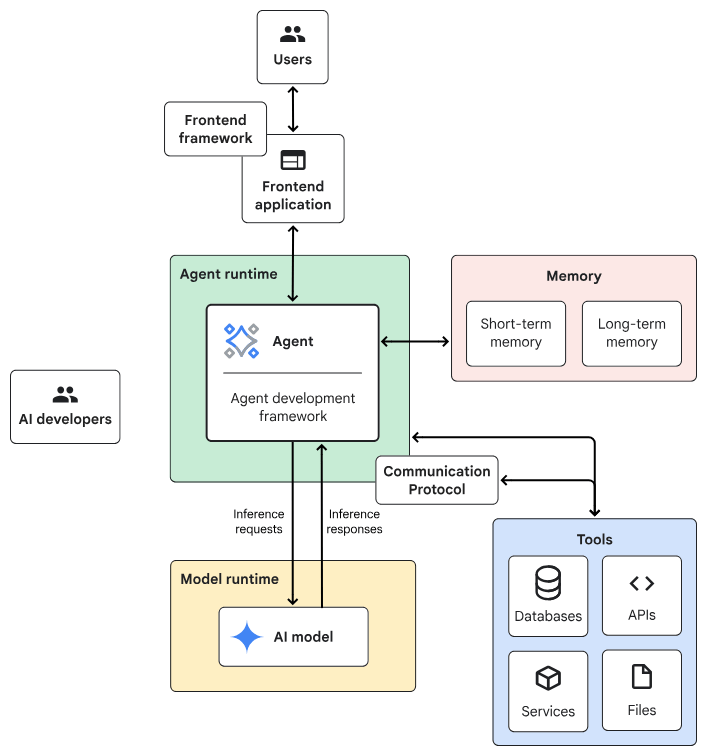
Agentic AI System Architecture
- Frontend:預先建構的元件、程式庫和工具集合,用於建構UI。
- Agent development framework:建構及架構agent的framework與程式庫。
- Tools:工具集合,例如 API、服務、函式與資源。
- Memory:儲存及回想資訊的子系統。
- Design Pattern:Agentic AI常見的運作方法。
- Agent runtime:執行、運算環境。
- AI 模型:核心推論引擎。
- Model runtime:用於代管及提供 AI 模型的基礎架構。
一般伺服器
Planner-Executor
AI伺服器
Agent Design Pattern design process
- Define your Requirement
- Task characteristics: 需要AI model協調工作流程嗎? 開放式任務 or有預定的步驟?
- Latency and performance:準確性 vs 高品質
- Cost:AI推理的成本預算
- Human involvement:任務是否涉及高風險決策、安全關鍵操作或需要人為判斷?
- Review the common agent design patterns
- Select one
- Agent Design Pattern: Agent的運作方式,例如:
- 如何選擇?
Planner-Executor
Agent Design Pattern common used patterns
Single-agent system
- 適合情境
tasks that require multiple steps and access to external data
e.g. customer support agent, research assistant
- 效能問題
less effective when: (1) use more tools (2) tasks increase in complexity.
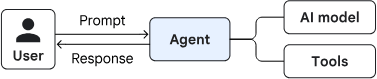
自動處理使用者請求或完成特定任務
預先定義的工具
完備的系統提示
- interpret a user's request
- plan a sequence of steps
- decide which tools to use
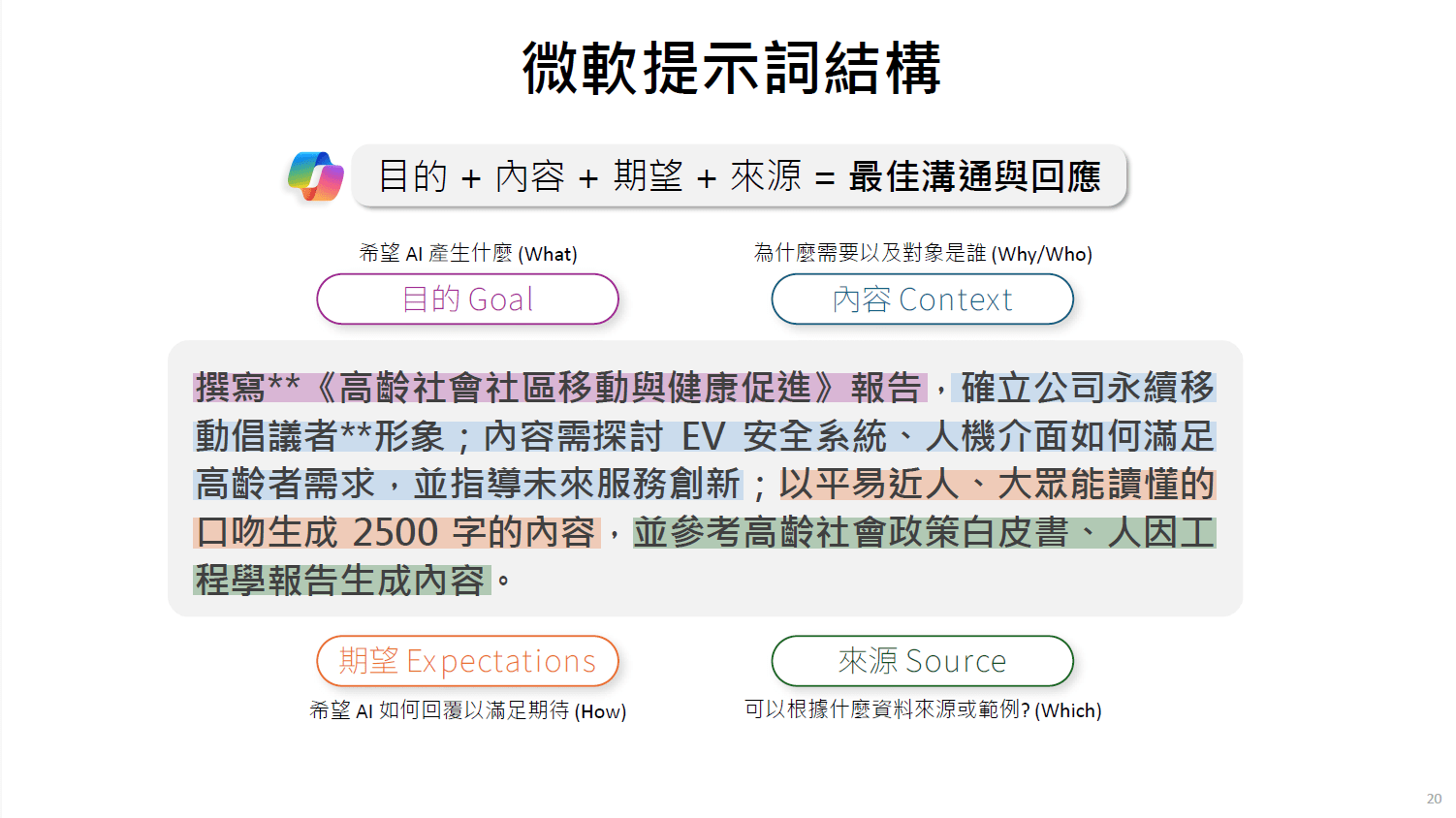
來源:

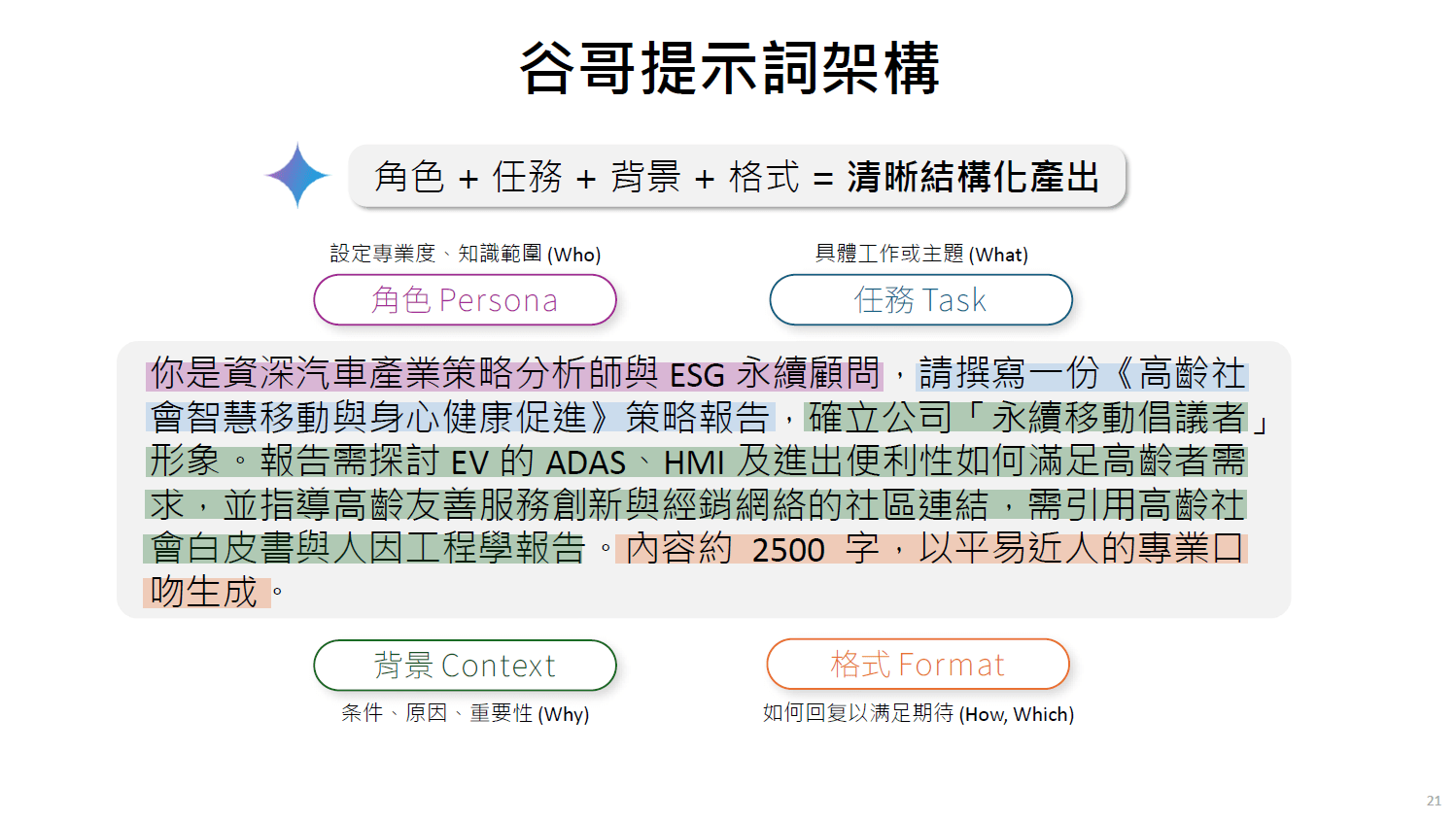
來源:
來源:
Agent Design Pattern common used patterns
Multi-agent system
: orchestrates multiple specialized agents to solve a complex problem
Sequential pattern

- executing in a predefined, linear order
- without consulting an AI model
loop pattern
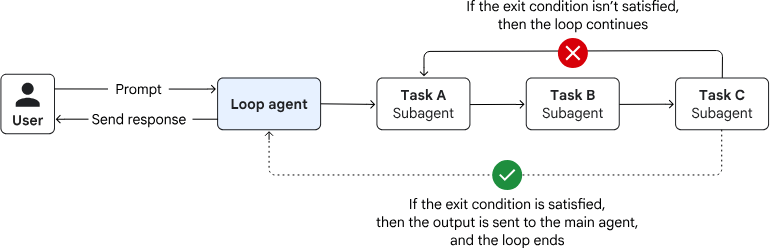
- executing until a termination condition is met
- without consulting an AI model for orchestration
Agent Design Pattern common used patterns
Iterative refinement pattern
(loop pattern)
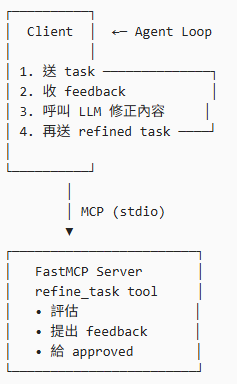
🎯 範例:幫使用者「精煉一段任務描述」
1.Client 傳入一段「可能模糊的需求」
2.Server 檢查是否清楚(目標 /限制 /輸出)
3.如果不清楚 → 回傳「需要補充的點」
4.Client 補齊後再次送出
直到 Server 回傳 ✅ approved = True
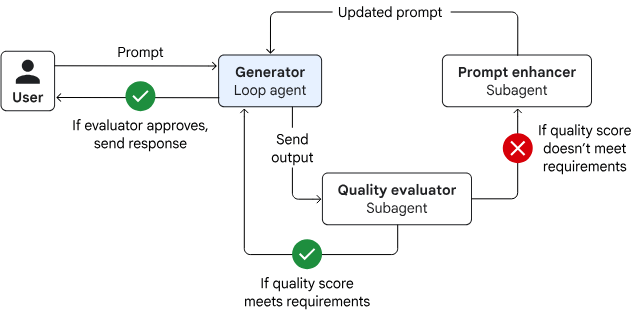
modifying a result that's stored in the session state
predefined quality threshold or it reaches a maximum number of iterations
Agent Design Pattern common used patterns
from fastmcp import FastMCP

mcp = FastMCP("iterative-refinement-server")


@mcp.tool
def refine_task(task_description: str, iteration: int = 1) -> dict:
    """
    Evaluate and refine a task description iteratively.
    Returns feedback until the task is sufficiently clear.
    """

    feedback = []
    approved = True

    # 簡化版檢查規則(教學用)
    if len(task_description) < 40:
        feedback.append("描述太短,請補充更多細節")
        approved = False

    if "output" not in task_description.lower():
        feedback.append("請說明期望的輸出格式或結果")
        approved = False

    if "goal" not in task_description.lower():
        feedback.append("請明確說明最終目標(goal)")
        approved = False

    return {
        "iteration": iteration,
        "approved": approved,
        "feedback": feedback,
        "current_task": task_description
    }


if __name__ == "__main__":
    mcp.run(transport="stdio")
refinement_server.py
✅ 評估
✅ 提出修正建議
✅ 決定是否達標
Agent Design Pattern common used patterns
import asyncio
from typing import List

from mcp import ClientSession, StdioServerParameters
from mcp.client.stdio import stdio_client


# =========================================================
# LLM Adapter
# =========================================================
def llm_refine_task(task: str, feedback: List[str]) -> str:
    """
    LLM-driven refinement function.

    這裡是「唯一需要替換成真實 LLM 的地方」。
    目前用 deterministic logic 模擬 LLM 的行為,
    方便你本地測試與教學。
    """

    refined_task = task.strip()

    for f in feedback:
        f_lower = f.lower()

        # 支援中文「目標」或英文「goal」
        if "goal" in f_lower or "目標" in f:
            refined_task += (
                "\n\nGoal: Clearly define the primary objective "
                "and success criteria of the task."
            )

        # 支援中文「輸出」或英文「output」
        elif "output" in f_lower or "輸出" in f:
            refined_task += (
                "\n\nOutput: Specify the expected deliverables, "
                "format (e.g., PDF, markdown), and level of detail."
            )

        # 支援中文「太短」或英文「short」
        elif "short" in f_lower or "太短" in f:
            refined_task += (
                "\n\nContext: Include background information, "
                "constraints, assumptions, and intended audience."
            )

        else:
            refined_task += f"\n\nNote: {f}"

    return refined_task


# =========================================================
# MCP Result Helpers
# =========================================================
def extract_json(result) -> dict:
    """
    FastMCP 專用 helper。
    假設 server 回傳的是 dict / list → JSON content。
    """
    if not result.content:
        raise RuntimeError("Empty MCP response content")

    item = result.content[0]

    # 如果是 text 類型,手動將其轉回 dict
    if item.type == "text":
        import json
        try:
            # FastMCP 有時會把 dict 轉成字串放在 .text 屬性裡
            return json.loads(item.text)
        except:
            return {"feedback": [item.text], "approved": False}

    # 如果已經是 json 類型,直接取 .data
    if item.type == "json":
        return item.data

    raise RuntimeError(f"Expected JSON or Text content, got {item.type}")


def print_iteration_header(iteration: int):
    print("\n" + "=" * 60)
    print(f"🔁 Iteration {iteration}")
    print("=" * 60)


# =========================================================
# LLM-driven Iterative Refinement Agent
# =========================================================
async def run_llm_refinement_client():
    # -----------------------------------------------------
    # MCP Server 設定
    # -----------------------------------------------------
    server_params = StdioServerParameters(
        command="python",
        args=["refinement_server.py"],  # 你的 FastMCP server
    )

    # -----------------------------------------------------
    # 初始任務(刻意不完整)
    # -----------------------------------------------------
    task_description = "Create a report about sales"

    iteration = 1
    max_iterations = 6

    print("\n🚀 LLM-driven Iterative Refinement Agent")
    print("-" * 60)
    print("Initial Task Description:")
    print(task_description)
    print("-" * 60)

    # -----------------------------------------------------
    # MCP Session
    # -----------------------------------------------------
    async with stdio_client(server_params) as (read, write):
        async with ClientSession(read, write) as session:
            # MCP handshake
            await session.initialize()

            # -------------------------------------------------
            # Iterative Refinement Loop
            # -------------------------------------------------
            while iteration <= max_iterations:
                print_iteration_header(iteration)

                # 1. 將目前任務交給 MCP Server 評估
                result = await session.call_tool(
                    "refine_task",
                    arguments={
                        "task_description": task_description,
                        "iteration": iteration,
                    },
                )

                data = extract_json(result)

                approved = data.get("approved", False)
                feedback = data.get("feedback", [])

                print("Approved:", approved)

                if approved:
                    print("\n✅ Task description approved by server.")
                    break

                print("\n📋 Feedback from server:")
                for f in feedback:
                    print(f"- {f}")

                # 2. 讓 LLM 根據 feedback 修正任務描述
                task_description = llm_refine_task(
                    task_description,
                    feedback,
                )

                print("\n🧠 LLM refined task description:")
                print(task_description)

                iteration += 1

            else:
                print("\n⚠️ Reached maximum iterations without approval.")

    # -----------------------------------------------------
    # Final Result
    # -----------------------------------------------------
    print("\n" + "#" * 60)
    print("✅ FINAL TASK DESCRIPTION")
    print("#" * 60)
    print(task_description)
    print("#" * 60)


# =========================================================
# Entry Point
# =========================================================
if __name__ == "__main__":
    asyncio.run(run_llm_refinement_client())
refinement_client.py
Agent Design Pattern common used patterns
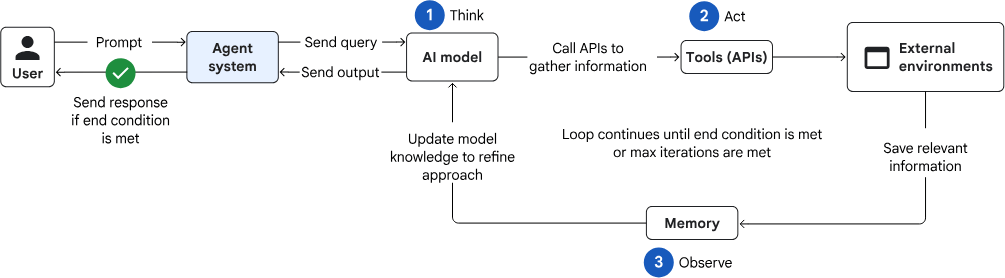
Reason and act (ReAct) pattern
- Thought
Reasoning optimal path(current state -> goal state). Optimizing for metrics like time or energy. - Action
Executes next steps by moving along a calculated path segment. - Observation
Observing and saving the new state.
Lesson 2: MCP
By Leuo-Hong Wang