Introduction to Agentic AI
代理式人工智慧簡介
Why Agentic AI?
From LLMs to AI Agents
input
真理大學的學年度行事曆可以在哪裡查詢?
先替您整理好重點:
真理大學的「學年度行事曆」可以在教務處的官方頁面查詢,最新版(如 113、114 學年度)都會集中公布在教務處網站。
output
大語言模型運作
From LLMs to AI Agents
input
代理式人工智慧這門課下一次小考是什麼時候?
目前,沒有公開「代理式人工智慧」這門課的小考日期。
建議直接從您修課的課程入口查詢(如:Tronclass、Teams)。
output
What If...
1. 訓練/學習資料的限制
2. 沒有查詢的能力
From LLMs to AI Agents
input
代理式人工智慧這門課下一次小考是什麼時候?
從課程行事曆查詢得知下一次小考日期是...。
output
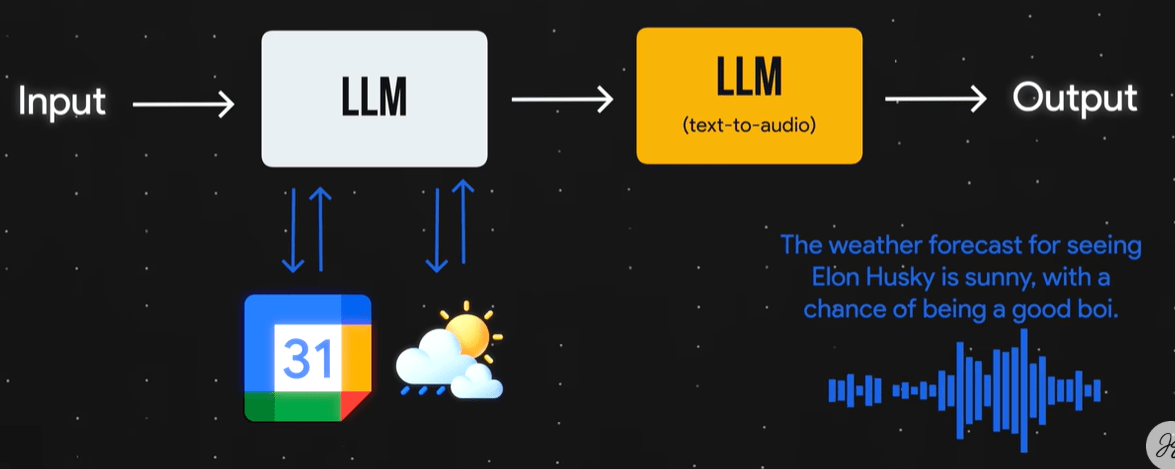
查詢外部資料

課程行事曆
回傳結果
From LLMs to AI Agents
input
下次小考的天氣如何?
???
output
查詢外部資料
課程行事曆
回傳結果

需要查詢氣象資料
From LLMs to AI Agents
One of Possible AI Workflows
From LLMs to AI Agents
From LLMs to AI Agents
AI Workflow Examples
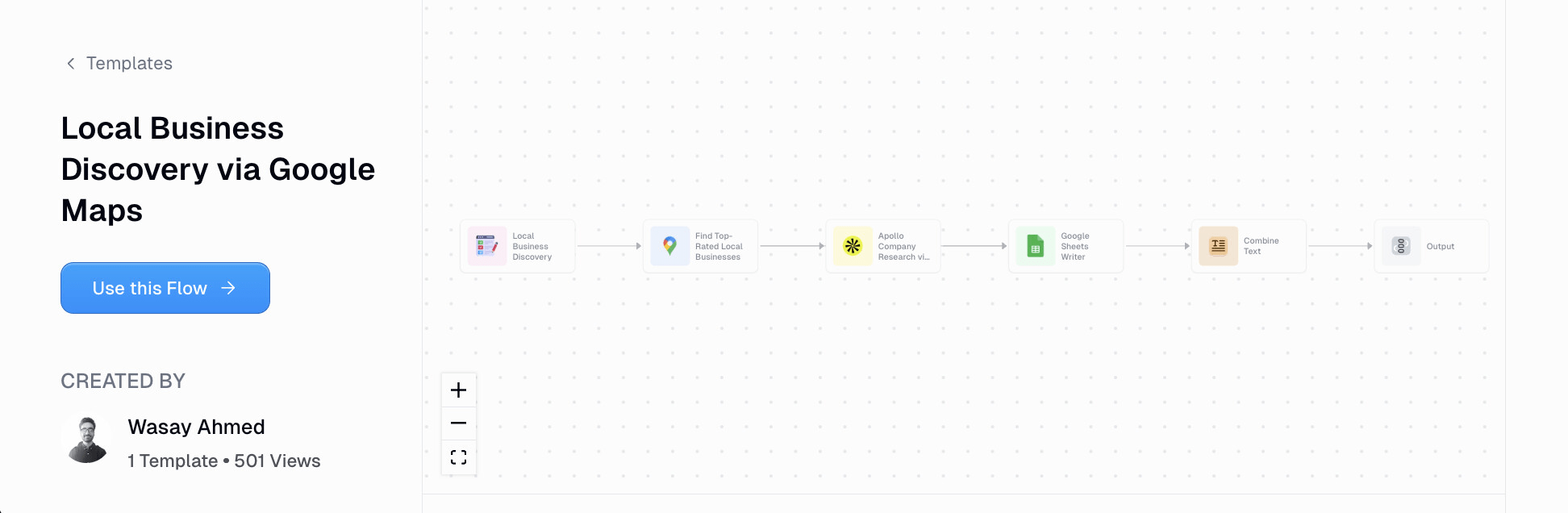
透過Google地圖開發潛在客戶
找出評分最高的本地商家,或搜尋關鍵字(如咖啡館、健身房)
使用Apollo.io取得商家資訊
建立清單
結合銷售資訊
寄送
From LLMs to AI Agents
AI Workflow Examples
搜尋公司資訊
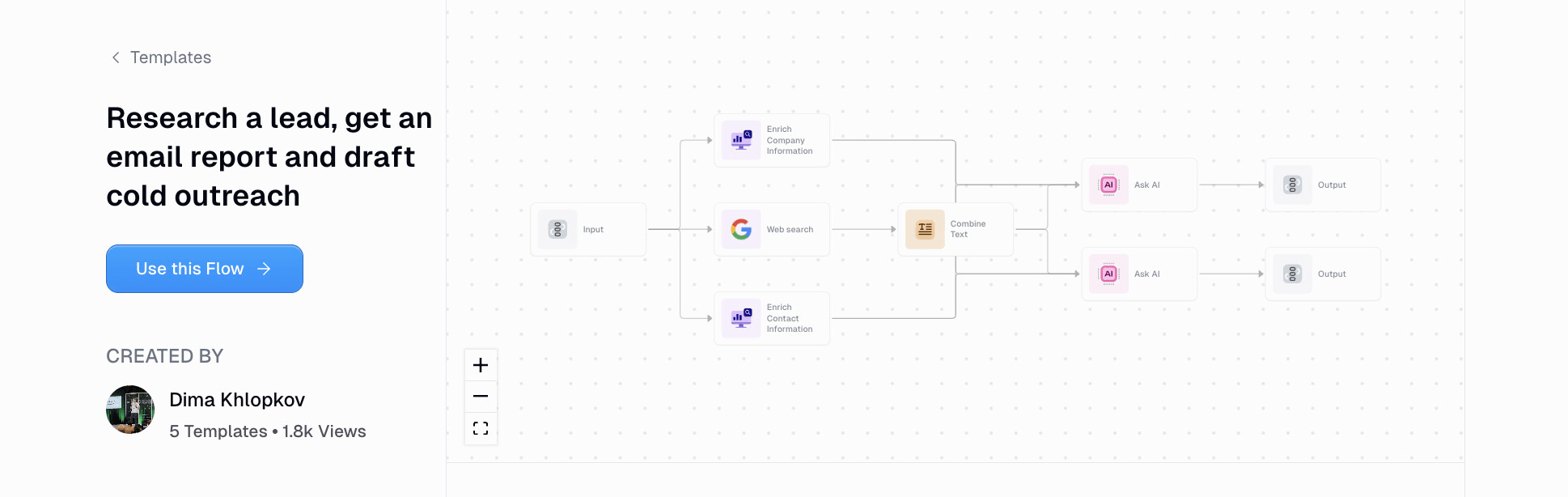
研究潛在客戶、取得報告並撰寫個人化的推銷郵件
詢問LLM
客戶報告
行銷郵件
context
搜尋聯絡資訊
公司名稱
From LLMs to AI Agents
AI Workflow Examples
輸入搜尋的分類、或地名
餐廳 Google 地圖推廣自動化
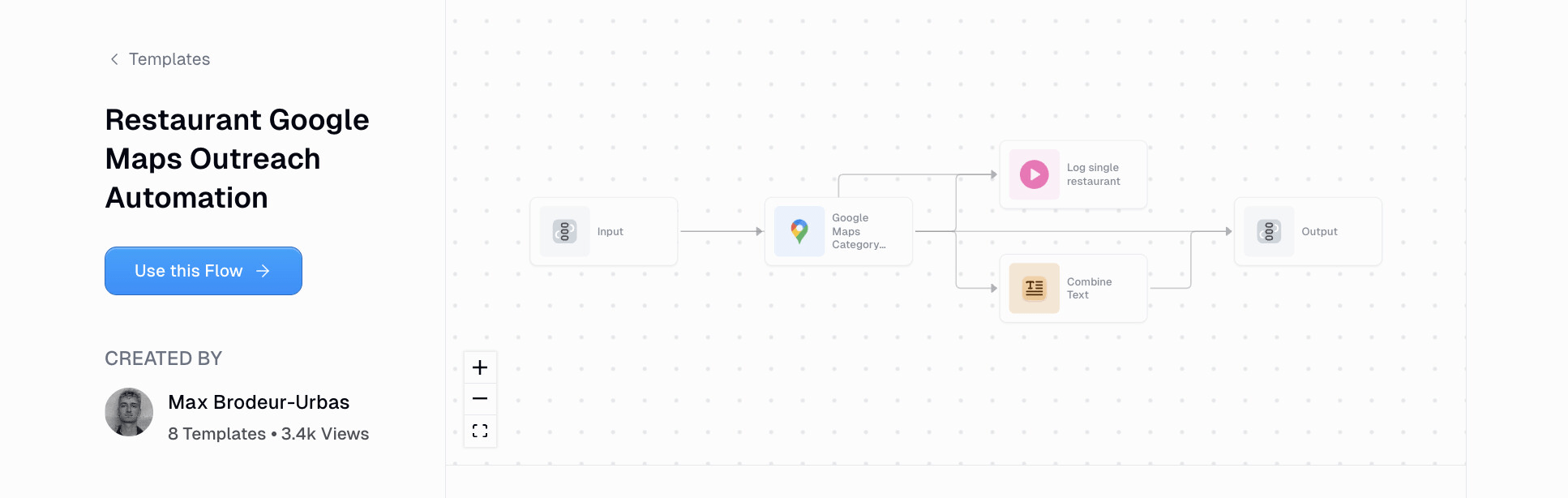
店家列表
店家推廣訊息
紀錄個別店家資訊: 網站、評論、菜單
LLM
From LLMs to AI Agents
AI Workflow Examples
抓取監控的Hashtag貼文
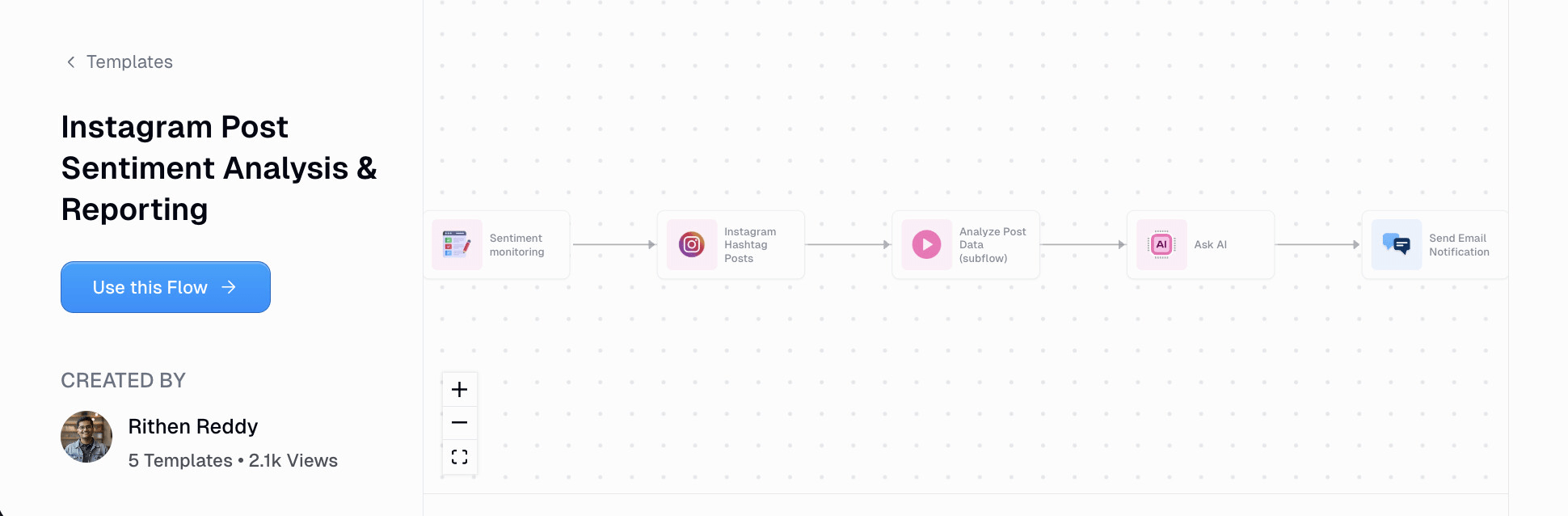
Instagram貼文情感分析報告
分析貼文內容
產生情感分析報告
寄送通知郵件
From LLMs to AI Agents
-
手動記錄工作流程的每一個步驟。
-
針對每個步驟,列出可能的特殊(例外)情況。
-
將內容整理成文檔,交給LLM制定完整的計劃
-
包括如何才能在這個工作流程中有效地使用AI
-
-
請LLM提出任何有助於你制定計劃的澄清問題。
-
根據計劃,使用 AI agent workflow builder 建立自動化流程。
AI工作流程自動化作法
使用案例use cases
提示詞prompt
代理agent
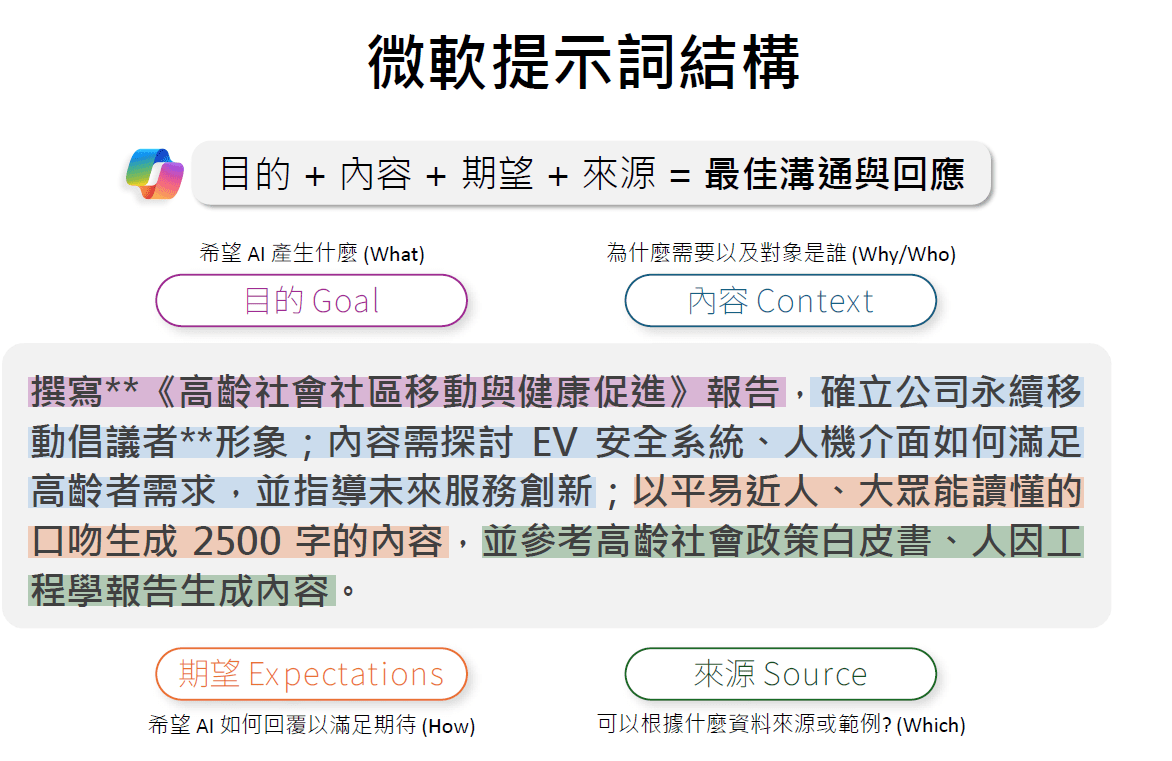
來源:王恩琦, 探索M365 Copilot Agent 與實作
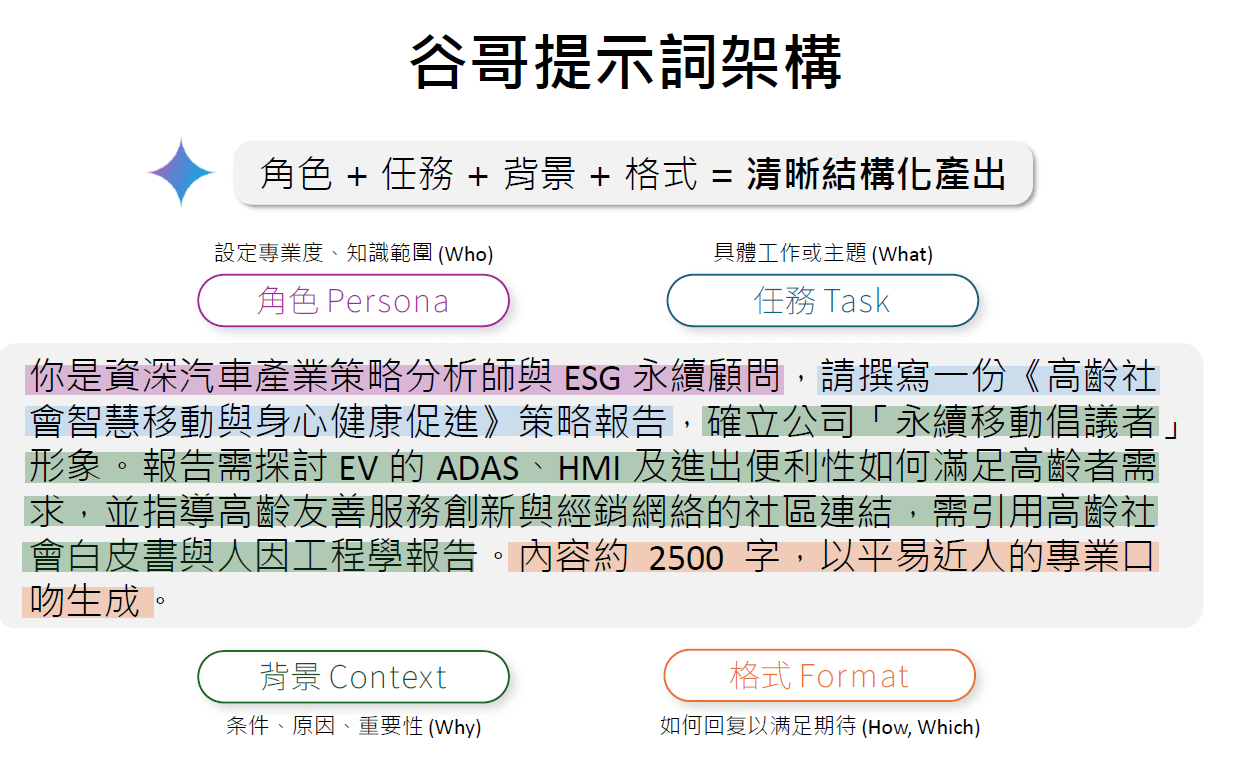
From LLMs to AI Agents

From LLMs to AI Agents
來源:王恩琦, 探索M365 Copilot Agent 與實作
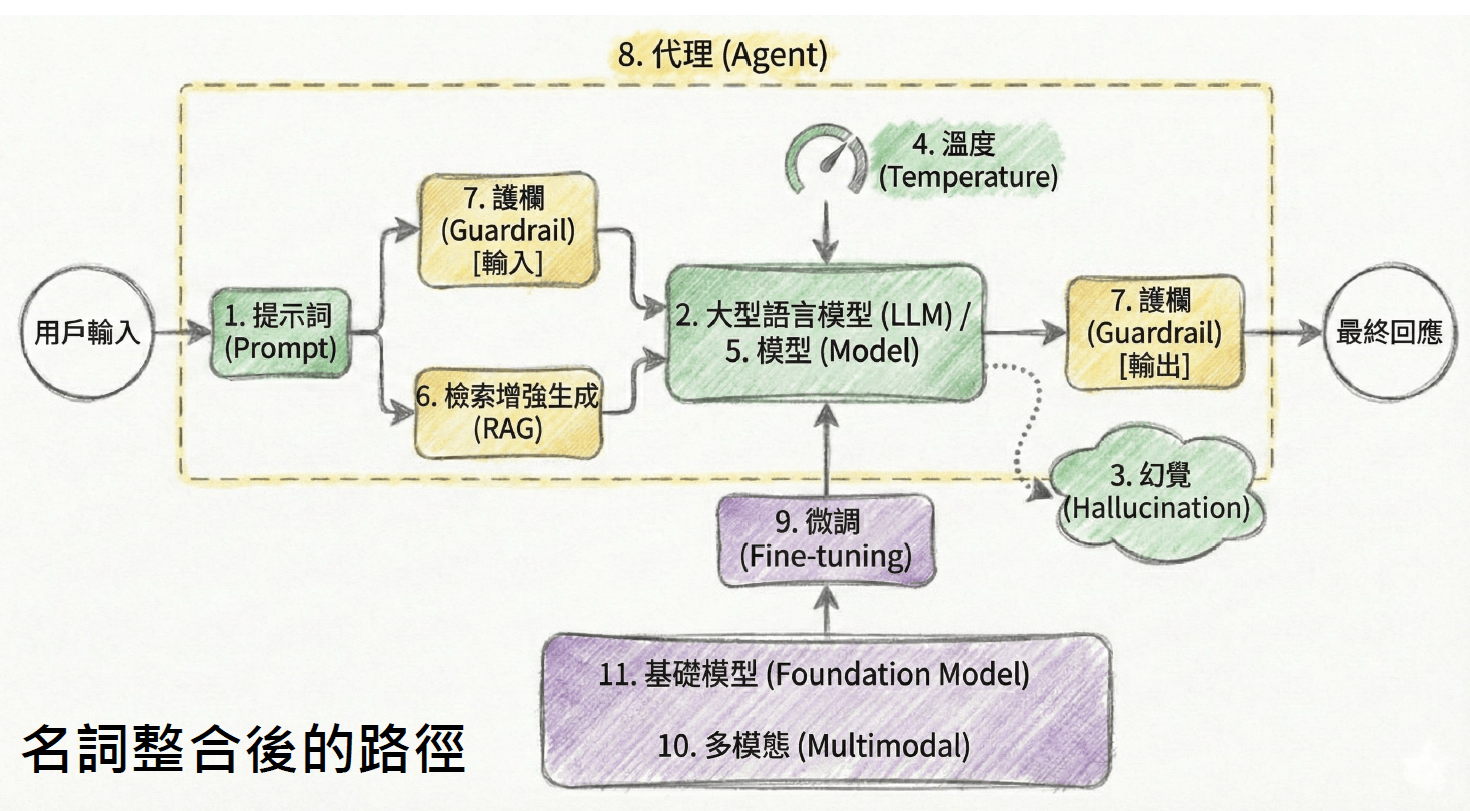
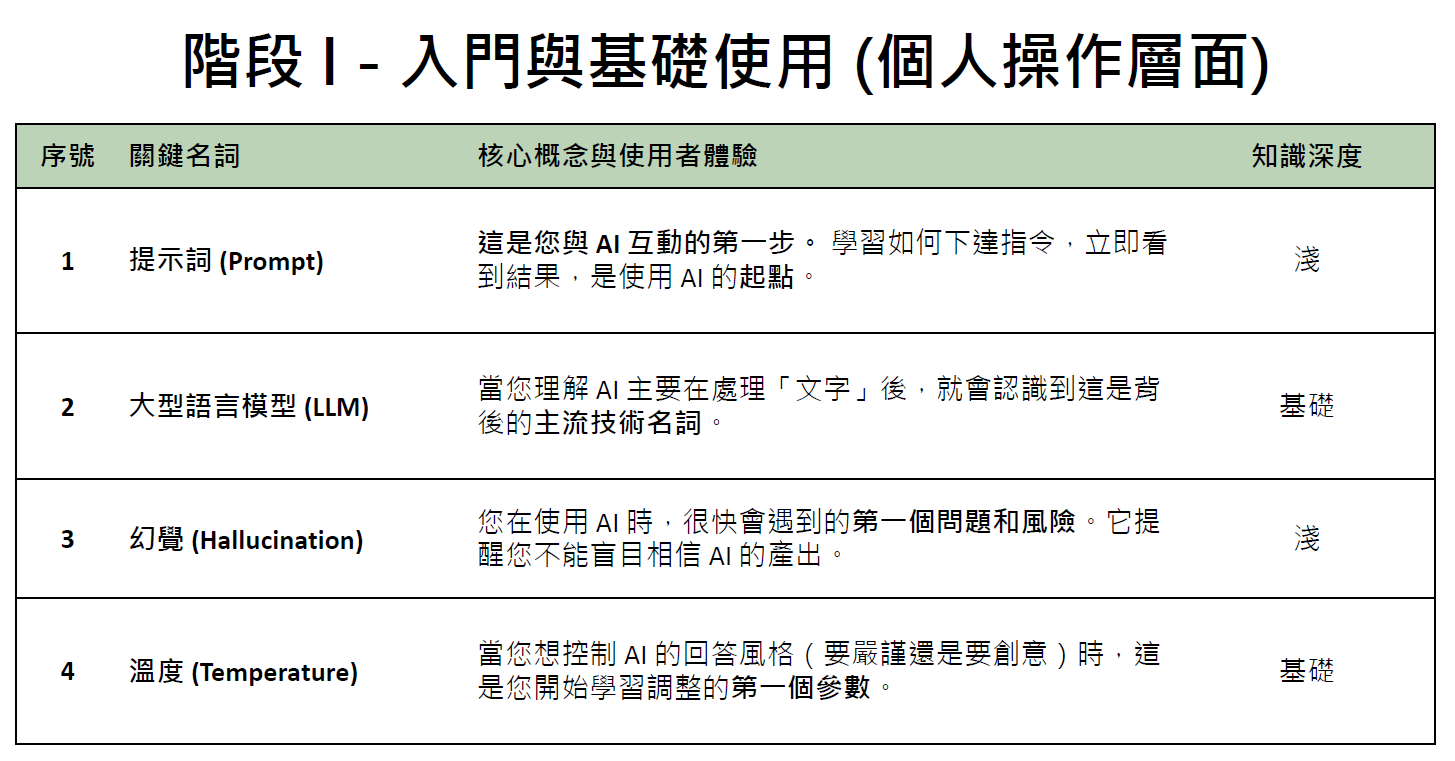
來源:王恩琦, 探索M365 Copilot Agent 與實作
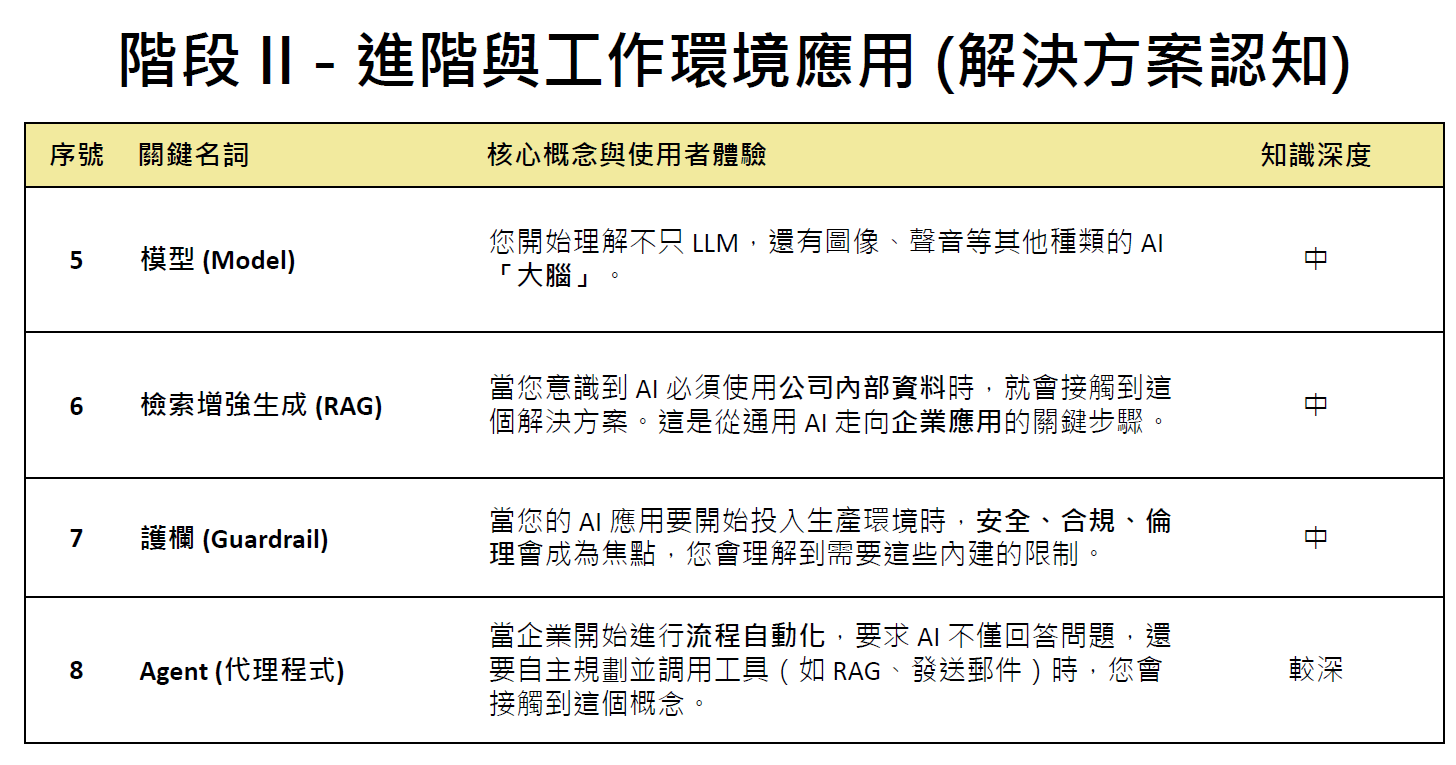
來源:王恩琦, 探索M365 Copilot Agent 與實作
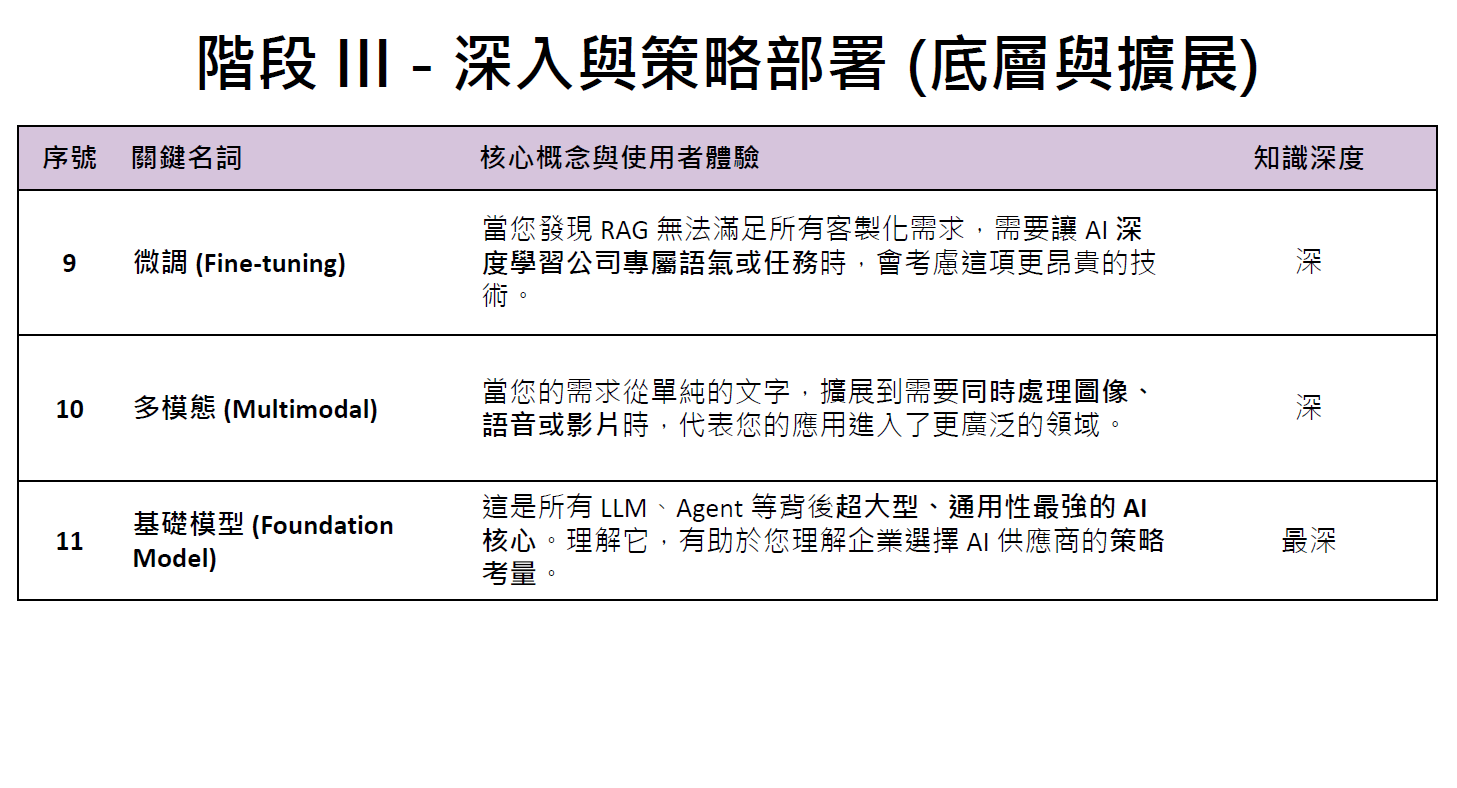
來源:王恩琦, 探索M365 Copilot Agent 與實作
What is Agentic AI?
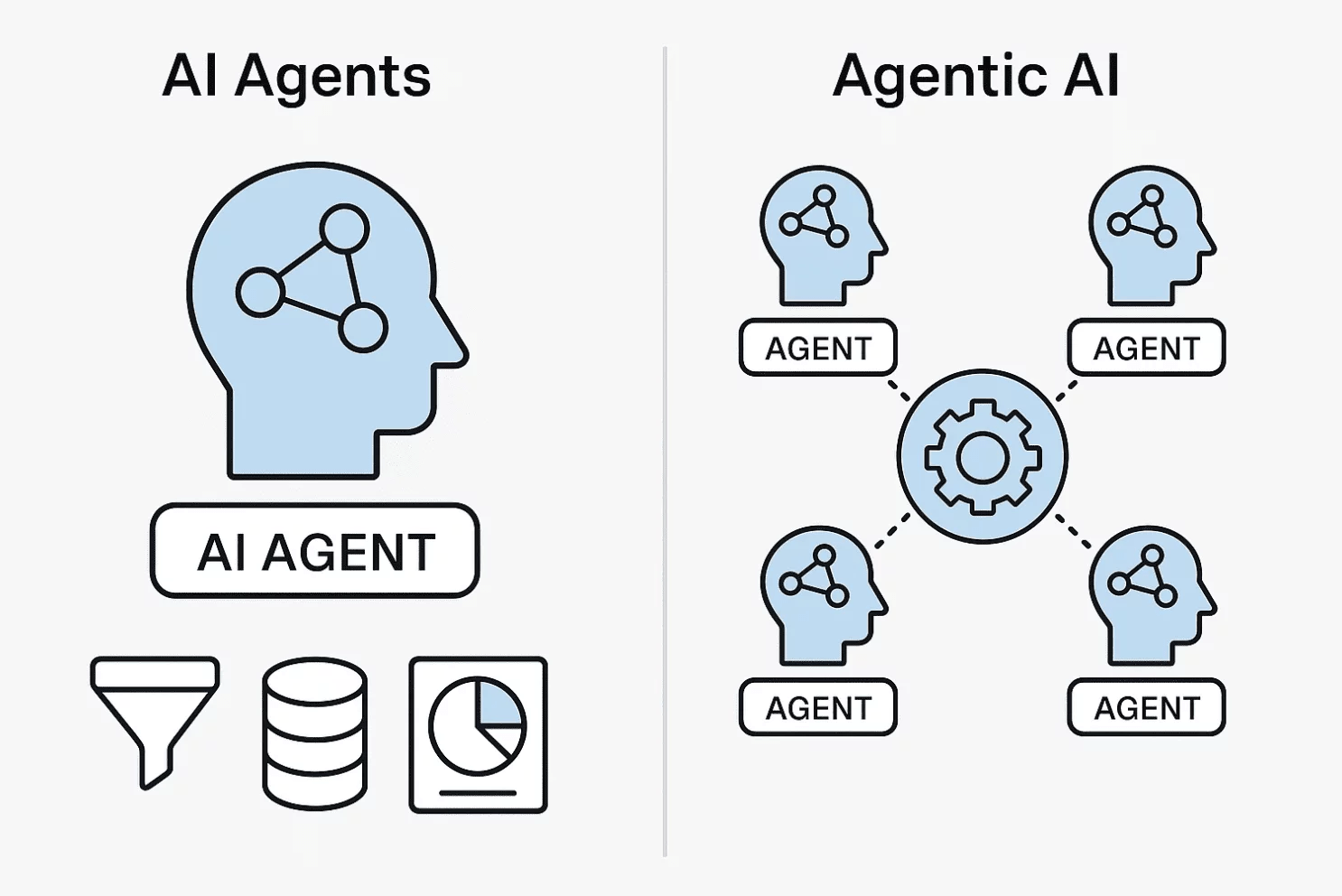
AI Agents vs Agentic AI
AI Agents/ Agentic AI Roadmap
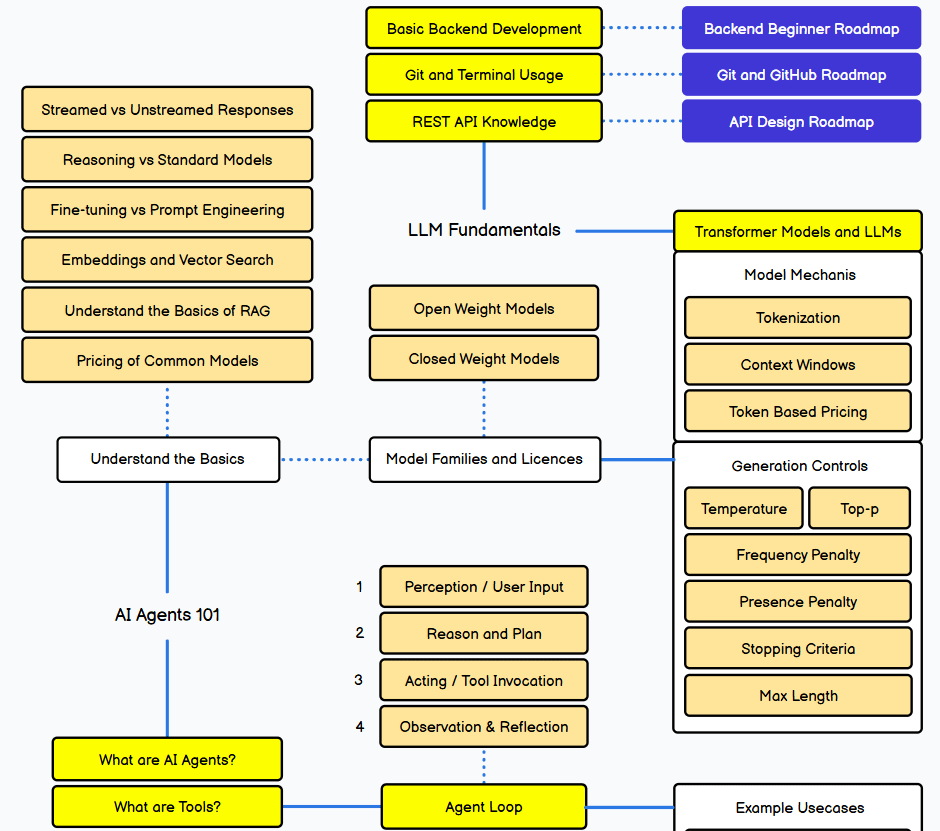
An AI Agent Example with OpenAI LLM
Token? 比word(單字)更小粒度的wordpieces (字根,字尾)

wordpieces
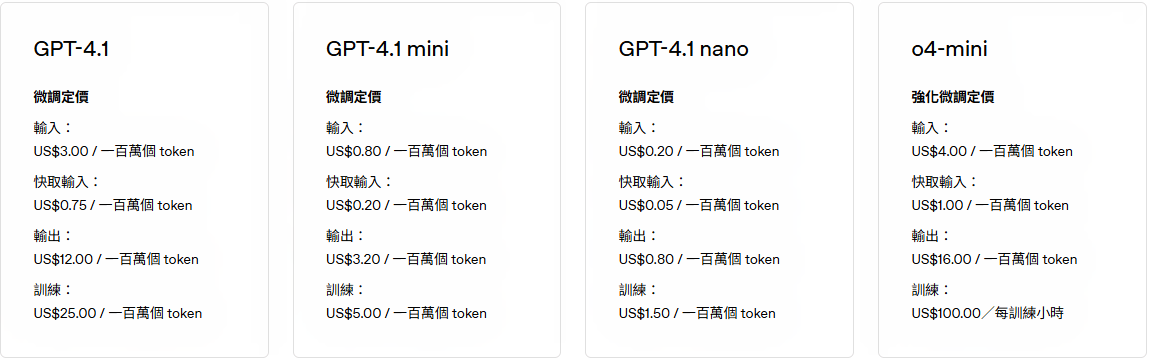
OpenAI API定價2026/02
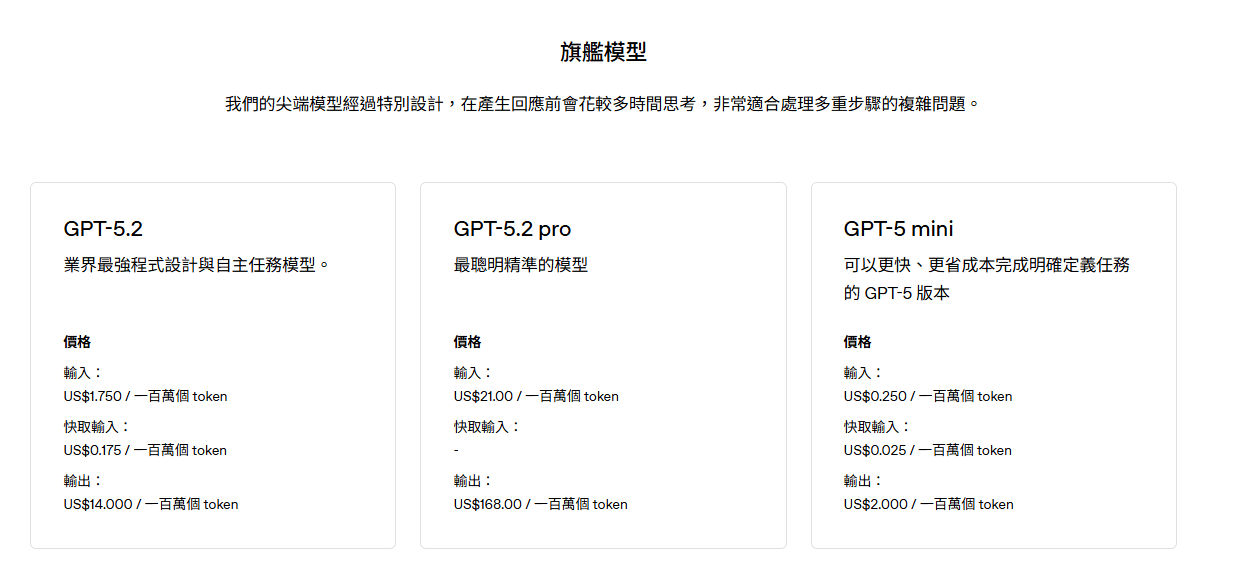
旗艦模型
OpenAI API定價2026/02
Fine-tuning?

特定領域知識
微調(監督式學習)
原始訓練資料
預訓練
基礎模型
微調模型
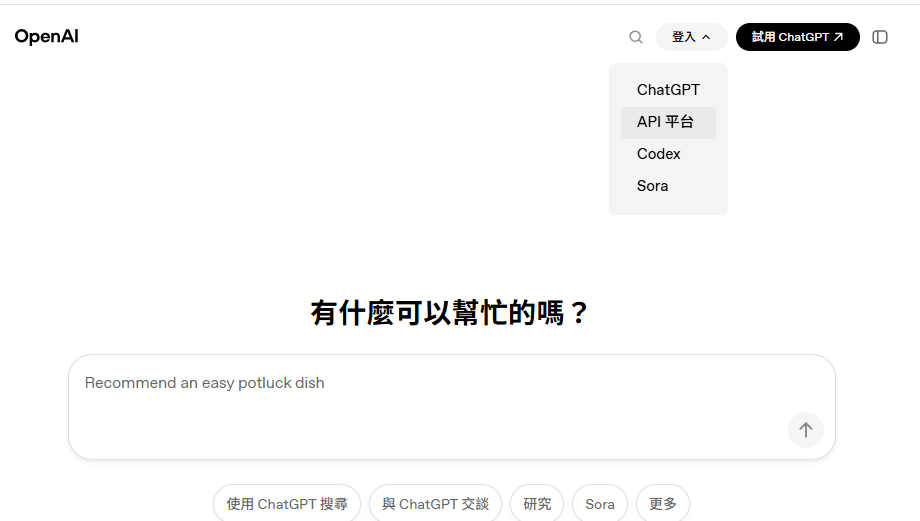
OpenAI API Key
前往 https://openai.com/ 登入 或 註冊後登入
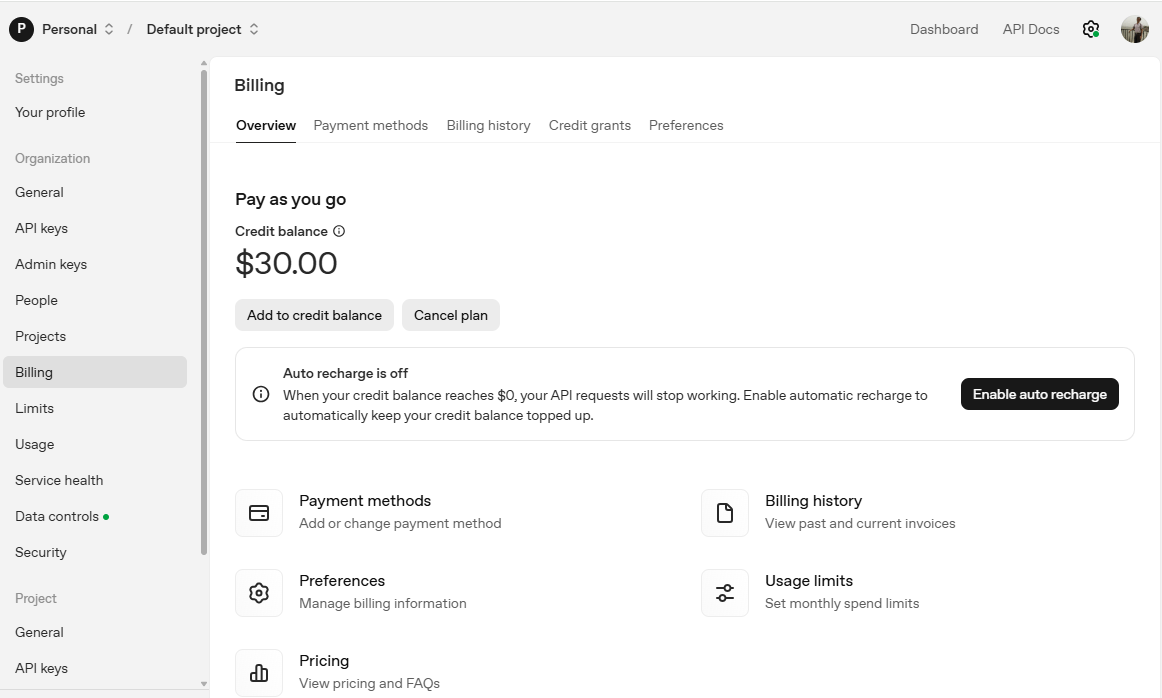
OpenAI API Key
OpenAI API Key
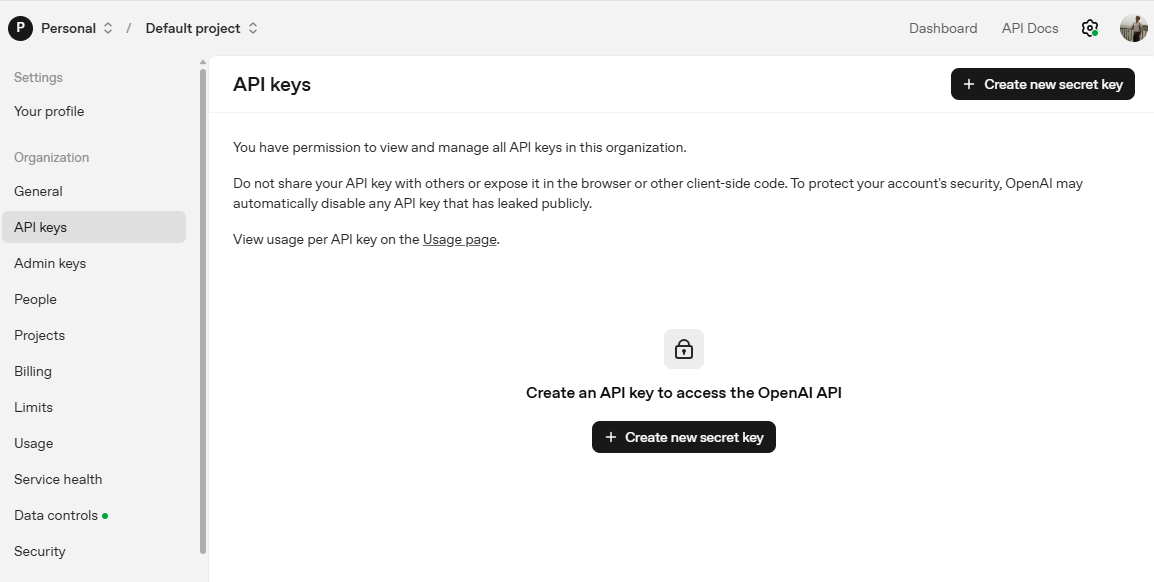
OpenAI API Key
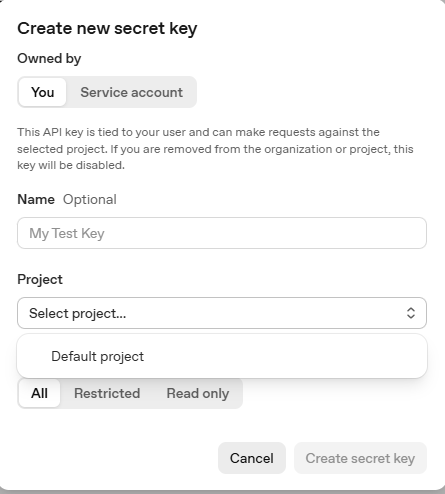
為密鑰取名字
選定專案
OpenAI API Key
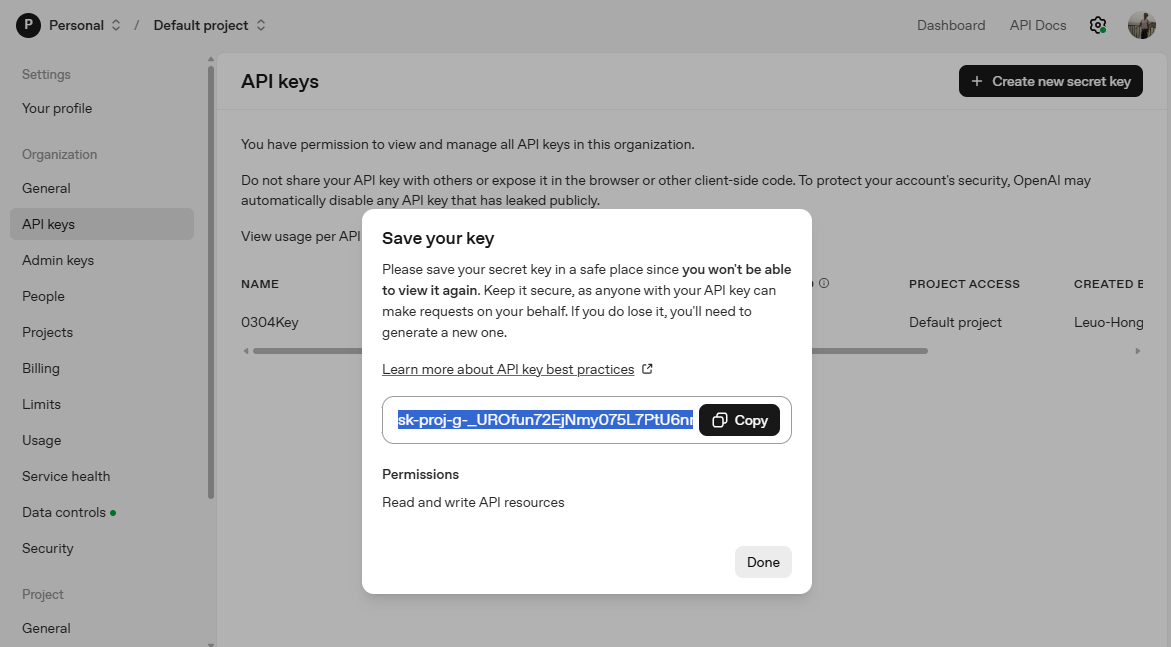
複製到剪貼簿
python -m venv openai-env➊ 創建「虛擬環境」(optional, 可選)
openai-env\Scripts\activate
source openai-env/bin/activate➋ 啟動虛擬環境: 後續套件僅安裝在此環境內
Windows
Unix / macOS
程式開發前置作業(1/2)
程式開發前置作業(2/2)
set OPENAI_API_KEY "你的API_KEY"❸ 設定「環境變數」OPENAI_API_KEY
一次性作法: 開啟cmd,或VSCode的終端機輸入:

一次性作法: 開啟cmd,或VSCode的終端機輸入:
永久作法: 新增「環境變數」OPENAI_API_KEY
echo %OPENAI_API_KEY%
# 如果是PowerShell >>> echo $env:OPENAI_API_KEY
➍ 確認設定值。重新開啟cmd,輸入:
import os
from openai import OpenAI

client = OpenAI(
    # This is the default and can be omitted
    api_key=os.environ.get("OPENAI_API_KEY"),
)

response = client.responses.create(
    model="gpt-5.2",
    instructions="You are a coding assistant that talks like a pirate.",
    input="How do I check if a Python object is an instance of a class?",
)

print(response.output_text)
pip install --upgrade openai範例: Chat Completions API
import os
from openai import OpenAI

client = OpenAI(
    # This is the default and can be omitted
    api_key=os.environ.get("OPENAI_API_KEY"),
)

response = client.responses.create(
    model="gpt-5.2",
    instructions="You are a coding assistant that talks like a pirate.",
    input="How do I check if a Python object is an instance of a class?",
)

print(response.output_text)
pip install --upgrade openai範例: Responses API
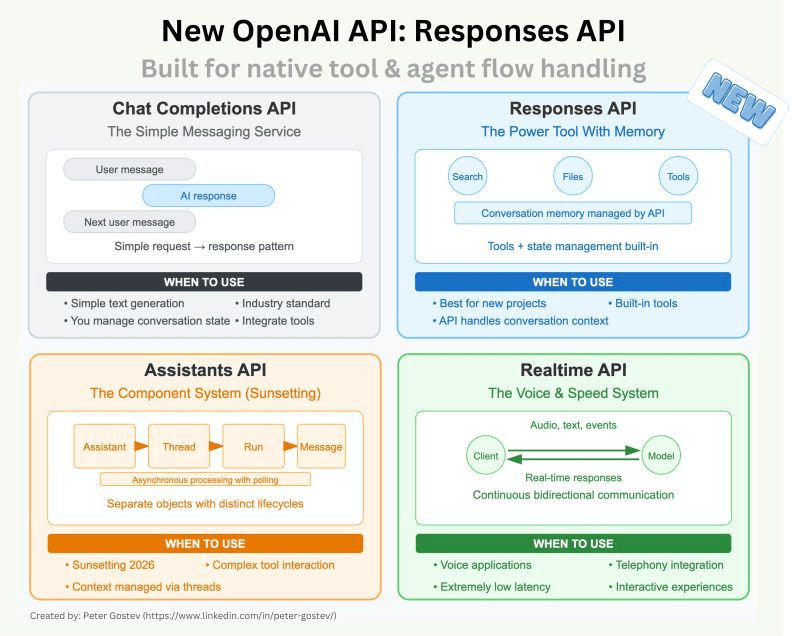
Responses API
Plan-and-Execute Agent
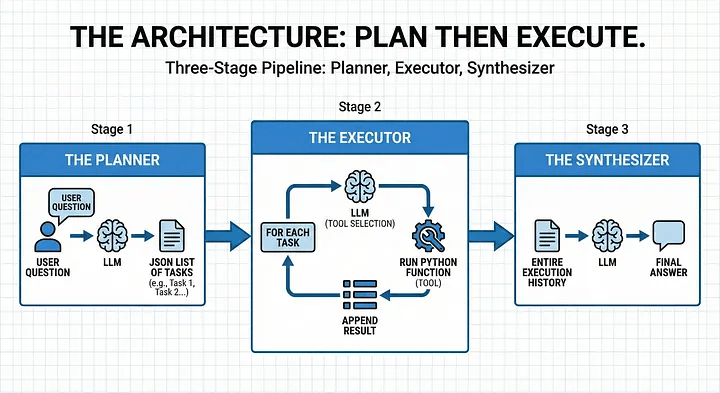
Plan-and-Execute Agent 任務規劃
- 規劃器Planner: LLM 接收使用者問題並傳回任務清單(task list)。
- 執行器Executor:對於每個任務(task),LLM 選擇合適的工具(tools),我們執行 Python 函數,並將結果附加到任務中。
- 合成器Synthesizer:LLM 會取得整個執行歷史(context)以提供最終答案。
關鍵問題: Agent可以使用哪些工具,執行哪些任務?
Answer: 採用json schema描述,並撰寫工具
Plan-and-Execute Agent實作
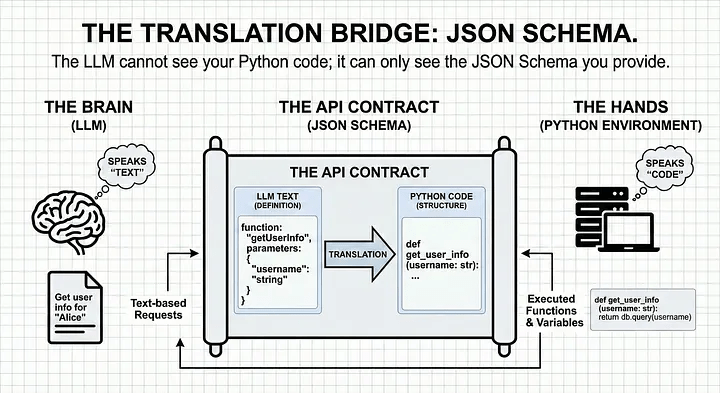
什麼情況執行什麼函式
Plan-and-Execute Agent Tools & Schema
JSON Schema定義工具,每個工具由兩個部分組成:
- 邏輯部分:實際執行工作的 Python 函數。
- 基模Schema: LLM 何時以及如何呼叫函數的描述。
# 1. The Schema (What the LLM sees)
tools_schema = [
    {
        "type": "function",
        "name": "get_planet_mass",
        "description": "Get the mass of a given planet.",
        "parameters": {
            "type": "object",
            "properties": {
                "planet": {"type": "string", "description": "Planet name (e.g., Earth)"},
            },
            "required": ["planet"],
        },
    }
    # ... additional tools like 'calculate'
]
# 2. The Logic (What Python executes)
def get_planet_mass(planet_dict):
    planet = planet_dict["planet"].lower().strip()
    masses = {"earth": "5.972e24 kg", "mars": "6.39e23 kg", "jupiter": "1.898e27 kg"}
    return masses.get(planet, "Unknown planet.")
Plan-and-Execute Agent Planner
human query
def __plan_tasks(self, user_prompt: str)-> json:
        '''This plans the task the LLM will do'''
        planner_system_prompt = (
            "You are a sophisticated planner Agent. "
            "Your job is to break down complex user questions into sequential, simple tasks. "
            "Return a JSON object with a single key  "
            " - 'tasks': list[string] #which contains a list of strings."
        )

        action_plan = self.call_llm(planner_system_prompt, user_prompt)
        return json.loads(action_plan.output_text)
task list (JSON格式)
藉助LLM的reasoning能力,將輸入的問題轉成一系列的tasks
JSON結構化tasks列表,可清楚交接。 Executor 無需「猜測」下一步操作
Plan-and-Execute Agent Executor(1/2)
逐一檢視task列表內容,詢問LLM找出適合的工具(從tools_schema中尋找),並呼叫實際的 Python 程式碼執行
def __plan_tools(self, action_plan, tools):
    execution_plan = []
    for task in action_plan["tasks"]:
        # 1. Ask the Brain: "Which tool fits this task?"
        response = self.call_llm(execution_system_prompt, user_prompt)
        # 2. Map the LLM's string choice to our actual Python function
        function_to_call = self.available_tools_dict[response["function"]]
        response["result"] = function_to_call(*kwargs)
    return execution_plan.append(response)
Plan-and-Execute Agent Executor(2/2)
Executor需要有明確指令,強制 LLM 只能回傳tools_schema裡面的工具,否則則回傳None
execution_system_prompt  = (
            "You are a sophisticated planner Agent. "
            "Your job is to find the correct given tools to the system to solve the given tasks."
            "The available tools and the task you will get from the user"
            "If no tools fit to Task write None"
            "Return a JSON object with a single key  "
            " - 'id: int #unique id to identify the task "
            " - 'task': {task}"
            " - 'function': string # name of the tool"
            " - 'properties: list # properties to execute the function"
            " - 'dependencies': list # id's if the needed results of other tasks"
        )

user_prompt = (f"I have the following task to do: {task}"
               f"I can use the following tools: {tools} to solve the taks "
               "Tell me the correct tool to use for a given task"
               f"Here is the full list of tasks {action_plan}"
               F"Here are the executions that are already done {execution_plan} take the results of tasks have dependencies."
            )
Plan-and-Execute Agent Synthesizer
Synthesizer負責最終品質控制。檢查三件事:
- 最初的問題:使用者真正想要的是什麼?
- 計劃:決定採取哪些步驟?
- 執行軌跡:工具實際上輸出了什麼?
    def __synthesize_answer(self, user_prompt, execution_results):
        synthesis_prompt = (
            "You are a helpful assistant. You have been given a user question"
            "and a set of execution results from various tools. "
            "Your goal is to provide a final, concise answer based on these results."
        )

        # We combine the history into a single 'context' string for the LLM
        context = f"User Question: {user_prompt}\nResults: {execution_results}"
        return self.call_llm(synthesis_prompt, context)
Plan-and-Execute Agent 好處
分階段架構(設計模式)的好處:
- Auditability:如果答案有誤,可檢查計劃的邏輯或是檢查執行程序是否出錯。
- Token Efficiency:各階斷不需要 “re-read” 先前對話。
- User Trust:最終結果可確保使用者獲得完善答案,避開中間步驟。
from openai import OpenAI
import openai
import logging
import json
import os
from tools import tools_schema, available_functions

client = OpenAI()

logging.basicConfig(
    level=logging.INFO,
    format='%(asctime)s - %(levelname)s - %(message)s',
    datefmt='%H:%M:%S'
)
logger = logging.getLogger(__name__)

class Agent():
    def __init__(self, available_tools_dict):
        self.plan = False # checks if the agent has a plan
        self.system_prompt = "You are a useful assistant"
        self.available_tools_dict = available_tools_dict

    # Structured Plan-and-Execute Agent
    def run(self, user_prompt: str, tools: list):
        '''This functions is the orchestrator'''
        print(f"\n--- STEP 1 PLAN TASKS---")
        action_plan = self.__plan_tasks(user_prompt)
        print(f"\n--- STEP 2 EXECUTE TASKS ---")
        execution_results = self.__plan_tools(action_plan, tools)
        print(f"\n--- STEP 3 CREATE ANSWER ---")
        final_answer = self.__synthesize_answer(user_prompt, execution_results)
        return final_answer

    # The Reasoning
    @staticmethod #function never needs to access data stored inside the class
    def call_llm(system_prompt: str, user_prompt: str,
                 model: str = "gpt-4.1-nano",
                 temperature: float = 0.7,
                 json_output: bool = False):

        max_retries = 3
        attempts = 0

        while attempts < max_retries:
            try:
                response = client.responses.create(
                    model=model,
                    temperature=temperature,
                    input=[
                        {"role": "system", "content": system_prompt},
                        {"role": "user", "content": user_prompt},
                    ],
                )

                raw_text = response.output_text
                if not json_output:
                    return raw_text  # Return plain text if JSON isn't requested
                try:
                    return json.loads(raw_text)   # Attempt to parse JSON
                except json.JSONDecodeError as e: # Catch JSON errors
                    attempts += 1
                    logger.warning(f"Attempt {attempts} JSON creation failed: {e}. Retrying...")
            except Exception as e:  # Catch API errors (timeouts, 500s, rate limits)
                attempts += 1
                logger.error(f"Attempt {attempts} API call failed: {e}. Retrying...")
        # Fail gracefully after max retries
        raise RuntimeError(f"Failed to get a valid response after {max_retries} attempts.")


    # The Brain: We ask a LLM to plan
    def __plan_tasks(self, user_prompt: str)-> json:
        '''This plans the task the LLM will do'''
        planner_system_prompt = (
            "You are a sophisticated planner Agent. "
            "Your job is to break down complex user questions into sequential, simple tasks. "
            "Return a JSON object with a single key  "
            " - 'tasks': list[string] #which contains a list of strings."
        )

        action_plan = self.call_llm(planner_system_prompt, user_prompt, json_output=True)
        logger.info(f'The action plan is: {action_plan}')
        self.plan = True
        return action_plan

    # The Environment: this is where the work happens
    def __plan_tools(self, action_plan: list, tools: list) -> json:
        '''Calls the functions that are necessary to fullfill the tasks'''
        execution_results = []
        response = ""
        execution_system_prompt  = (
            "You are a sophisticated planner Agent. "
            "Your job is to find the correct given tools to the system to solve the given tasks."
            "The available tools and the task you will get from the user"
            "If no tools fit to Task write None"
            "Return a JSON object with a single key  "
            " - 'id: int #unique id to identify the task "
            " - 'task': {task}"
            " - 'function': string # name of the tool"
            " - 'properties: list # properties to execute the function"
            " - 'dependencies': list # id's if the needed results of other tasks"
        )
        for task in action_plan["tasks"]:
            logger.info(f"******************Execute Task: {task} *******************")
            user_prompt = (f"I have the following task to do: {task}"
                           f"I can use the following tools: {tools} to solve the task "
                            "Tell me the correct tool to use for a given task"
                           f"Here is the full list of tasks {action_plan}"
                           F"Here are the executions that are already done {execution_results} take the results of tasks have dependencies."
            )

            response = self.call_llm(execution_system_prompt ,user_prompt, json_output=True)
            kwargs = response["properties"]
            func_name = response["function"]
            # Execute the Tools we have available to solve the task
            if func_name in self.available_tools_dict:
                logger.info(f"Execute Function {func_name} with {kwargs}...")
                function_to_call = self.available_tools_dict[func_name]
                result = function_to_call(*kwargs)
                response["result"] = result # Add Result to the task.
                logger.info(f"Result of {func_name}: {result}")
            execution_results.append(response)
        logger.info(f"******************Execution Results: {task} *******************")
        logger.info(f'The execution result are: {execution_results}')
        return execution_results

    def __synthesize_answer(self, user_prompt, execution_results) -> str:
        synthesis_prompt = (
            "You are a helpful assistant. You have been given a user question"
            "and a set of execution results from various tools. "
            "Your goal is to provide a final, concise answer based on these results."
            "Check if the task of the user is fullfilled."
            "If not let him know that you don't have the tools to fullfill the tasks"
        )

        # We combine the history into a single 'context' string for the LLM
        context = f"User Question: {user_prompt}\nResults: {execution_results}"
        return self.call_llm(synthesis_prompt, context)


system_prompt = "You are a useful assistant"
user_prompt = "What is the combine mass of Earth and jupiter"
# Try: "Please book me a flight from Munich to London on 22.02.2026 and book my a hotel close to the city center with a gym."

if os.environ.get("OPENAI_API_KEY"):
    my_Agent = Agent(available_functions) # create Agent
    response = my_Agent.run(user_prompt, tools_schema)
    logger.info(f"Output: {response}.")
else:
    print("No OPENAI_API_KEY is set. You can find your API key at https://platform.openai.com/account/api-keys.")
AIAgent.py
def get_planet_mass(planet):
    # Ensure we are working with a string and cleaning it up
    if isinstance(planet, dict):
        planet = planet.get("planet", "")

    planet = str(planet).lower().strip()

    masses = {
        "earth": "5.972e24",
        "mars": "6.39e23",
        "jupiter": "1.898e27"
    }
    return masses.get(planet, "Unknown planet.")

def calculate(number1, number2):
    # #A risky tool in production, but perfect for a demo!
    a = number1["number1"]
    b = number2["number2"]
    return a + b

# Define a list of callable tools for the model
tools_schema = [
    {
        "type": "function",
        "name": "get_planet_mass",
        "description": "Get the mass of a given planet.",
        "parameters": {
            "type": "object",
            "properties": {
                "planet": {
                    "type": "string",
                    "description": "Mass of the earth in kg",
                },
            },
            "required": ["planet"],
        },
    },
    {
        "type": "function",
        "name": "calculate",
        "description": "Sum two numbers together",
        "parameters": {
            "type": "object",
            "properties": {
                "number1": {
                    "type": "number",
                    "description": "The first number",
                },
                "number2": {
                    "type": "number",
                    "description": "The second number",
                },
            },
            "required": ["number1", "number2"],
        },
    },
]

available_functions = {
    "get_planet_mass": get_planet_mass,
    "calculate": calculate
}
tools.py
--- STEP 1 PLAN TASKS---
11:04:32 - INFO - HTTP Request: POST https://api.openai.com/v1/responses "HTTP/1.1 200 OK"
11:04:32 - INFO - The action plan is: {'tasks': ['Find the mass of Earth.', 'Find the mass of Jupiter.', 'Add the masses of Earth and Jupiter to find the combined mass.']}
--- STEP 2 EXECUTE TASKS ---
11:04:32 - INFO - ******************Execute Task: Find the mass of Earth. *******************
11:04:34 - INFO - HTTP Request: POST https://api.openai.com/v1/responses "HTTP/1.1 200 OK"
11:04:34 - INFO - Execute Function get_planet_mass with [{'planet': 'Earth'}]...
11:04:34 - INFO - Result of get_planet_mass: 5.972e24
11:04:34 - INFO - ******************Execute Task: Find the mass of Jupiter. *******************
11:04:36 - INFO - HTTP Request: POST https://api.openai.com/v1/responses "HTTP/1.1 200 OK"
11:04:36 - INFO - Execute Function get_planet_mass with [{'planet': 'Jupiter'}]...
11:04:36 - INFO - Result of get_planet_mass: 1.898e27
11:04:36 - INFO - ******************Execute Task: Add the masses of Earth and Jupiter to find the combined mass. *******************
11:04:39 - INFO - HTTP Request: POST https://api.openai.com/v1/responses "HTTP/1.1 200 OK"
11:04:39 - INFO - Execute Function calculate with [{'number1': 5.972e+24}, {'number2': 1.898e+27}]...
11:04:39 - INFO - Result of calculate: 1.903972e+27
11:04:39 - INFO - ******************Execution Results: Add the masses of Earth and Jupiter to find the combined mass. *******************
11:04:39 - INFO - The execution result are: [{'id': 1, 'task': 'Find the mass of Earth.', 'function': 'get_planet_mass', 'properties': [{'planet': 'Earth'}], 'dependencies': [], 'result': '5.972e24'}, {'id': 2, 'task': 'Find the mass of Jupiter.', 'function': 'get_planet_mass', 'properties': [{'planet': 'Jupiter'}], 'dependencies': [], 'result': '1.898e27'}, {'id': 3, 'task': 'Add the masses of Earth and Jupiter to find the combined mass.', 'function': 'calculate', 'properties': [{'number1': 5.972e+24}, {'number2': 1.898e+27}], 'dependencies': [1, 2], 'result': 1.903972e+27}]
--- STEP 3 CREATE ANSWER ---
11:04:41 - INFO - HTTP Request: POST https://api.openai.com/v1/responses "HTTP/1.1 200 OK"
11:04:41 - INFO - Output: The combined mass of Earth and Jupiter is approximately 1.90397 x 10^27 kilograms..
An AI Agent Example with local LLM
Open-AI Compatible Server vLLM支援
it: instruction trainning
pt: pre-trained
pip install vllm

# 需要 transformers 4.56版之後, <5版
pip install transformers==4.57.6

# sudo需輸入密碼
sudo apt-get install python3-dev

# GPU記憶體預設保留0.9, 改成0.8
vllm serve google/gemma-3-1b-it --gpu-memory-utilization 0.8
--gpu-memory-utilization
requested_memory = total_gpu_memory × gpu_memory_utilization
gemma-3-1b-it需要token: 註冊HuggingFace帳號,建立HF_TOKEN
以Gemma-3-1b-it為例
Open-AI Compatible Server vLLM支援
在port 8000服務,支援chat completions, responses API
from openai import OpenAI

# 指向本地 vLLM 伺服器 (預設為port 8000)
client = OpenAI(
    base_url="http://localhost:8000/v1",
    api_key="ignore", #vLLM預設不驗證key
)

response = client.responses.create(
    model = "google/gemma-3-1b-it",
    input = "寫一句有關獨角獸的床邊故事"
)
print(response.output_text)
測試範例.py

    # The Reasoning using local llm
    @staticmethod #function never needs to access data stored inside the class
    def call_local_llm(system_prompt: str, user_prompt: str,
                 model: str = "google/gemma-3-1b-it",
                 temperature: float = 0.7,
                 json_output: bool = False):
        # 指向本地 vLLM 伺服器 (預設為port 8000)
        client = OpenAI(
            base_url="http://localhost:8000/v1",
            api_key="ignore", #vLLM預設不驗證key
        )

        max_retries = 3
        attempts = 0

        while attempts < max_retries:
            try:
                response = client.responses.create(
                    model=model,
                    temperature=temperature,
                    input=[
                        {"role": "system", "content": system_prompt},
                        {"role": "user", "content": user_prompt},
                    ],
                )
                raw_text = response.output_text
                if not json_output:
                    return raw_text  # Return plain text if JSON isn't requested
                try:
                    return json.loads(raw_text)   # Attempt to parse JSON
                except json.JSONDecodeError as e: # Catch JSON errors
                    attempts += 1
                    logger.warning(f"Attempt {attempts} JSON creation failed: {e}. Retrying...")
            except Exception as e:  # Catch API errors (timeouts, 500s, rate limits)
                attempts += 1
                logger.error(f"Attempt {attempts} API call failed: {e}. Retrying...")
        # Fail gracefully after max retries
        raise RuntimeError(f"Failed to get a valid response after {max_retries} attempts.")
改用local LLM
將呼叫call_llm() 改成呼叫call_local_llm()
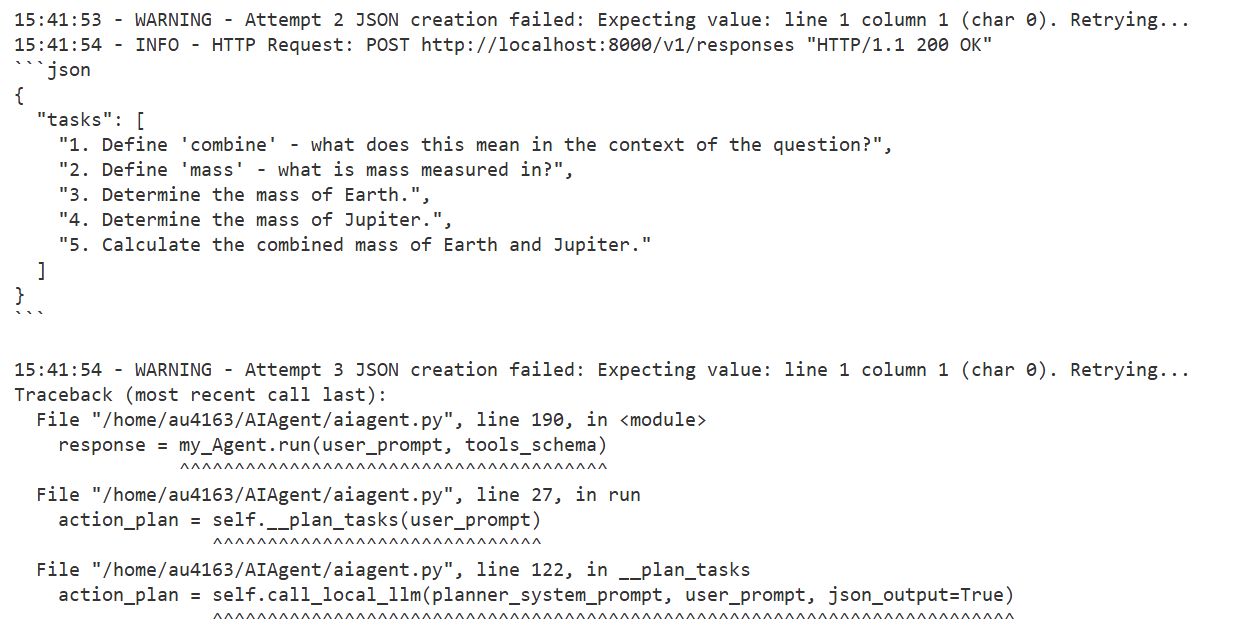
因為仰賴LLM產生步驟,執行工具;不同LLM產生不同結果
錯誤訊息
小結
- LLM負擔許多工作,不同LLM會有不同結果。
Lesson 1: Introduction
By Leuo-Hong Wang