Git/Github
20251031 北資大社課
Claire
- 北資一六社長 x 網管
- 競程是舊愛 而且我很爛
- 新歡大概是資安
- 但我都只打水題
樹枝爆肝仔
Who am I

1
Version Control
3
Git/Github
5
References
2
What is Git?
4
CLI
Index
Version Control
Version Control
- 版本控制系統(Version Control System, VCS)
-
手動版控:每個階段建立一個專案的副本
- 要存很多檔案、可能用錯版本
- 專案的修改日誌
- 包含修改的人、時間、細節、主題
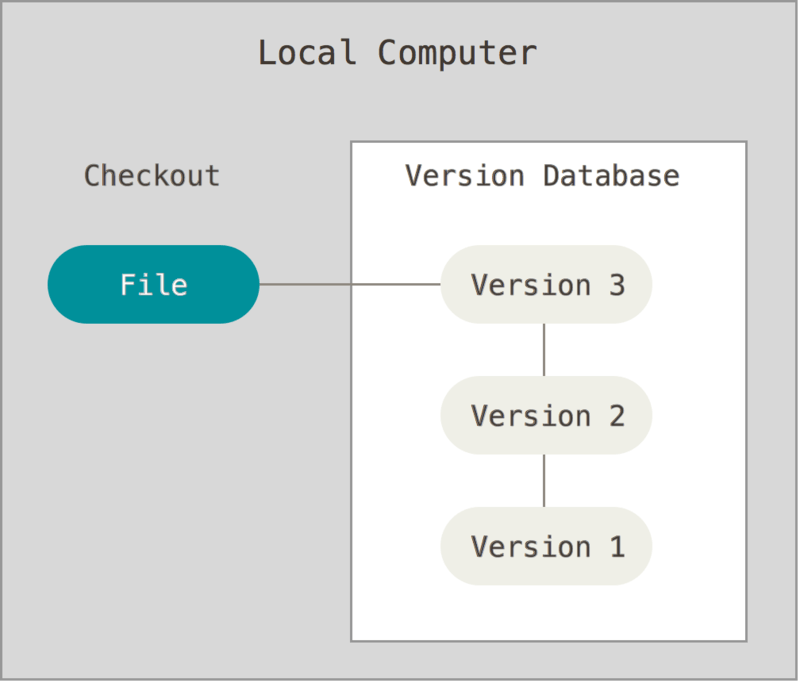
本地端的版本控制
- 從頭到尾所有檔案都在本地
- ex. RCS
CVCSs
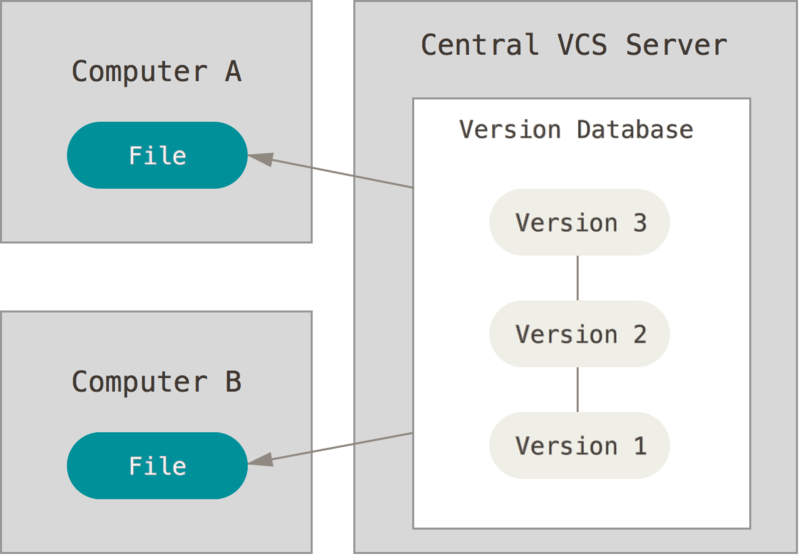
- 集中式版本控制系統(Centralized Version Control Systems)
- 同步、追溯、以及檔案的備份
- ex. CVS、Subversion、Perforce
CVCSs
-
鎖定模式
- 想要修改 -> 簽出該檔案
- 檔案進入鎖定狀態 -> 其他人無法修改
- 簽出者將檔案簽回
-
合併模式
- 可同時修改同一檔案
- 分別將檔案提交回集中的檔案庫時
- 發生衝突的情況 -> 自動進行合併
- 自動合併失敗 -> 要求人工進行衝突的調解
CVCSs - 缺點
- 中央伺服器發生故障,沒人可以提交更新也無法協同合作
- 中心版本庫的硬碟發生損壞 -> 遺失所有資料
- 存取或提交檔案都需連網
- 為什麼不等到能聯網之後再提交就好了?
- 版本控制、紀錄
- 希望每次提交的變更都是一個不可分割的最小單位
- 繼續修改其他的項目會讓應被分為多次提交的內容混在一起
- 未到穩定、完備到足以提供其他開發者使用的程度就提交
- 集中檔案庫中的檔案處於不穩定、不成熟的狀態
- 到完備再提交 -> 失去版本控制的意義
DVCSs
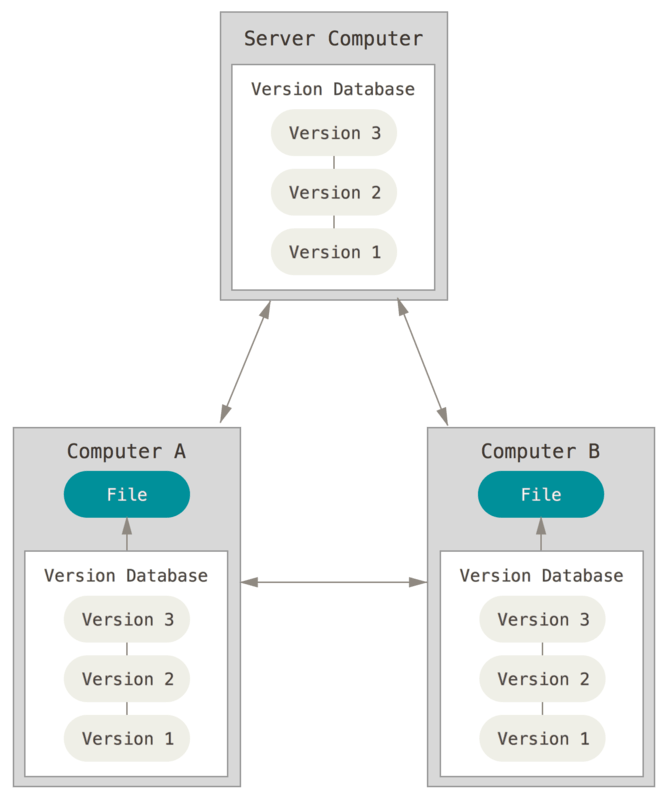
- 分散式版本控制系統(Distributed Version Control Systems)
- 檔案庫允許不只一份
- 可在自己的電腦上建立檔案庫
- 獨立變更專案,彼此可分享
- 存取時完整複製整個檔案庫
- ex. Git、Mercurial、Bazaar、Darcs
-
和檔案在本地的工作複本的差別:
- 版本管理有關的資訊
- 對版控系統的操作可直接在本機端的檔案庫進行
What is Git?
What is Git?
Linux kernel 是規模相當大的開放原始碼軟體專案。 Linux kernel 在 1991 年到 2002 年間的維護工作,幾乎都是透過補丁和壓縮檔來完成的。 在 2002 年時,Linux kernel 開始採用名為 BitKeeper 的商業分散式版本控制系統。
在 2005 年時,開發 Linux kernel 的社群與開發 BitKeeper 的商業公司的合作關係結束,也就無法再免費使用該工具。 這就迫使了 Linux 社群(特別是 Linux 之父 Linus Torvalds)基於使用 BitKeeper 所學到的經驗,來開發自有的工具。 這個系統必須達成:
快速、簡潔的設計、完整支援非線性的開發(上千個同時進行的分支)、完全的分散式系統、能夠有效地處理像 Linux kernel 規模的專案(速度及資料大小)
What is Git?
- Linux 系統的開發者 Linus Torvalds 為管理 Linux kernel 開發而創造
-
一個免費、開源的分散式版本控制系統
- 大部份的操作皆可在本地端完成
-
主要任務:
- 記錄專案所有的修改歷史
- 讓多人能安全地協作
What is Git?
- 大部份的操作皆可在本地端完成
-
能檢查完整性
- SHA-1 checksum
- 有一個字不同 checksum 就會完全不同
- 防止竊改
-
只增加資料
- 幾乎所有的動作都只是增加資料到 Git 的資料庫
-
提交快照後不太會遺失資料
- 使用 Git 時可以隨意操作不會弄壞任何東西
與其他 VCSs 的差別
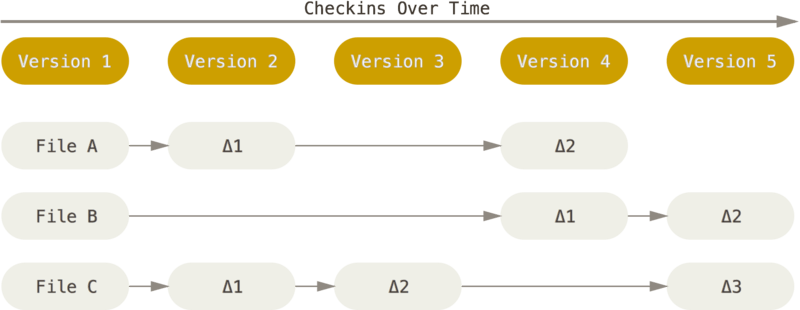
- 處理資料的方式
-
其他系統大多紀錄更改的資訊
- 儲存一組基本的檔案以及這些檔案的更動資料
與其他 VCSs 的差別
- Git 每次 commit* 都會儲存整個專案當時的狀態
-
視為一個小型檔案系統的 Snapshot
- 檔案沒變直接將上一次相同的檔案參照
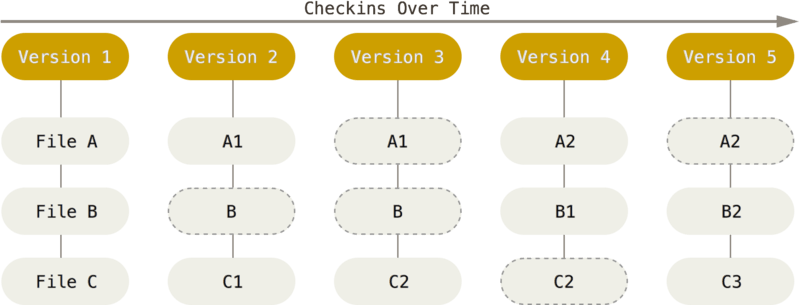
Git/Github
Git/Github
Git(1+hub)-
GitHub 是一個基於 Git 的雲端版本控制平台
- 專案文件管理(Project Documentation)
- 個人履歷與作品集展示(Digital Portfolio)
- 團隊協作與版本追蹤(Collaboration & Version Control)
- 學習筆記與知識管理(Knowledge Management)
Repository
- repo,儲存庫
- 代表一個專案
- 包含原始碼、版本歷史、討論區、協作紀錄
-
分散式協作
- local repo 包含所有歷史紀錄、分支、設定
- push 把變更上傳,pull 把別人的變更拉回本地
- 中心伺服器是交流節點
-
新建 Repo:
- 直接在 GitHub 上建立:空的遠端儲存庫
- 把本地已有的 Git 專案上傳(push)上去
Issues
- 專案管理系統內管理工作事項的功能
- 可把你對這個 repo 的想法告訴開發者
- 回報 Bug、強化既有功能、建立工作事項與討論專案規劃
- Github 協作文化一個重要的部分
Pull Requests (PR)
- 對 repo 沒有修改權限時可用
- 請開發者採納你的版本
- 包含討論、審查、測試的流程
- 協作最直接的方式,讓開源專案能安全的接受他人貢獻
Github Pages
- 你的 repo 放的專案是個網頁
- Github 可以幫你把它架設成公開的網站
Github 操作
- Push:把本地的修改歷史同步到 Github 的 repo
- Pull:把在 GitHub 上有更動 repo 同步更新至本機
- Clone:複製一份別人公開的 repo 到本機
- Fork:建立一個 repo 的副本在自己的 Github 頁面上
CLI
CLI
- Command Line Interface
- 透過文字指令與電腦互動的介面
-
唯一可以使用所有 Git 的功能的地方
- 大多數 GUI 只實作了部分功能
終端機
- 可輸入文字指令來控制電腦的介面
-
常見終端機軟體:
- macOS:Terminal(內建)
- Windows:PowerShell、Command Prompt、Git Bash
-
指令提示字元(Prompt)
- 開啟終端機時,會看到類似這樣的畫面
- 代表系統正在等待你輸入命令
user@MacBook ~ %常見指令
- 指令格式:
提示詞 指令 參數1 參數2 ... 參數n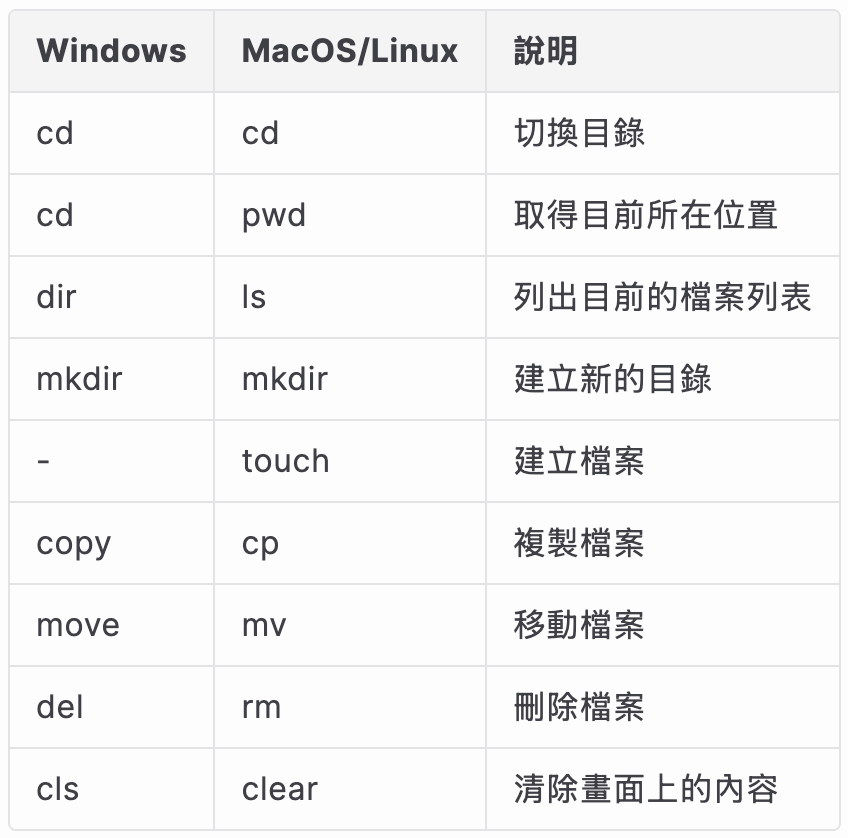
pwd
- print working directory
- 顯示目前所在資料夾的完整路徑
- Git 會根據所在的位置判斷是否在 repo 中
-
.git存在的資料夾裡 Git 才會啟用版本控制功能-
.git是 Git 專案的資料庫,負責儲存所有歷史紀錄與設定 -
每個被 Git 管理的專案都會有一個
.git -
clone 一個專案
.git也會被複製下來
-
# MacOS/Linux
$ pwd
/tmp

#Windows
D:\abc> cd
D:\abc
ls
- 列出目前資料夾中的所有檔案與資料夾
-
搭配參數
-a顯示隱藏檔(檔名為.開頭) -
ls -a可檢查 Git 專案是否成功初始化(出現.git)
cd
- 進入或離開資料夾
-
cd a:進入a,a必須在原本使用者所在的目錄中 -
cd ..:回到上一層目錄 -
cd ~:回到根目錄 - 必須進入專案根目錄後再下 Git 指令
mkdir
- 建立新的資料夾在當前目錄
-
建立後要再
cd才會進到新建立的資料夾
安裝 Git
- https://git-scm.com/install/
- macOS:homebrew
$ /bin/bash -c "$(curl -fsSL https://raw.githubusercontent.com/Homebrew/install/HEAD/install.sh)"
$ brew install git
- Windows:https://git-scm.com/install/windows
-
$ git --version:驗證安裝成功-
如果成功會出現
git version 2.xx.x
-
如果成功會出現
使用者設定
- 所有 Git 相關的設定:
.gitconfig - 控制 Git 各方面的外觀和行為
$ git config --global user.name "名字"
$ git config --global user.email "電子郵件地址"
-
檢視目前設定:
$git config --list
使用者設定
- 為每個專案設定不同作者
$ git config --local user.name "名字"
$ git config --local user.email "電子郵件地址"
建立 repo
-
git init會在目錄中建立.git- 如果不想再被版控就把它刪了
$ mkdir repo-name
$ cd repo-name
$ git init        # 初始化目錄,讓 Git 對這個目錄開始進行版控
References
-
https://slides.com/aaw/burn-chicken/#/6
-
https://hackmd.io/@Sylvia-H/rkdKW2iaL
-
https://learn.microsoft.com/zh-tw/devops/develop/git/what-is-version-control
-
https://androidpollyanna.medium.com/git-基本原理-什麼是版本控制系統-4134d7024d18
-
https://www.astralweb.com.tw/version-control-and-github-project-build/
-
https://www.ithome.com.tw/voice/77088
-
https://git-scm.com/book/zh-tw/v2
-
https://willh.gitbook.io/gitpro/7d615cb13a55ac231e35e8658a897e0e/fbc71b2bb6fb6e6f999917afe5281632
-
https://career-map.org/2025/02/18/【完整指南】非工程師也能快速上手的-github-使用教學
-
https://docs.github.com/en
-
https://ithelp.ithome.com.tw/m/articles/10259830#:~:text=GitHub Issue 有點像是,功能確定問題是否解決。
-
https://medium.com/@brad61517/git101-心得-筆記-github-操作-push-pull-clone-fork-a414d4af64be
-
https://gitbook.tw/chapters/command-line/command-line
Thank You!