Introduction to Agentic AI
Agent Development Framework
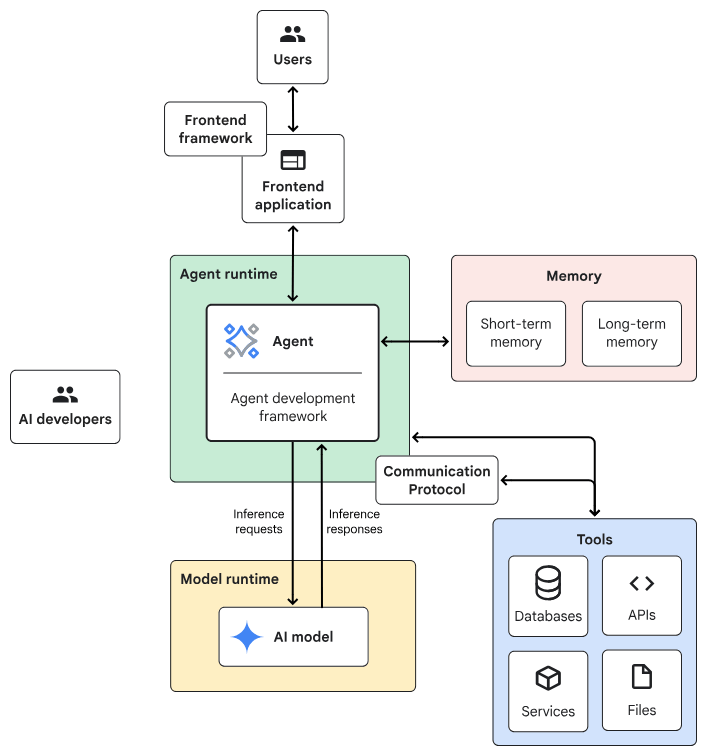
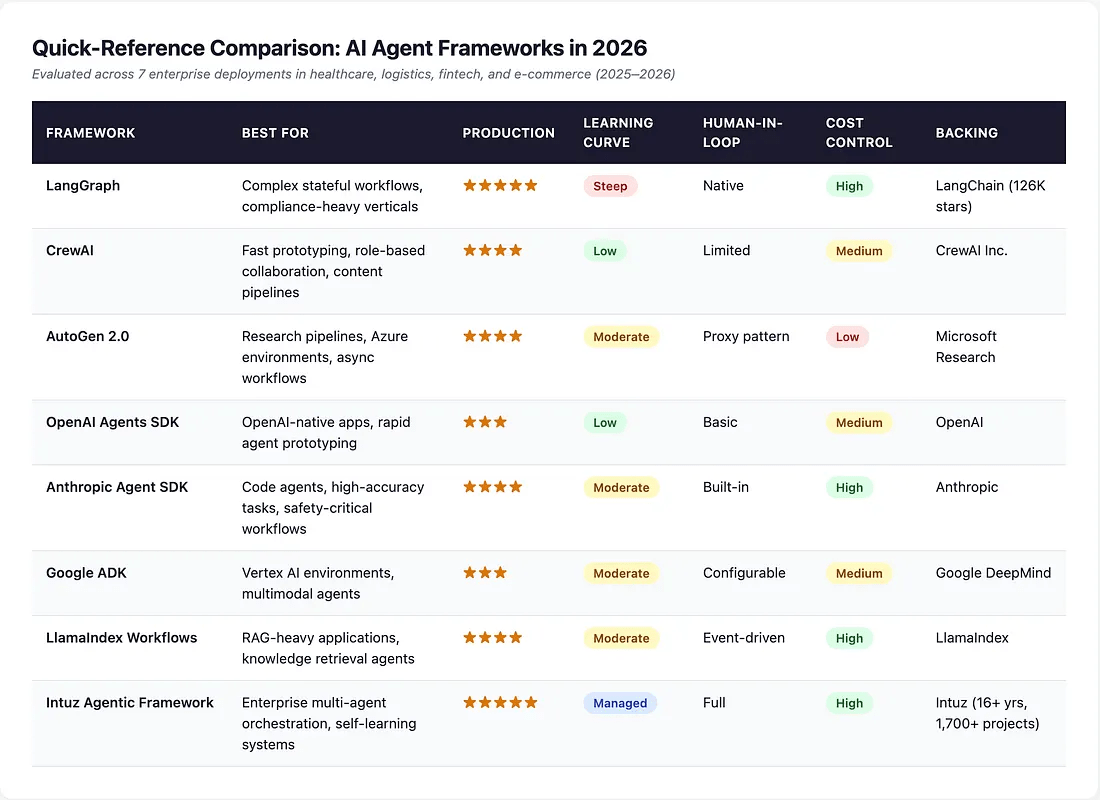
Agentic AI System Architecture
- Frontend:預先建構的元件、程式庫和工具集合,用於建構UI。
- Agent development framework:建構及架構agent的framework與程式庫。
- Tools:工具集合,例如 API、服務、函式與資源。
- Memory:儲存及回想資訊的子系統。
- Design Pattern:Agentic AI常見的運作方法。
- Agent runtime:執行、運算環境。
- AI 模型:核心推論引擎。
- Model runtime:用於代管及提供 AI 模型的基礎架構。
一般伺服器
Planner-Executor
AI伺服器
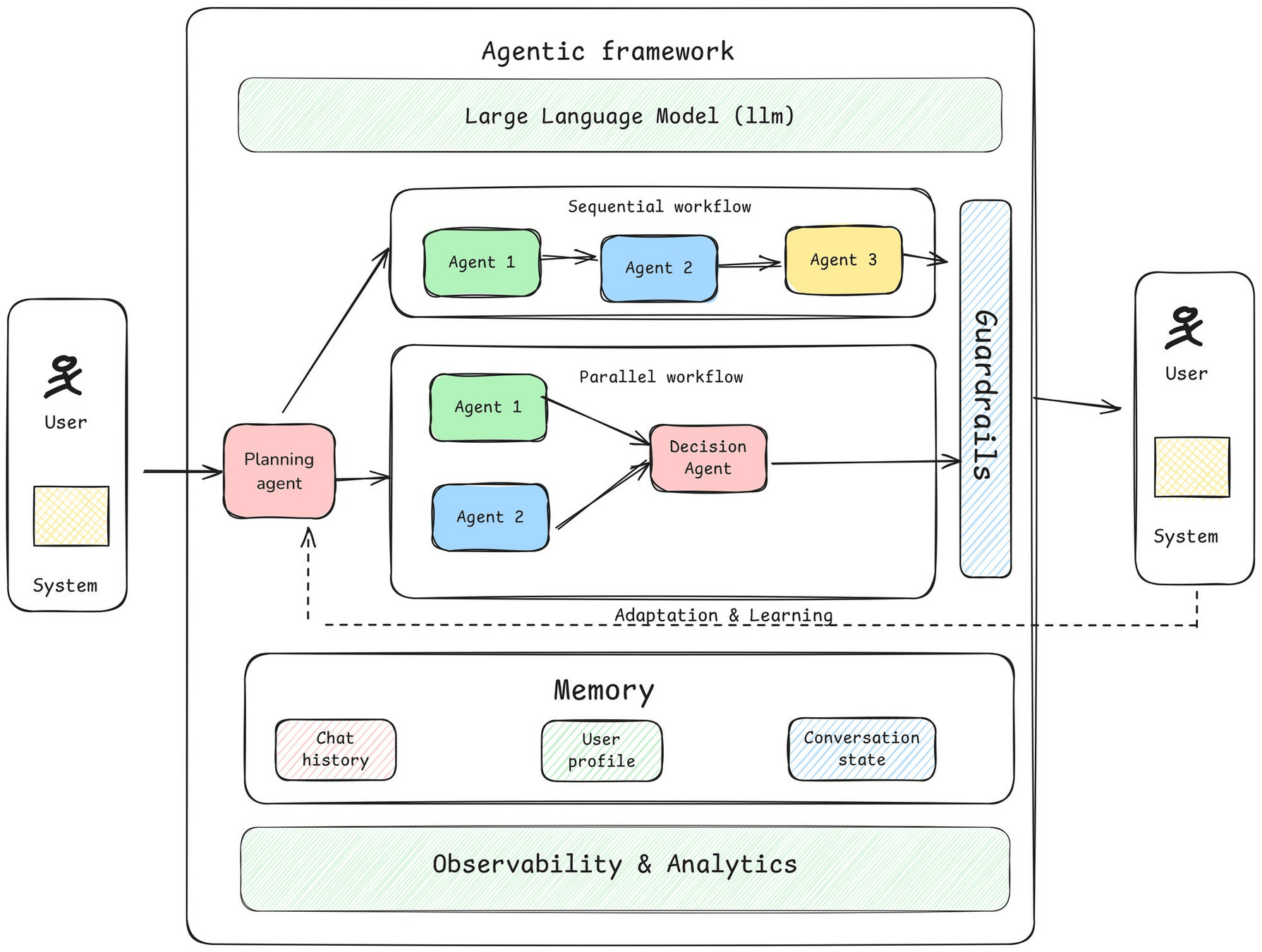
Agent Development Framework Introduction
- Triggering Mechanisms
- LLMs
- Agents: Planner, Memory...
- Guardrails: safety mechanisms
- Agent Observability: transparency
- Adaptation and Learning
Agent Development Framework Introduction
Framework &
Developping IDE
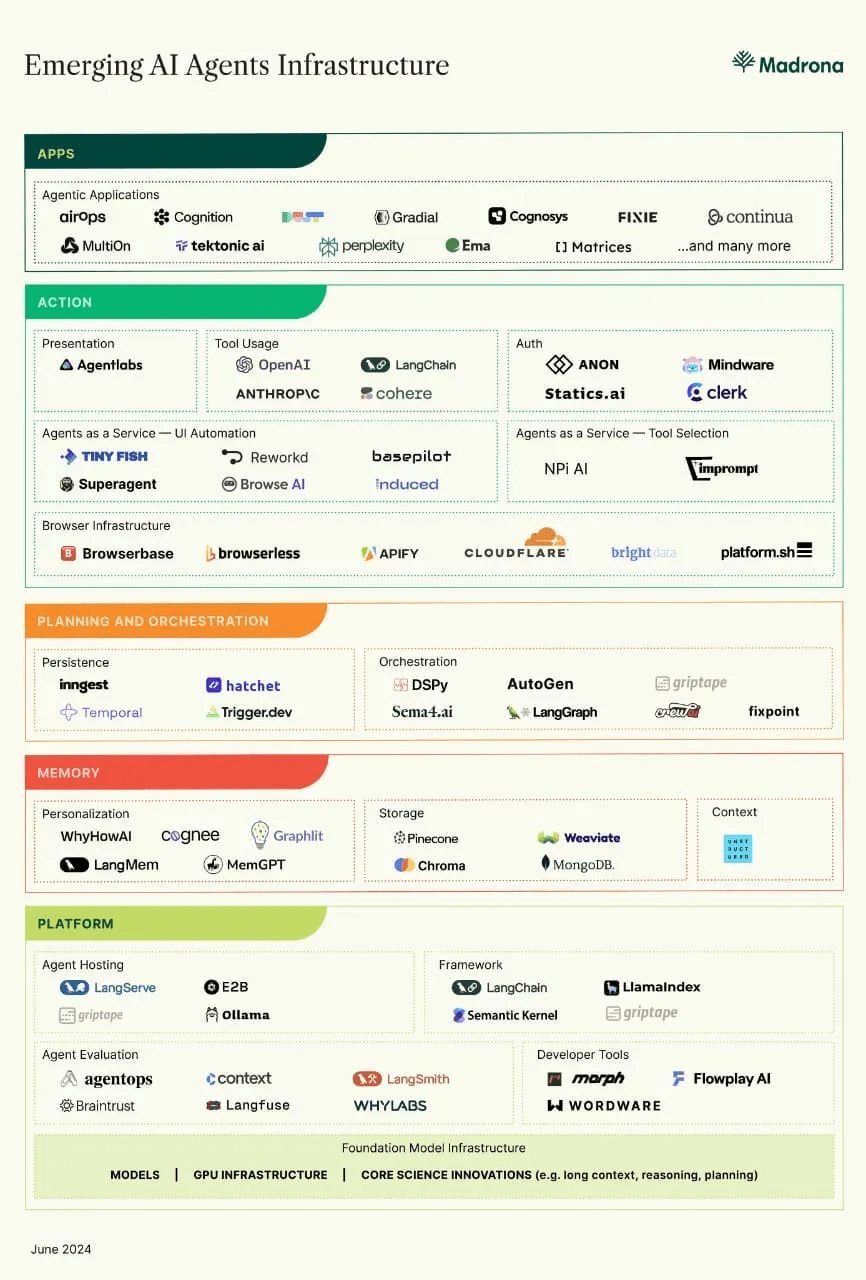
Agent Development Framework Introduction
- Define your Requirement
- Task characteristics: 需要AI model協調工作流程嗎? 開放式任務 or有預定的步驟?
- Latency and performance:準確性 vs 高品質
- Cost:AI推理的成本預算
- Human involvement:任務是否涉及高風險決策、安全關鍵操作或需要人為判斷?
- Review the common agent design patterns
- Select one
- Agent Design Pattern: Agent的運作方式,例如:
- 如何選擇?
Planner-Executor
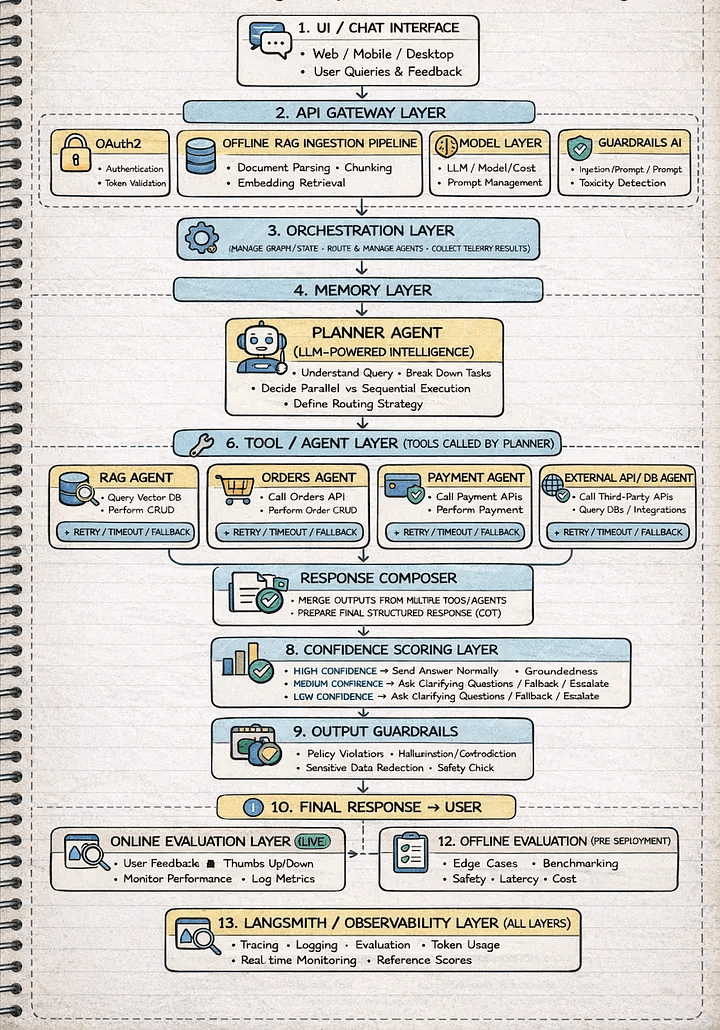
- UI → API Gateway (FastAPI)
登入認證、輸入驗證 - Model & Inference Layer
LLM相關,成本、效能 - Input Guardrails
處理injection, schema validation - Orchestration Layer (LangGraph)
workflow管理 - Memory Layer
context管理,short-term、long-term - Planner (Decision Engine)
- Execution Layer
- Response Composer
- Confidence & Output Guardrails
Trustworthy AI, 避免hallucination - Evaluation & Observability
Tracable & managable
Build Agents using LangGraph
An Agent Example Virtual Environment & packages
# On macOS and Linux.
curl -LsSf https://astral.sh/uv/install.sh | sh
# On Windows.
powershell -ExecutionPolicy ByPass -c "irm https://astral.sh/uv/install.ps1 | iex"1. uv installation &設定環境變數
2. 建立專案
# 建立專案
uv init agent-project
# Mac or Linux: 將$HOME/.local/bin 加入PATH
export PATH="$HOME/.local/bin:$PATH"
# 重新啟動
source $HOME/.local/bin/env (sh, bash, zsh)Windows環境變數設定
(自動加入path)
An Agent Example Virtual Environment & packages
# On macOS and Linux.
source .venv/bin/activate
4. 啟動虛擬環境
3. 建立虛擬環境(建議python使用3.12版)
# 可指定python版本,例如3.12
cd agent-project
uv sync --python 3.12
# On Windows
.venv\Scripts\activate

An Agent Example Virtual Environment & packages
6. 安裝packages
5. 執行測試檔案
def main():
    print("Hello from agent-project!")


if __name__ == "__main__":
    main()
python -m pip install langchain langchain-community langchain-ollama ollamamain.py

python -m ensurepip --upgradeAn Agent Example local LLM using Ollama
7. 啟動local LLM: 必須支援「工具調用(Tool Calling)」功能
- 使用orieg/gemma3-tools:https://ollama.com/orieg/gemma3-tools
# 下載LLM model
ollama pull orieg/gemma3-tools:4b-ft- 安裝ollama
irm https://ollama.com/install.ps1 | iexirm https://ollama.com/install.ps1 | iexWindows
Mac OS/ Linux
An Agent Example local LLM using Ollama
# 檢視有哪些model
ollama list
# 背景服務
ollama serve


- 服務啟動後,檢視port 11434
Windows
Mac OS/ Linux
An Agent Example local LLM using Ollama
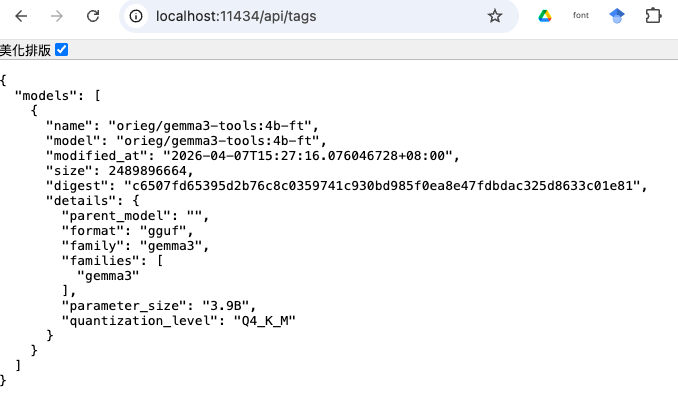
An Agent Example local LLM test
from langchain_ollama import ChatOllama
def main():
    MODEL = "orieg/gemma3-tools:4b-ft"

    model = ChatOllama(
        model=MODEL,
        base_url="http://localhost:11434",
        temperature=0.2,
        top_k=25
    )

    prompt = "可以介紹一下你自己嗎?"
    response = model.invoke(prompt)
    print(type(response))
    print(response)

if __name__ == "__main__":
    main()
main.py
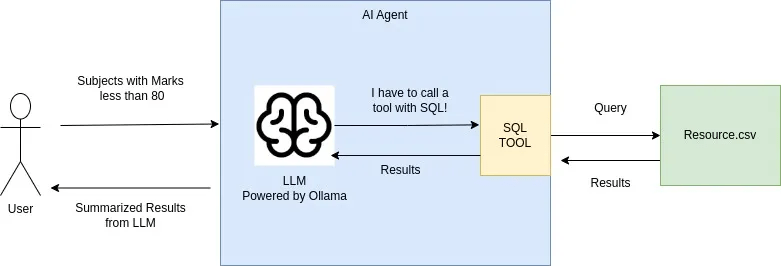
An Agent Example Langgraph & Local LLM(Ollama)
subject,marks
Physics,95
Chemistry,97
Maths,80
Biology,50
resource.csv
範例執行情境
An Agent Example Langgraph & Local LLM(Ollama)
from langchain_ollama import ChatOllama
from langchain_core.messages import HumanMessage, SystemMessage
from langgraph.prebuilt import create_react_agent
import pandas as pd
import duckdb as ddb

model = ChatOllama(
    model="orieg/gemma3-tools:4b-ft",
    base_url="http://localhost:11434"
    )

def querycsv(query:str) -> str:
    """
    Execute a SQL query against a table named 'df' which represents resource.csv/
    The table has two columns: 'subject' (text) and 'marks' (numeric).

    Args:
        query: A valid SQL string (e.g., "SELECT AVG(marks) FROM df")
    """
    df = pd.read_csv("resource.csv")

    # Ensuring the agent doesn't have to worry about the filename vs table name
    query = query.replace("resource.csv", "df")

    try:
        mod_df = ddb.query(query).df()
        return mod_df.to_string()
    except Exception as e:
        return f"Error executing SQL: {str(e)}"

def main():
    tools = [querycsv]
    # 定義你的系統指令
    system_msg = SystemMessage(
        content="""You are an AI Agent that queries resource.csv file and give information.
        You always call tools with SQL Query"""
        )
    agent_executor = create_react_agent(
        model,
        tools=tools,
        )

    config = {"configurable": {"thread_id": "test"}}

    # Running the stream
    inputs = {"messages": [
        system_msg,
        HumanMessage(content="Get average over marks column. Query resource.csv")]}
        # HumanMessage(content="Subjects with marks less than 80. Query resource.csv")]}


    for step in agent_executor.stream(inputs, config, stream_mode="values"):
        step["messages"][-1].pretty_print()

if __name__ == "__main__":
    main()
main-agent01.py
An Agent Example Langgraph & Local LLM(Ollama)
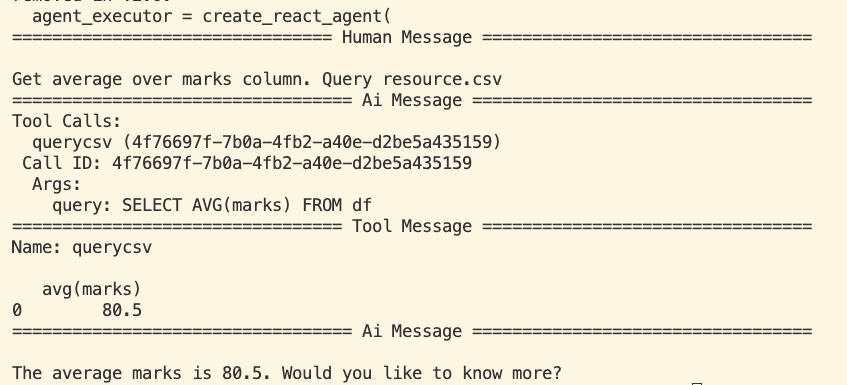
An Agent Example Langgraph & Local LLM(Ollama)
1. 核心工具定義:querycsv 函數
- Docstring (文檔字串):何時該用這個工具。表格名稱叫 df。欄位名稱有 subject 和 marks。
- DuckDB:專為分析設計的資料庫引擎,可直接針對 Pandas 的 DataFrame (df) 執行 SQL,效能非常快。
- 字串替換:query.replace("resource.csv", "df") 是一個防錯機制,防止 AI 寫出 SELECT * FROM resource.csv 這種無效的 SQL
def querycsv(query:str) -> str:
    """
    Execute a SQL query against a table named 'df' which represents resource.csv/
    The table has two columns: 'subject' (text) and 'marks' (numeric).
    Args:
        query: A valid SQL string (e.g., "SELECT AVG(marks) FROM df")
    """
    df = pd.read_csv("resource.csv")

    # Ensuring the agent doesn't have to worry about the filename vs table name
    query = query.replace("resource.csv", "df")

    try:
        mod_df = ddb.query(query).df()
        return mod_df.to_string()
    except Exception as e:
        return f"Error executing SQL: {str(e)}"
An Agent Example Langgraph & Local LLM(Ollama)
2. 模型初始化與模型選擇
- Gemma 3 (Fine-tuned):4b-ft 版本。經過「微調 (Fine-tuned)」的小型模型,強化 tools(工具調用)的支援,大幅降低 AI 亂回或不執行工具的機率。
model = ChatOllama(
    model="orieg/gemma3-tools:4b-ft",
    base_url="http://localhost:11434"
    )
tools = [querycsv]
...
agent_executor = create_react_agent(
model,
tools=tools,
)3. Agent 邏輯構建:create_react_agent
-
ReAct 模式: Reason (推理) + Act (行動)。
推理:AI 思考「用戶想要平均分數,我應該使用 SQL 查詢工具」。
行動:AI 生成 SQL 字串並呼叫 querycsv。
An Agent Example Langgraph & Local LLM(Ollama)
4. 訊息流與執行
-
SystemMessage:「人格」和「行為準則」。「你是一個 AI 代理」且「必須使用工具」。
-
Thread ID:config 中的 thread_id 是為了記憶功能。在連續對話中,能讓 Agent 記住之前的對話上下文。
-
Stream Mode (values):印出對話過程中的完整訊息列表,讓你可以看到 AI 的思考過程、工具呼叫的結果,以及最後的回覆。
    # 定義你的系統指令
    system_msg = SystemMessage(
        content="""You are an AI Agent that queries resource.csv file and give information.
        You always call tools with SQL Query"""
        )
    ...
    config = {"configurable": {"thread_id": "test"}}
    ...
    # Running the stream
    inputs = {"messages": [
        system_msg,
        HumanMessage(content="Get average over marks column. Query resource.csv")]}

    for step in agent_executor.stream(inputs, config, stream_mode="values"):
        step["messages"][-1].pretty_print()
An Agent Example Langgraph & Local LLM(Ollama)
5. 執行流程
-
用戶輸入:「計算 marks 的平均值」。
-
LLM 判斷:需要調用 querycsv,生成 SELECT AVG(marks) FROM df。
-
LangGraph 攔截:發現 LLM 想要調用工具,暫停 LLM,執行 querycsv。
-
工具執行:DuckDB 讀取 resource.csv 並計算出結果。
-
結果回傳:將計算結果(例如 80.5)傳回給 LLM。
-
LLM 總結:根據結果生成人類讀得懂的句子:「平均分數是 80.5 分。」
6. 問題
-
LLM的穩定度:errors occur and LLM wont be able to understand and resolve the question
-
使用pre-built ReAct agent. This makes customization and debugging impossible(無修改彈性)
Langgraph Agent Example multi-agent
Multi-agent system
: orchestrates multiple specialized agents to solve a complex problem
Sequential pattern

- executing in a predefined, linear order
- without consulting an AI model
loop pattern
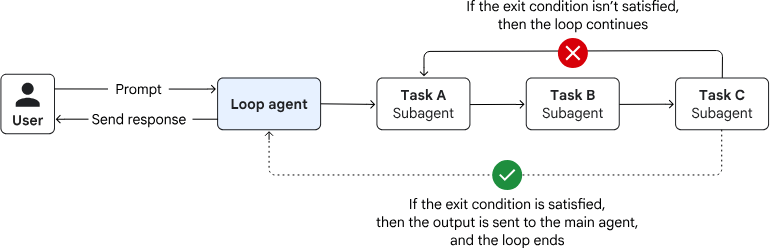
- executing until a termination condition is met
- without consulting an AI model for orchestration
Langgraph Agent Example langchain implementation
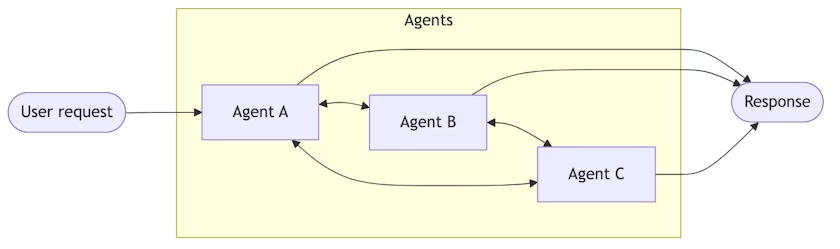
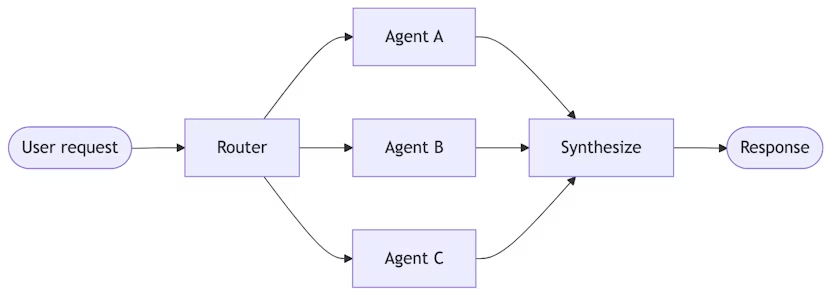
Handsoffs
Agents transfer control to each other via tool calls. Each agent can hand off to others or respond directly.
Router
A routing step classifies input and directs it to specialized agents. Results are synthesized.
Langgraph Agent Example langchain implementation
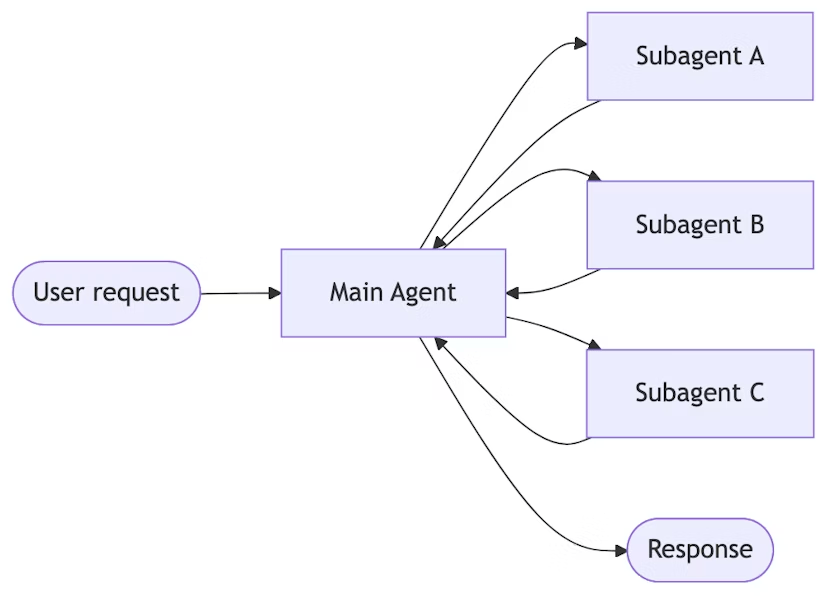
a central main agent coordinates subagents by calling them as tools.
Subagents
subagents are stateless, with all conversation memory maintained by the main agent.
Langgraph Agent Example Langgraph concept
Graph based Architecture
Interactions from users, tools and LLMs.
Take State as an input and perform operations on this.
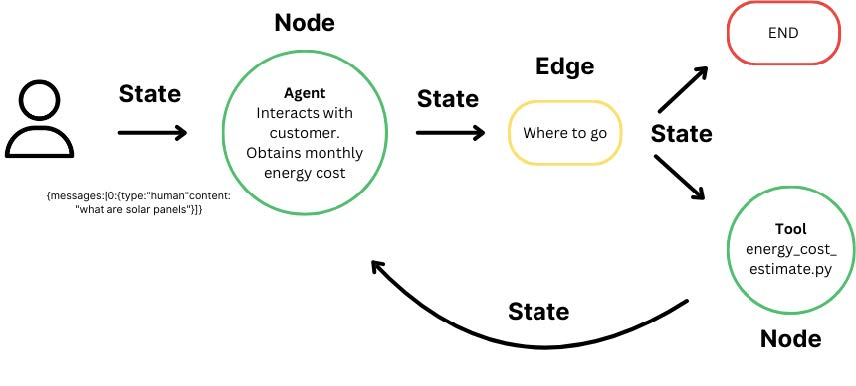
Edges help to redirect requests between Nodes
Langgraph Agent Example Langgraph & Local LLM(Ollama)
from langchain_ollama import ChatOllama
from typing import Annotated
from typing_extensions import TypedDict
from langgraph.graph import StateGraph
from langgraph.graph.message import add_messages
from langgraph.prebuilt import ToolNode, tools_condition
from tools.tool import querycsv # 直接匯入被 @tool 裝飾過的函式

class State(TypedDict):
    messages: Annotated[list, add_messages]

graph_builder = StateGraph(State)

tools = [querycsv]
llm = ChatOllama(
    model="orieg/gemma3-tools:4b-ft",
    base_url="http://localhost:11434"
)
llm_with_tools = llm.bind_tools(tools)

def chatbot(state: State):
    return {"messages": [llm_with_tools.invoke(state["messages"]) ]}

graph_builder.add_node("chatbot", chatbot)

tool_node = ToolNode(tools=tools)
graph_builder.add_node("tools", tool_node)

graph_builder.add_conditional_edges(
    "chatbot",
    tools_condition
)
# Any time a tool is called, we return to chatbot to decide the next step
graph_builder.add_edge("tools", "chatbot")
graph_builder.set_entry_point("chatbot")

graph = graph_builder.compile()

def stream_graph_updates(user_input: str):
    for event in graph.stream({"messages":[{"role": "user", "content": user_input}] }):
        for node, value in event.items():
            last_msg = value["messages"][-1]
            print(f"Node: {node}")
            # 檢查是否有 tool_calls 產生
            if hasattr(last_msg, 'tool_calls') and last_msg.tool_calls:
                print("Tool Calls detected:", last_msg.tool_calls)
            else:
                print("Assistant content:", last_msg.content)

while True:
    try:
        user_input = input("User: ")
        if user_input.lower() in ["exit", "quit", "bye"]:
            print("Goodbye")
            break

        stream_graph_updates(user_input)
    except KeyboardInterrupt:
        # fallback if input() is not available
        user_input = "What do you know about LangGraph?"
        print("User: " + user_input)
        stream_graph_updates(user_input)
        break
main-agent02.py
Langgraph Agent Example Langgraph & Local LLM(Ollama)
import pandas as pd
import duckdb as ddb
from langchain_core.tools import tool

@tool
def querycsv(query:str) -> str:
    """
    USE THIS TOOL TO READ DATA FROM resource.csv
    Execute a SQL query against a table named 'df' which represents resource.csv/
    The table has two columns: 'subject' (text) and 'marks' (numeric).
    當詢問關於 resource.csv 或成績 (marks) 時,必須呼叫此工具

    Args:
        query: A valid SQL string (e.g., "SELECT AVG(marks) FROM df")
    """
    try:
        df = pd.read_csv("resources/resource.csv")

        # 將 pandas 檔案註冊成 DuckDB 看得到的臨時視圖
        # 這樣無論模型寫 "resource.csv"、'resource.csv' 還是 resource.csv
        # DuckDB 都能正確對應
        con = ddb.connect(database=':memory:')
        con.register('resource.csv', df)
        con.register('df', df) # 同時保留 df 作為備案

        result_df = con.execute(query).df()
        return result_df.to_string()
    except Exception as e:
        return f"Error executing SQL: {str(e)}"
tools/tool.py
subject,marks
Physics,95
Chemistry,97
Maths,80
Biology,50
reources/resource.csv