Restaurant Menu Management

Business Scenario
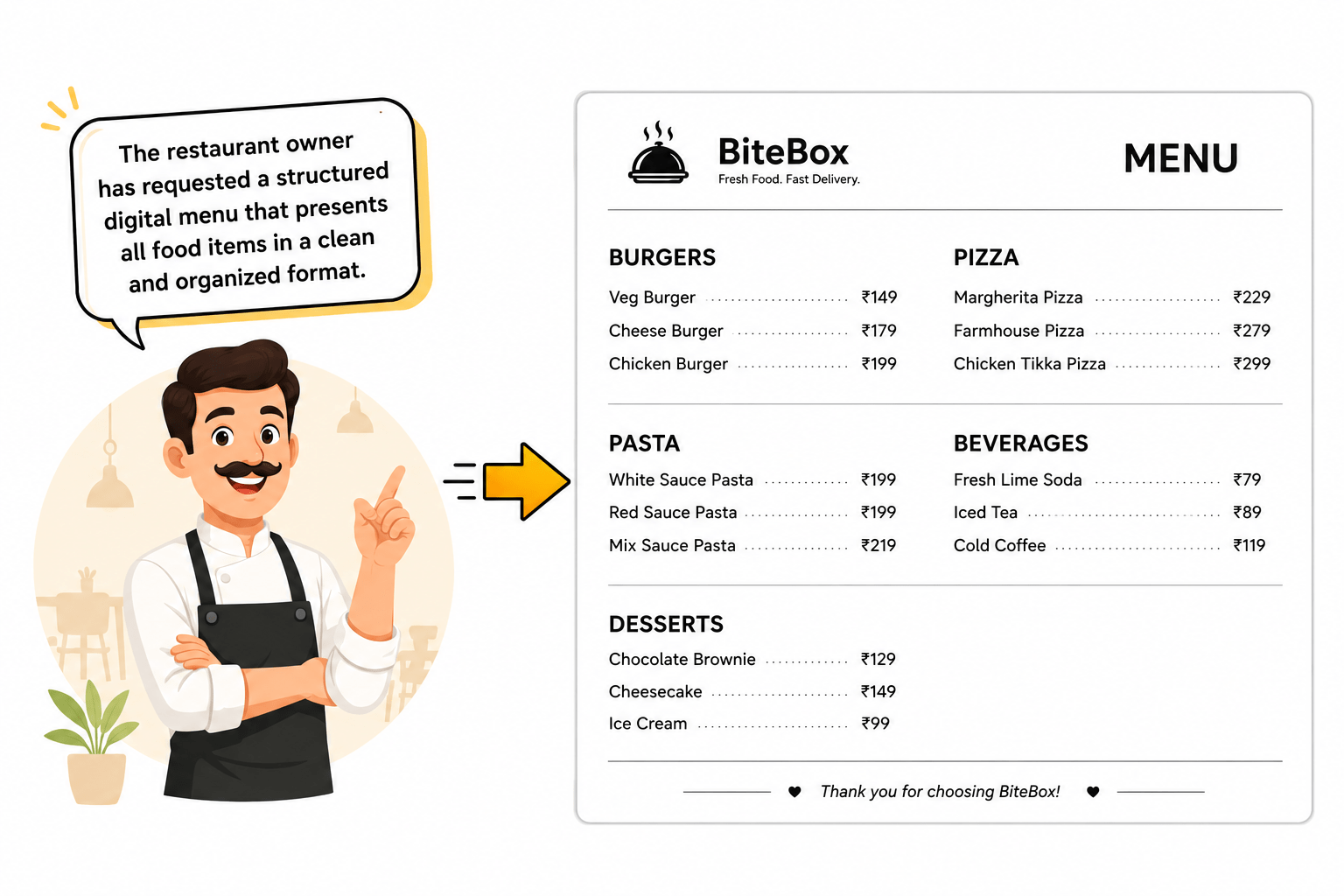
The BiteBox website now displays food images, categories, descriptions, and restaurant information. While customers can browse the menu visually, they cannot easily compare food items, prices, availability, and offers.

Now...
Pre-Lab Preparation
git pull origin branchName
Git Pull
Module: Advanced HTML: Structure, Tables, Forms, and Media
1) Semantic HTML and Page Structure
2) Why semantic HTML matters
Task 1: Create the Basic Restaurant Menu Table
Open menu.html - Add a horizontal rule below the Food Gallery to separate the gallery from the table
1
<hr>
<h2>Restaurant Menu</h2>

<table>

  <caption>
  BiteBox Menu
  </caption>

</table>- Add a heading
- Create the table container.
- Add a table caption.
Create the first row - Inside the row, add the column headings.
2
<table>
  <caption> BiteBox Menu </caption>

<tr>

<th>Category</th>
<th>Food Item</th>
<th>Price</th>
<th>Availability</th>

</tr>

</table>
Task 2: Add Menu Items Using Table Data (<td>)
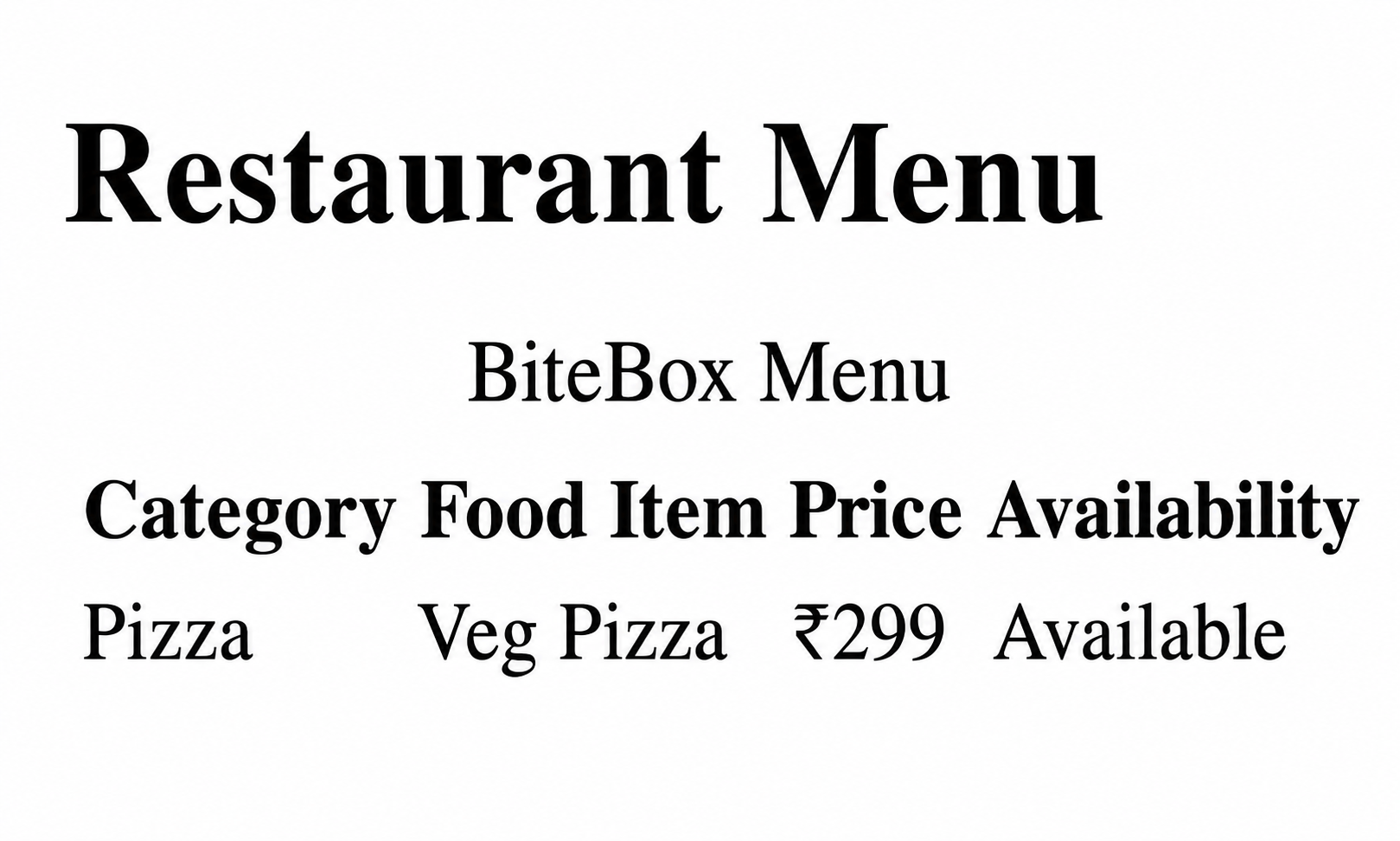
<tr>

    <td>Pizza</td>

    <td>Veg Pizza</td>

    <td>₹299</td>

    <td>Available</td>

</tr>
Add the first menu item.
1
Check the Output
2
Add more menu items
3
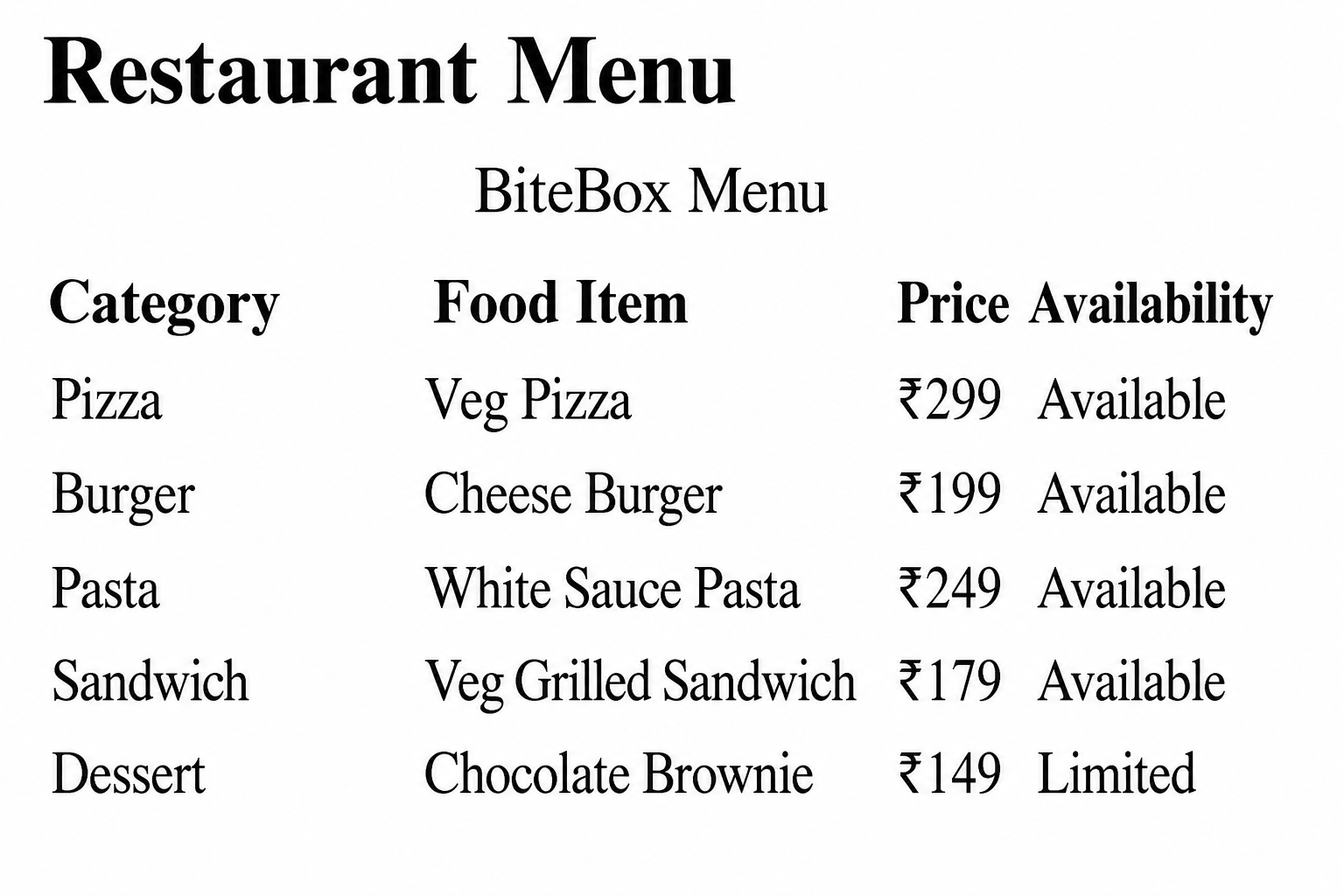
<tr>
    <td>Burger</td>
    <td>Cheese Burger</td>
    <td>₹199</td>
    <td>Available</td>
</tr>

<tr>
    <td>Pasta</td>
    <td>White Sauce Pasta</td>
    <td>₹249</td>
    <td>Available</td>
</tr>
<tr>
<td>Sandwich</td>
<td>Veg Grilled Sandwich</td>
<td>₹179</td>
<td>Available</td>
</tr>
<tr>
<td>Dessert</td>
<td>Chocolate Brownie</td>
<td>₹149</td>
<td>Limited</td>
</tr>Check the Output
4
Task 3: Improve Table Using Border, Padding, Spacing
1
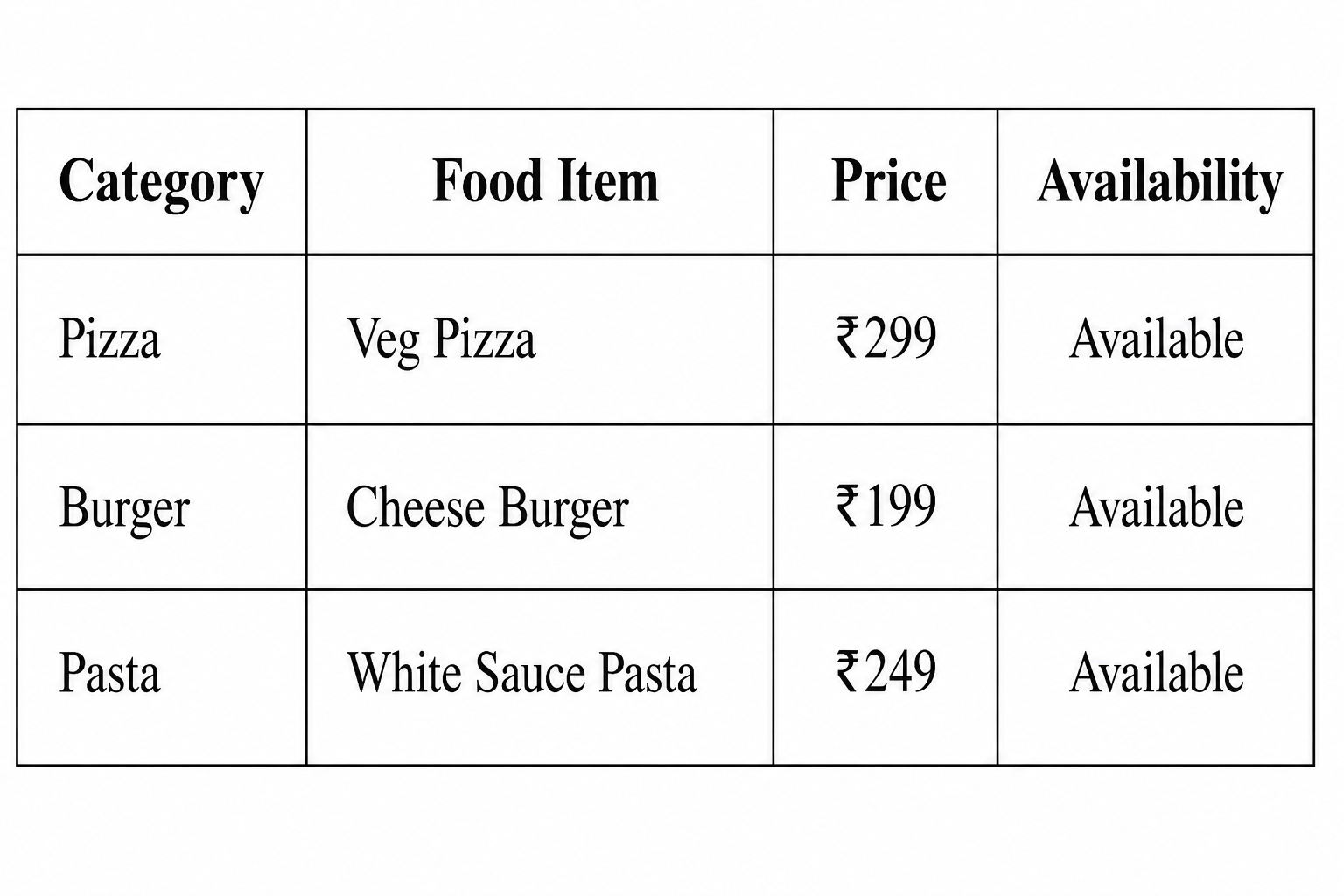
Locate the <table> tag and update it
<!--Restaurant Menu-->
  <hr>
  <h2>Restaurant Menu</h2>

<table border="1"
       cellpadding="10"
       cellspacing="0">

  <caption> BiteBox Menu </caption>

  <tr>
2
Check the Output
Task 4: Merge Table Columns Using
Task 3: Organize Related Content Using <section>
<section>

<h2>Welcome to BiteBox</h2>

<p>

Fresh Food • Fast Delivery

</p>

</section>
Open index.html file - Locate the welcome section and wrap it inside a <section>.
1
<!-- About section -->
    <section>

         <hr>
         <h2>About BiteBox</h2>
         <p>
         BiteBox is your one-stop destination for delicious meals
         prepared using fresh ingredients and delivered quickly
         to your doorstep.
        </p>

    </section>
Similarly, wrap the About Us content inside separate <section> elements.
2
<!--Restaurant Story -->
   <section>

      <hr>
      <h2> Our Story </h2>
      <p>
      BiteBox started with a simple mission—to serve fresh,
      delicious meals prepared with quality ingredients and
      delivered with exceptional service. Every meal is
      crafted with care to bring happiness to our customers.
      </p>

   </section>
Similarly, wrap the Restaurant Story content inside separate <section> elements.
3
<!-- Chef's Message-->
   <section>

      <hr>
      <h2> Chef's Message </h2>
      <p>
        <em>
        Every dish at BiteBox is prepared with fresh ingredients,
        authentic recipes, and a passion for delivering memorable
        dining experiences.
        </em>
      </p>

   </section>
Similarly, wrap the Chef's Message content inside separate <section> elements.
4
<!--Todays Special Offers -->
      <section>

        <hr>
        <h2> Today's Special Offer </h2>
        <p>
          Get <strong>20% OFF</strong> on all Combo Meals.
        </p>
        <p>
            Offer Valid Till 31<sup>st</sup> July
        </p>

      </section>
Similarly, wrap the Today's Special Offers content inside separate <section> elements.
5
<!--Contact Information-->
      <section>

        <hr>
        <h2> Contact Information </h2>
        <p>
            Phone : +91 98765 43210
            <br>
            Email : contact@bitebox.com
            <br>
            Location : Pune, Maharashtra
        </p>

        </section>
Similarly, wrap the Contact Information content inside separate <section> elements.
6
<!-- Opening Hours Section-->
      <section>

          <hr>
          <h2>Opening Hours</h2>

          <p>
              Monday - Sunday
              <br>
              10:00 AM - 11:00 PM
          </p

      </section>
Similarly, wrap the Opening Hours content inside separate <section> elements.
7
Task 4: Organize Independent Content Using <article> and Related Content Using <aside>
 <!--Todays Featured Dishes -->
       <article>

            <hr>
            <h2>Today's Featured Dishes</h2>

            <p>Pizza</p>
            <p>Burger</p>
            <p>Pasta</p>

        </article>
Locate the Featured Dishes section and wrap it inside <article>
1
 <!-- Customer Notice -->
      <aside>
         <hr>
         <h2> Customer Notice </h2>

         <p>
            <mark> Free home delivery is available on orders
            above ₹499. </mark>
         </p>

            <p>
               Delivery services are available from 10:00 AM
               to 11:00 PM.
            </p>
      </aside>
Locate the Customer Notice and Wrap it inside the <aside> element.
2
Task 5: Replace the Existing Footer with <footer>
<!--Footer Section-->
<footer>

<p>

© 2026 BiteBox. All Rights Reserved.

</p>

</footer>
Locate the existing footer and Wrap it inside the semantic footer.
1
*
Complete Solution
Home Page(index.html)
<!DOCTYPE html>
<html lang="en">

<head>
    <meta charset="UTF-8">
    <meta name="viewport" content="width=device-width, initial-scale=1.0">
    <title>BiteBox</title>
</head>

<body>
    <header>
        <!--Restaurant Name-->
        <h1><mark>BiteBox</mark></h1>

        <!--Navigation Menu-->
        <nav>
            <a href="index.html">Home</a>
|
<a href="menu.html">Menu</a>
|
<a href="about.html">About</a>
|
<a href="contact.html">Contact</a>
</nav>
</header>
<main>
<section>
<!-- Welcome Section -->
<h2>Welcome to BiteBox</h2>
<p>
<strong>Fresh Food</strong>
•
<em>Fast Delivery</em>
</p>
</section>
<!-- About section -->
<section>
<hr>
<h2>About BiteBox</h2>
<p>
BiteBox is your one-stop destination for delicious meals prepared using fresh ingredients and delivered quickly to your doorstep.
</p>
</section>
<!--Restaurant Story -->
<section>
<hr>
<h2> Our Story </h2>
<p>
BiteBox started with a simple mission—to serve fresh, delicious
meals prepared with quality ingredients and delivered with
exceptional service. Every meal is crafted with care to bring
happiness to our customers.
</p>
</section>
<!-- Chef's Message-->
<section>
<hr>
<h2> Chef's Message </h2>
<p>
<em>
Every dish at BiteBox is prepared with fresh ingredients,
authentic recipes,and a passion for delivering memorable
dining experiences.
</em> </p>
</section>
<!--Todays Featured Dishes -->
<article>
<hr>
<h2>Today's Featured Dishes</h2>
<p>Pizza</p>
<p>Burger</p>
<p>Pasta</p>
</article>
<!--Todays Special Offers -->
<section>
<hr>
<h2> Today's Special Offer </h2>
<p> Get <strong>20% OFF</strong> on all Combo Meals. </p>
<p>
Offer Valid Till 31<sup>st</sup> July
</p>
</section>
<!--Contact Information-->
  <section>
            <hr>
            <h2> Contact Information </h2>
            <p>

                Phone : +91 98765 43210
                <br>
                Email : contact@bitebox.com
                <br>
                Location : Pune, Maharashtra
            </p>
        </section>


        <!-- Customer Notice -->
        <aside>
            <hr>
            <h2> Customer Notice </h2>

            <p>
                <mark> Free home delivery is available on orders above ₹499. </mark>
            </p>

            <p>
                Delivery services are available from 10:00 AM to 11:00 PM.
            </p>
        </aside>
  <!-- Opening Hours Section-->
        <section>
            <hr>
            <h2>Opening Hours</h2>

            <p>
                Monday - Sunday
                <br>
                10:00 AM - 11:00 PM
            </p>
        </section>

    </main>


    <!--Footer Section-->
    <footer>
        <hr>
        <p>
            © 2026 BiteBox
        </p>
    </footer>

    <hr>
</body>
</html>
Great job!
You successfully the replaced generic elements with semantic HTML tags.
Checkpoint
Git Push
git push origin branchNameNext-Lab Preparation
Module: Advanced HTML: Structure, Tables, Forms, and Media
1) Understanding of HTML Tables
2) Understanding of various table tags and attributes