Secure Banking Data Model Implementation & Banking Business Rules Enforcement

Business Scenario
Welcome!
Today is your second day as a Database Developer at our digital banking company. We have received the next phase of the Banking Management Database System project from the client.
The client now wants us to implement a Secure Banking Data Model for the digital bank called BankingDB.
In this system, the bank staff should be able to:

- Identify entities and attributes in banking datasets
- Design Entity Relationship Models (ERD)
- Understand relationships between banking tables
- Apply normalization concepts
- Create banking tables using DDL commands
- Modify table structures when required
- Remove unnecessary tables
- Apply constraints to enforce banking business rules
- Maintain secure and consistent banking records
Your task is to implement the secure banking database structure and enforce business rules using SQL DDL commands and constraints.
Pre-Lab Preparation
Topic : Crafting SQL Databases (DDL)
1) Types of Database Relationships
2) Concept of Entity Relationship Model (ERD)
3) Normalization and Denormalization
4) Types of DDL Commands
5) Types of Constraints
git pull origin branchName
Git Pull
Task 1: Identify Entities and Attributes
Before creating banking tables, we first identify the entities and their attributes present in the banking system.
An entity represents a real-world object or concept for which data needs to be stored inside the database. In a banking system, entities can include customers, accounts, transactions, branches, and loans.
Each entity contains a set of attributes that describe the details of that entity. Attributes become the columns of a table in the database.
What are Entities and attributes?

For example:
Identifying entities and attributes is one of the most important steps in database design because it helps developers:
- Organize banking data properly
- Avoid data duplication
- Maintain data consistency
- Build relationships between tables
- Enforce banking business rules
- Improve database security and efficiency
Customers Entity
The Customers entity stores information related to bank customers.
1
| CustomerID | FirstName | LastName | Phone | Address | AccountCreationDate | |
|---|---|---|---|---|---|---|
Attributes:
-
CustomerID → Unique identification number for each customer
-
FirstName → Customer’s first name
-
LastName → Customer’s last name
-
Email → Customer’s email address
-
Phone → Customer’s contact number
-
Address → Residential address of the customer
-
AccountCreationDate → Date when the customer account was created
Activity
After going through BankingDB database list down the entities and attributes in the tabulated Format as shown Below.
| Entity | Attributes |
|---|---|
Task 2: Understand Database Relationships
By identifying entities and attributes before table creation, developers can design a well-structured and secure banking database system that efficiently stores and manages banking operations.
Before implementing the database, we must understand how tables are connected with each other.
Database relationships define how data in one table is linked to data in another table. These relationships help organize banking data, maintain consistency, reduce duplication, and enforce business rules.
Types of Database Relationships
One-to-One Relationship
In a One-to-One relationship, one record in a table is connected to only one record in another table.
Example:
One customer can have one KYC record.
Relationships are created using:
- Primary Key → Uniquely identifies each record
- Foreign Key → Connects related tables
1
Benefit:
Helps store sensitive verification details separately and securely.
2
One-to-Many Relationship
In a One-to-Many relationship, one record in a table can be related to multiple records in another table.
Example:
One customer can have multiple bank accounts.
Benefit:
Allows a customer to manage different types of bank accounts efficiently.
3
Many-to-Many Relationship
In a Many-to-Many relationship, multiple records in one table can relate to multiple records in another table.
Example:
Multiple accounts can be managed across multiple branches.
Benefit:
Supports flexible and efficient banking operations across branches.
Understanding these relationships helps developers design a secure, organized, and efficient banking database system.
Task 3: Understand Entity Relationship Model (ERD)
An ERD (Entity Relationship Diagram) is a visual representation of the entities, attributes, and relationships present inside a database system.
ERDs help developers understand how different tables are connected and how data flows within the database. In a banking system, ERDs are very important because multiple entities such as customers, accounts, transactions, branches, and loans are interconnected.
Before creating tables in SQL, developers first design an ERD to organize the database structure properly and avoid redundancy or data inconsistency.
An ERD mainly consists of:
- Entities → Real-world objects like Customers, Accounts, Loans
- Attributes → Details related to entities
- Relationships → Connections between entities
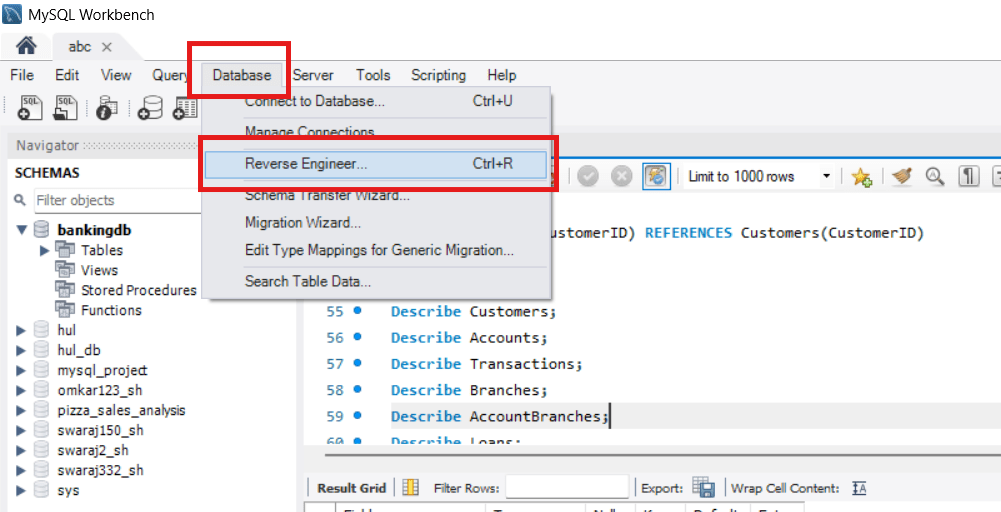
Lets make it in MySQL
Click on Database and then click Reverse Engineering
1
2
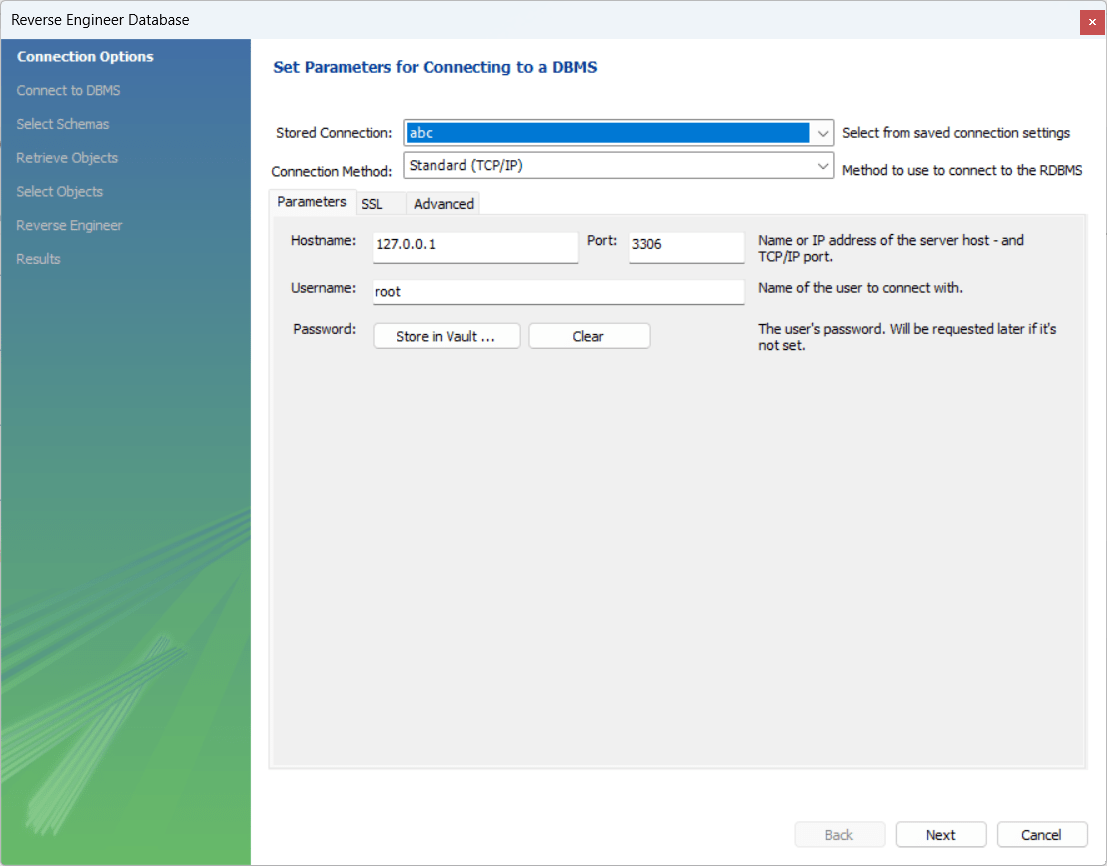
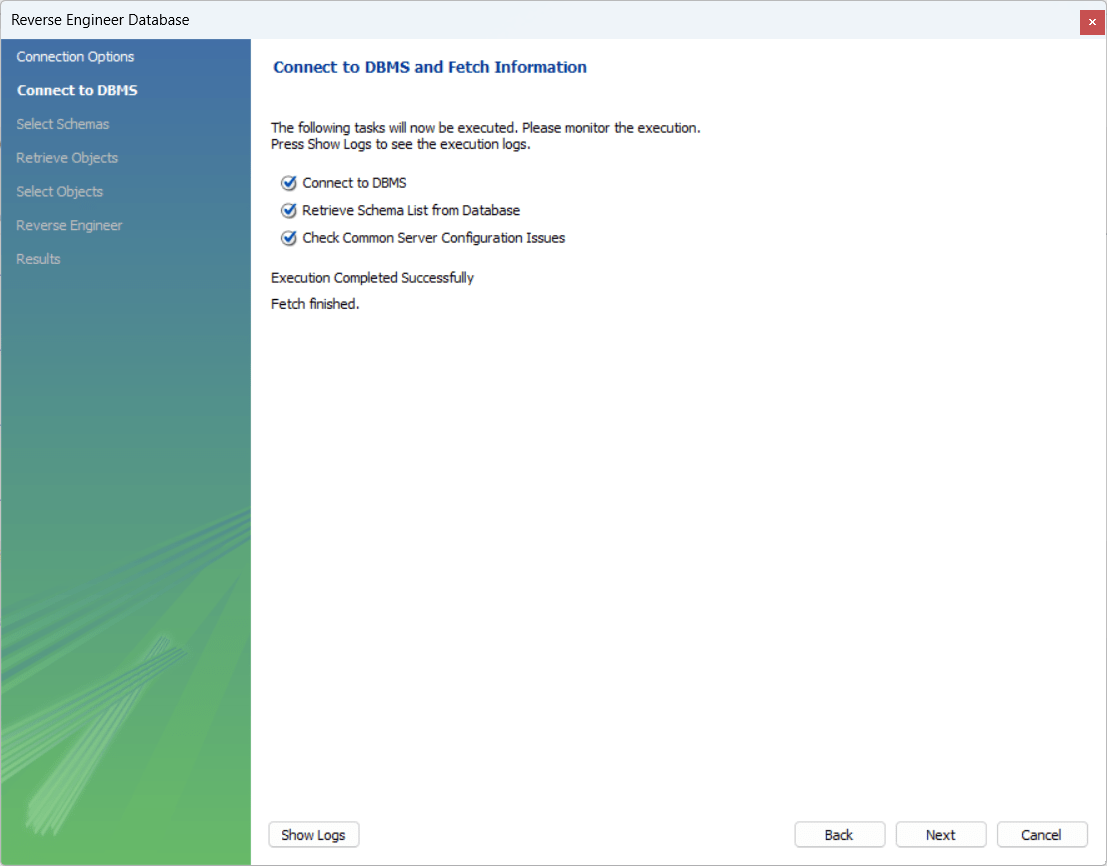
Select the Database connection and hit next
3
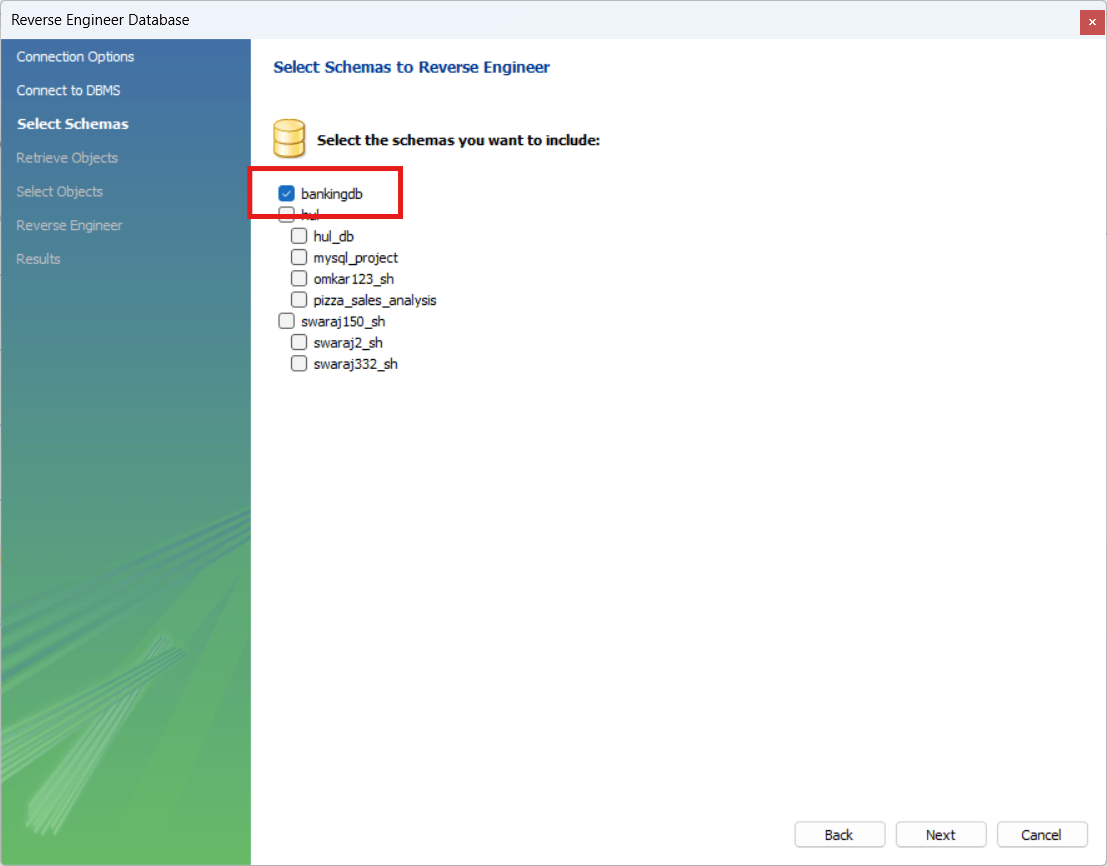
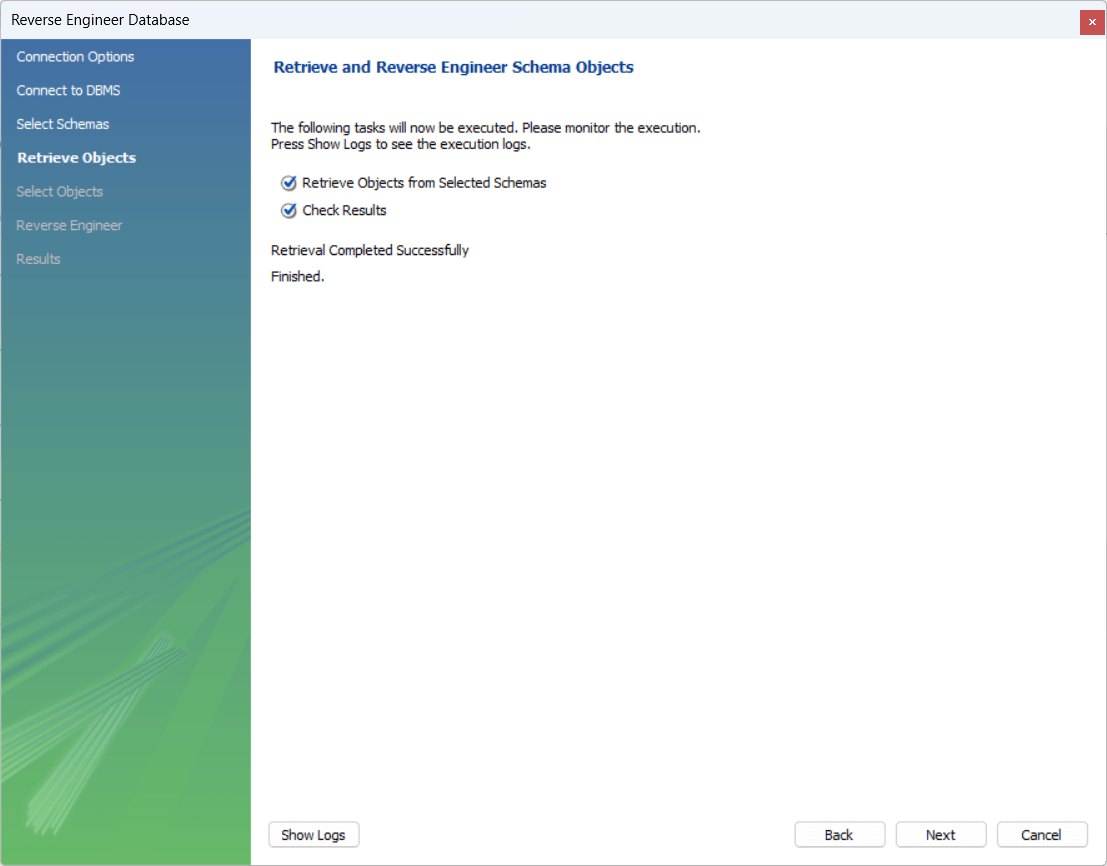
Select your Database (BankingDB) and hit next
4
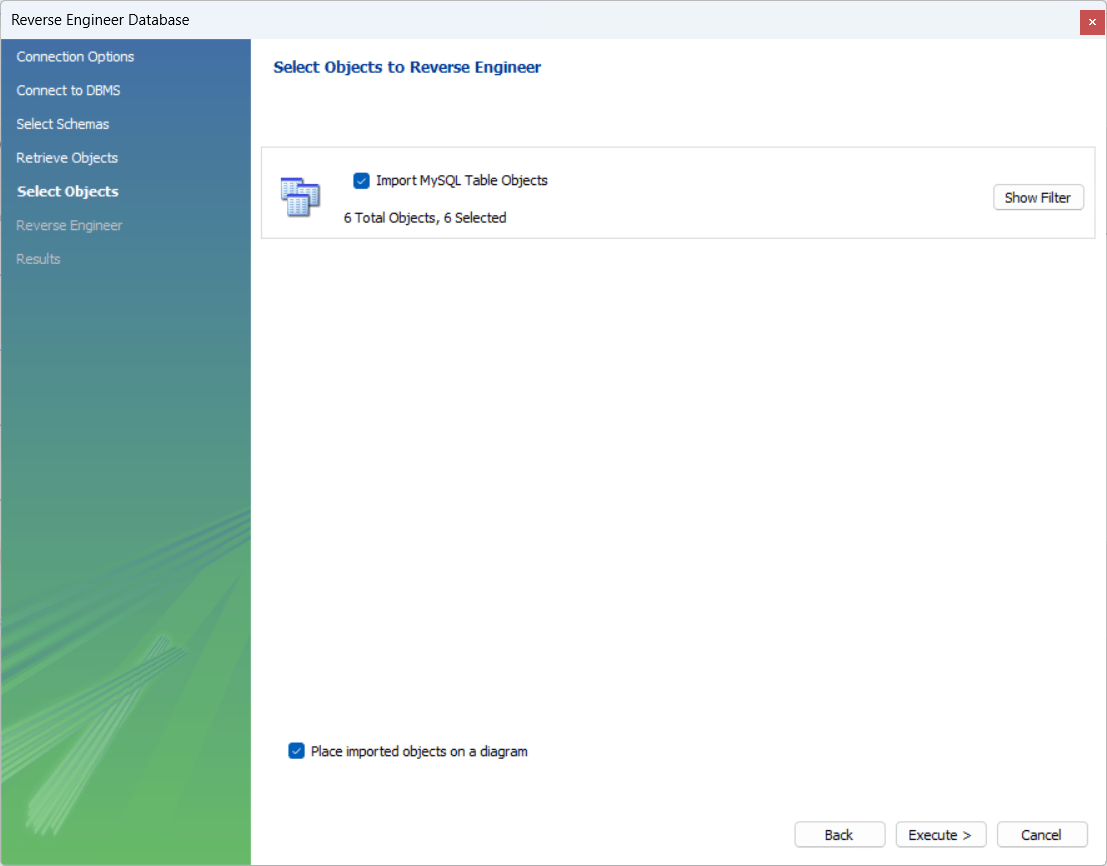
Select the object, hit next and then click finish
5
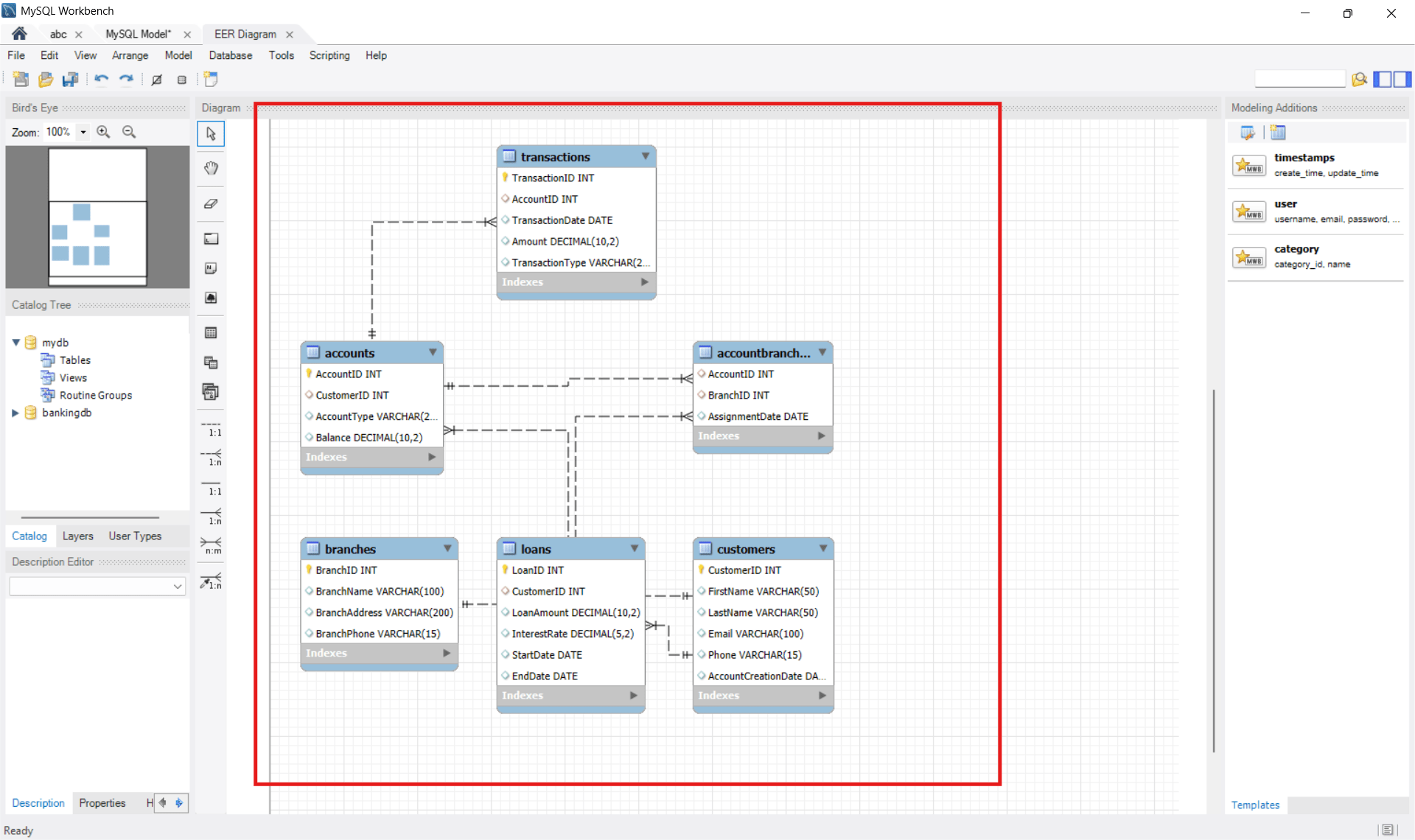
EER Diagram is generated
Explanation of Relationships
Customers → Accounts (One-to-Many)
One customer can have multiple bank accounts, such as savings or current accounts.
-
One customer → Many accounts
-
Each account belongs to one customer
This relationship is created using:
-
CustomerID as Primary Key in Customers table
-
CustomerID as Foreign Key in Accounts table
A
Accounts → Transactions (One-to-Many)
One bank account can have multiple transactions.
Examples
B
- Deposits
- Withdrawals
- Transfers
Each transaction is linked to only one account.
This relationship helps track account activity securely.
C
Customers → Loans (One-to-Many)
One customer can apply for multiple loans.
Examples:
-
Home Loan
-
Car Loan
-
Education Loan
Each loan belongs to one customer.
This helps banks manage loan records efficiently.
D
Accounts ↔ Branches (Many-to-Many)
Multiple accounts can be associated with multiple bank branches.
This relationship is managed using an intermediate table such as AccountBranches.
This structure helps support:
- Multi-branch banking
- Shared banking services
- Flexible account management
ERDs help developers:
- Understand the database structure clearly
- Identify relationships between tables
- Reduce data redundancy
- Maintain data integrity
- Design secure and efficient banking databases
This ERD helps developers understand the complete flow of banking data inside the system before implementing the database using SQL commands.
Task 4: Applying Normalization
Normalization helps organize data efficiently and reduces redundancy.
1
Types of Normalization:
First Normal Form (1NF)
-
Remove repeating groups
-
Store atomic values only
3
Third Normal Form (3NF)
-
Remove transitive dependency
2
Second Normal Form (2NF)
-
Remove partial dependency
Example:
Instead of storing customer details and transaction details in one table, separate tables are created:
- Customers
- Accounts
- Transactions
Normalization improves the database by:
- Improving data security
- Maintaining data consistency
- Reducing data redundancy
- Improving database performance
- Simplifying updates and maintenance
Normalization helps developers design a secure, organized, and efficient banking database system.
Task 5: Create Banking Tables using DDL Commands
Now let’s create banking tables to implement the secure banking data model.
Tables are used to store banking data in an organized form using rows and columns. Different tables are created to store customer details, account information, transactions, branches, and loans.
Each table is connected using Primary Keys and Foreign Keys to maintain relationships and enforce banking business rules.
Before creating tables, developers define:
- Columns and data types
- Primary Keys
- Foreign Keys
- Constraints for data integrity
The CREATE TABLE command is used to create tables inside the database.
These banking tables help:
- Organize data efficiently
- Reduce redundancy
- Maintain data security
- Improve database performance
In this task, we will create tables such as Customers, Accounts, Transactions, Branches, AccountBranches, and Loans.
CREATE TABLE Customers (
    CustomerID INT PRIMARY KEY,
    FirstName VARCHAR(50),
    LastName VARCHAR(50),
    Email VARCHAR(100),
    Phone VARCHAR(15),
    AccountCreationDate DATE
);
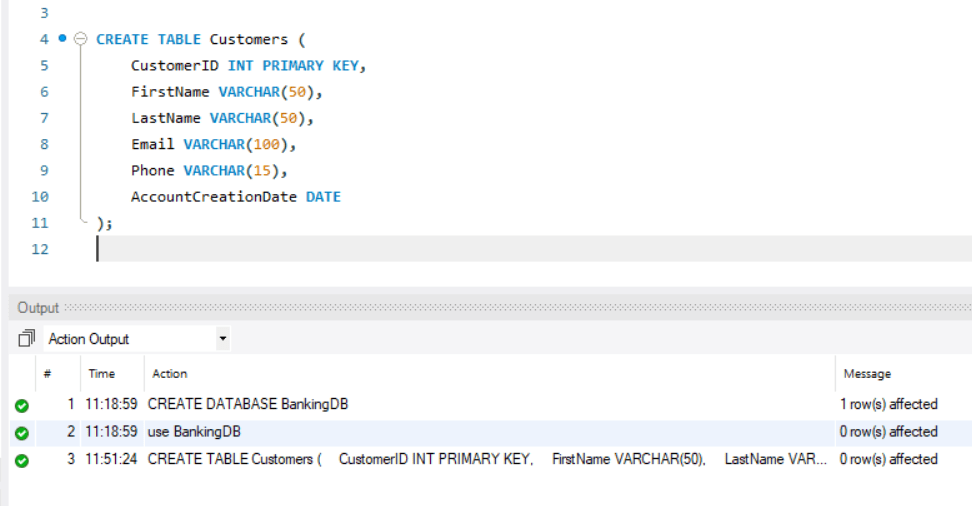
This table stores customer details.
Create Customers Table
1
CREATE TABLE Accounts (
    AccountID INT PRIMARY KEY,
    CustomerID INT,
    AccountType VARCHAR(20),
    Balance DECIMAL(10,2),
    FOREIGN KEY (CustomerID) REFERENCES Customers(CustomerID) );
Create Accounts Table
2
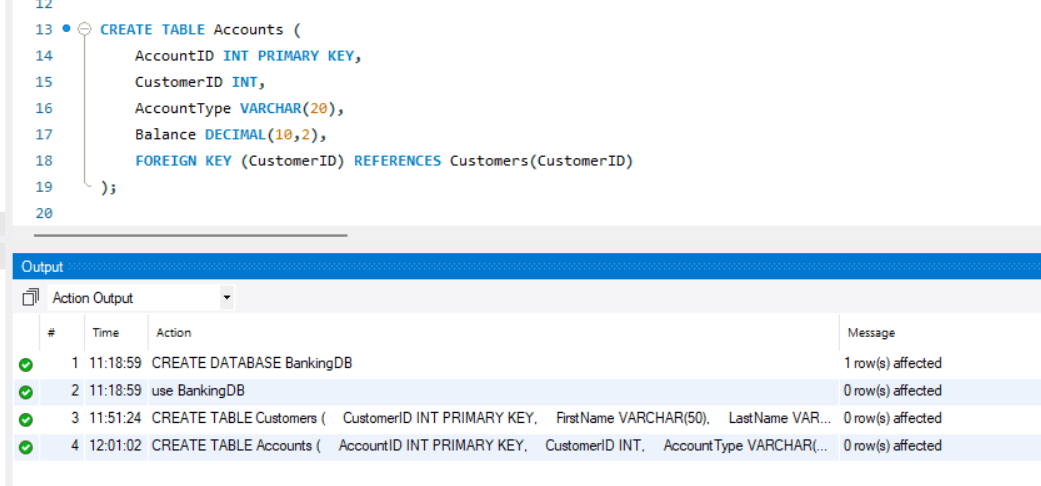
This table stores bank account information.
Create Transactions Table
3
CREATE TABLE Transactions (
    TransactionID INT PRIMARY KEY,
    AccountID INT,
    TransactionDate DATE,
    Amount DECIMAL(10,2),
    TransactionType VARCHAR(20),
    FOREIGN KEY (AccountID) REFERENCES Accounts(AccountID) );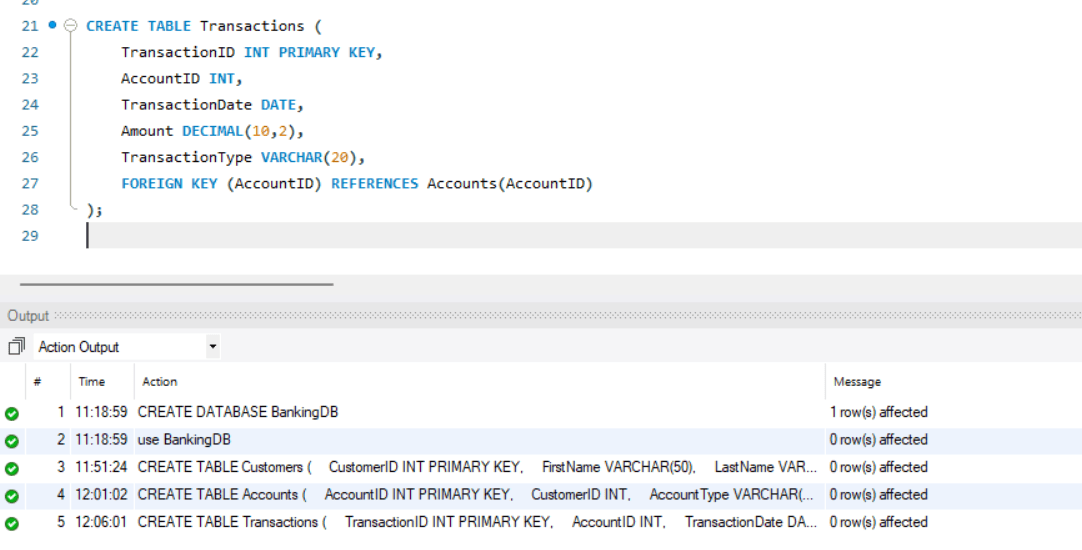
This table stores transaction details.
Create Branches Table
4
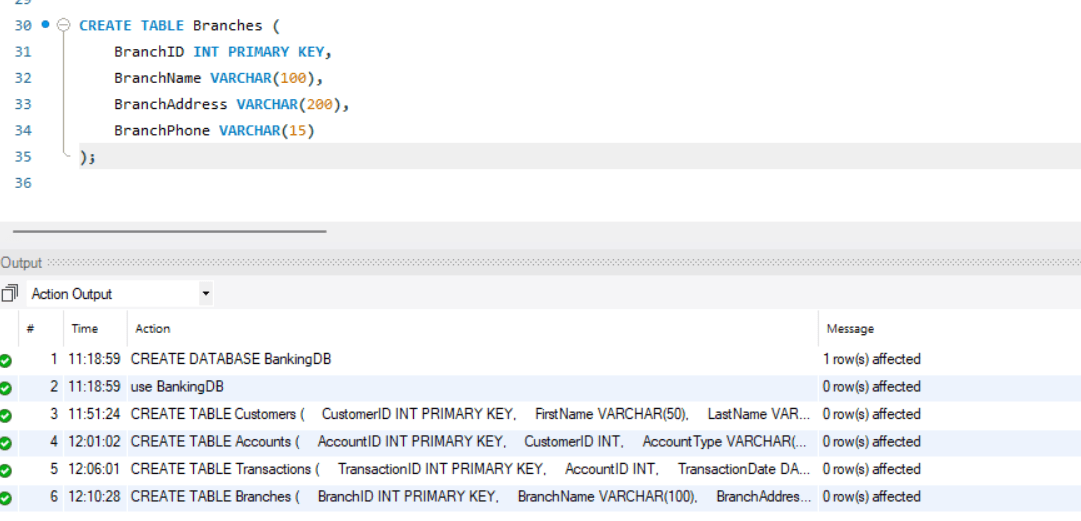
CREATE TABLE Branches (
	BranchID INT PRIMARY KEY,
    BranchName VARCHAR(100),
    BranchAddress VARCHAR(200),
    BranchPhone VARCHAR(15)
);
Create AccountBranches Table
5
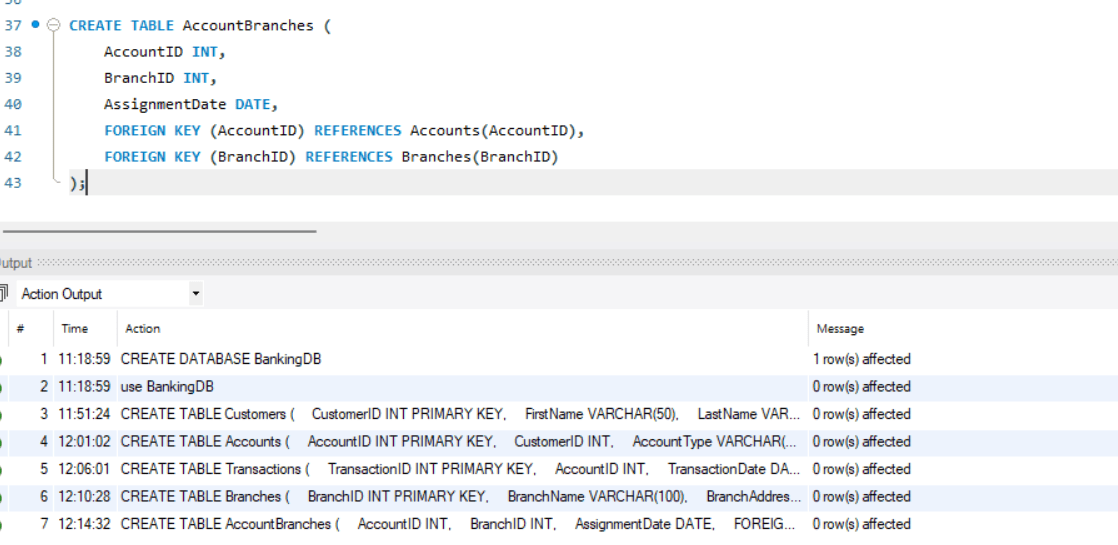
CREATE TABLE AccountBranches (
    AccountID INT,
    BranchID INT,
    AssignmentDate DATE,
    FOREIGN KEY (AccountID) REFERENCES Accounts(AccountID),
    FOREIGN KEY (BranchID) REFERENCES Branches(BranchID)
);
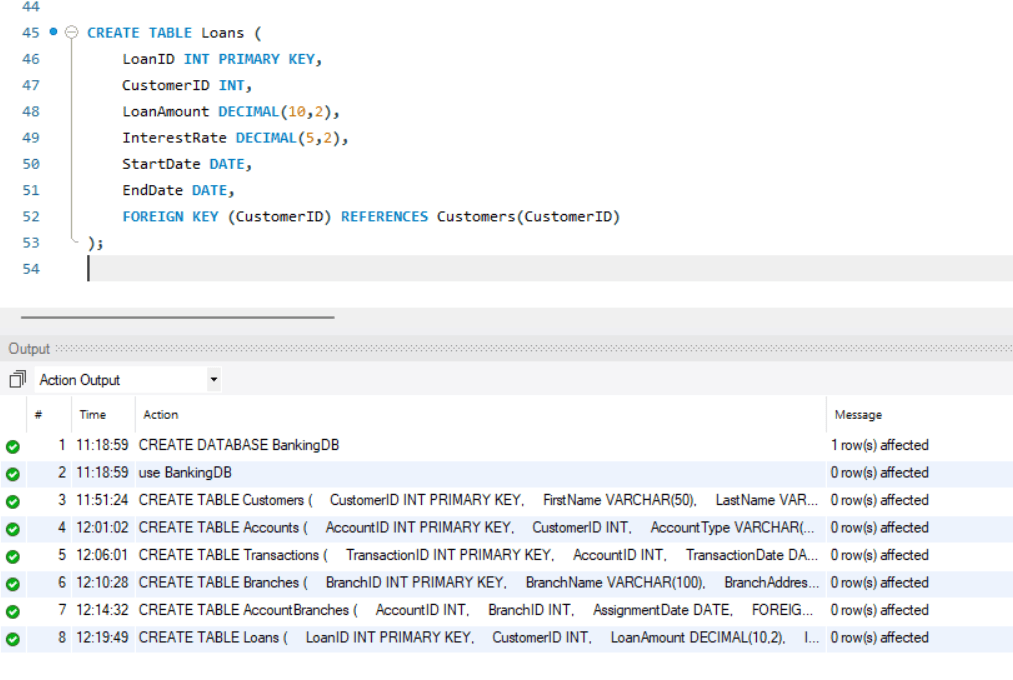
Create Loans Table
6
CREATE TABLE Loans (
    LoanID INT PRIMARY KEY,
    CustomerID INT,
    LoanAmount DECIMAL(10,2),
    InterestRate DECIMAL(5,2),
    StartDate DATE,
    EndDate DATE,
    FOREIGN KEY (CustomerID) REFERENCES Customers(CustomerID)
);
Task 2: Modify Table Structure using ALTER
After creating tables, sometimes developers need to change the structure of existing tables according to new business requirements.
The ALTER command is used to modify an existing table without deleting the table or losing the stored data.
Using ALTER, developers can:
- Add new columns
- Modify existing columns
- Rename columns
- Add constraints
- Remove constraints
This helps keep the banking database flexible and updated as business needs change.
1
Add New Column
Sometimes additional information needs to be stored in a table.
Example:
Adding DateOfBirth column to the Customers table.
ALTER TABLE Customers
ADD DateOfBirth DATE;
This command adds a new column named DateOfBirth to store customer birth dates.
2
Modify Existing Column
The ALTER command can also change the data type or size of an existing column.
Example:
Increasing the size of the Phone column.
ALTER TABLE Customers
MODIFY Phone VARCHAR(20);
This allows larger phone numbers or country codes to be stored.
3
Add Constraint
Constraints can also be added using ALTER to enforce business rules.
Example:
Adding a minimum balance rule to the Accounts table.
ALTER TABLE Accounts
ADD CONSTRAINT chk_MinBalance
CHECK (Balance >= 1000);
This ensures that account balances cannot go below the minimum required amount.
The ALTER command allows developers to update and enhance the banking database structure efficiently while maintaining existing data and supporting changing business requirements.
Task 7: Delete Tables using DROP
The DROP command is used to permanently remove database objects such as tables or databases from the SQL system.
When a table is no longer required or was created incorrectly, developers can use the DROP command to delete it completely from the database. Once a table is dropped, all its data, structure, relationships, indexes, and constraints are also removed permanently.
The DROP command is a DDL (Data Definition Language) command and should be used carefully because the deleted data cannot be recovered easily.
Developers commonly use DROP to:
- Remove unnecessary tables
- Delete old or temporary database structures
- Recreate tables with updated designs
- Clean unwanted database objects
The following command deletes the AccountBranches table from the database:
DROP TABLE AccountBranches;After execution:
- The table structure is removed
- All records inside the table are deleted
- Related constraints are removed
| Col 1 | Col 2 | Col 3 |
|---|---|---|
| Row 1 | ||
| Row 2 | ||
| Row 3 |
Formula
Profit = Revenue - Cost
Task 2: Create WireFrame
Now that you understand the requirements, don’t jump into coding yet. Before development, we always visualize the layout.
Now lets create a simple wireframe for the homepage.
A wireframe is like a layout plan of a house. Before building, you decide where rooms, doors, and windows will be placed.Similarly, a wireframe helps you plan where elements like headers, images, and buttons will appear on a webpage—before adding design or colours.
Task 3: Code Editor Installation
Good work on completing the planning phase.
Now we will start development. Before that, make sure your system is ready with the required tools.
In this step we will install the VS code editor that will help to Write code efficiently,Organize files , Run and test your application
Go to the visual studio code official website
1
Click to download Homepage Wireframe : Homepage Wireframe
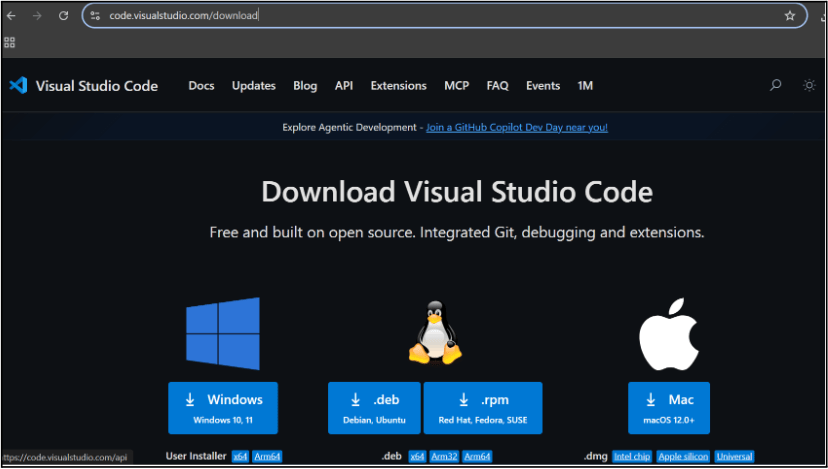
Choose your operating system(windows / Mac) and download the installation file.
Double click on the download app and Accept the agreement and click next
2
It is a long established fact that a reader will be distracted
b
Sub Steps
a
Double click on the download app and Accept the agreement and click next
public class MathSample {
    public static void main(String[] args) {
        int x = 10;
        int y = 20;
        int sum = x + y;

        System.out.println("The sum is: " + sum);
    }
}
public class MathSample {
public static void main(String[] args) {
int x = 10;
int y = 20;
int sum = x + y;
System.out.println("The sum is: " + sum);
}
}
public class MathSample {
public static void main(String[] args) {
int x = 10;
int y = 20;
int sum = x + y;
System.out.println("The sum is: " + sum);
}
}
Great job!
You have successfully completed your first lab on BiteBox Project Onboarding.
In this lab, you have: Understood the BRD, Created a wireframe, Set up your development environment, Organised your project structure, Run your first program
You are now ready to move to the next stage of development
Checkpoint
Next-Lab Preparation
Git Push
git push origin branchNameTopic : Working with a Text and Listin HTML
1) Power of HTML text tags
2) Customizing your style with CSS
3) Listing it right using HTML
4) HTML Link up , attributes of tag, block vs inline elements
Text box Width : 887
Business Scenario, Pre-lab Preparation, Next-lab Preparation, Task, Activity, Checkpoint : 90%.
Steps : 1,2,3 [Sub Steps - a,b,c]
Normal Text, Topic Name : 80%
Subtopic : 70%
Code Box font Size : 16px