
Content ITV PRO
This is Itvedant Content department
FinCheck Advanced SQL for Financial Data Testing
Business Scenario
Welcome!
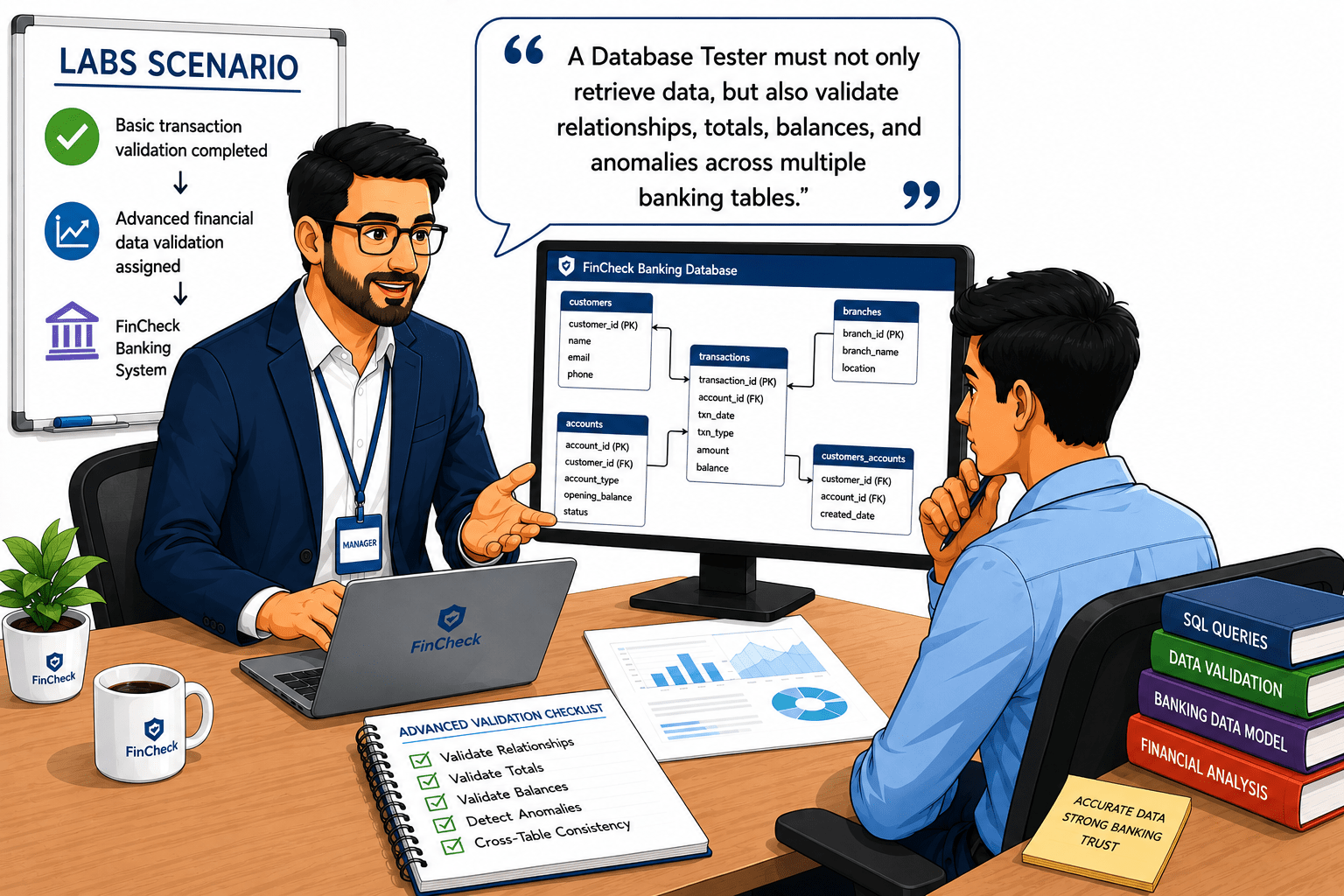
After successfully validating basic banking transactions using SQL queries, your manager now assigns you advanced financial data validation activities in the FinCheck banking system.
Recently, the bank identified multiple financial inconsistencies
Pre-Lab Preparation
Like incorrect account balances, duplicate customer accounts, mismatched transaction totals, missing customer mappings, and suspicious transaction patterns.
The manager says: A Database Tester must not only retrieve data but also validate relationships, totals, balances, and anomalies across multiple banking tables.
Topic: SQL for Testers
1)Database Basics, DDL/DML Commands
2)Joins, Aggregates, and Data Validation with SQL
git pull origin branchNameGit Pull
Task 1: Perform Table Relationship Validation Using JOIN Operations
Verify Database Availability
1
1
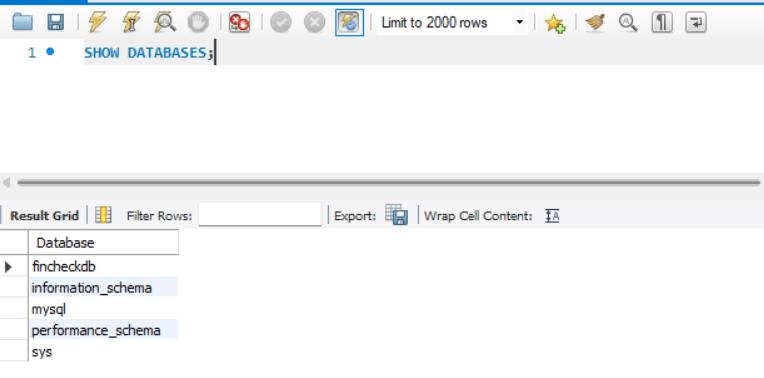
What is SHOW DATABASES?
THE SHOW DATABASES command is used to display all available databases inside the MySQL server.
Database Testers use this command to identify available banking databases before query execution.
Types of Database Verification Commands
SHOW DATABASES - Used to display all available databases present in the MySQL server.
How it Works
When the tester executes the SHOW DATABASES command:-
MySQL server checks all available databases
Database names are collected
The result is displayed to the tester
Real Life Example
Before validating banking transactions, the tester first checks whether the FinCheck banking database is available on the server.
Practical Activity
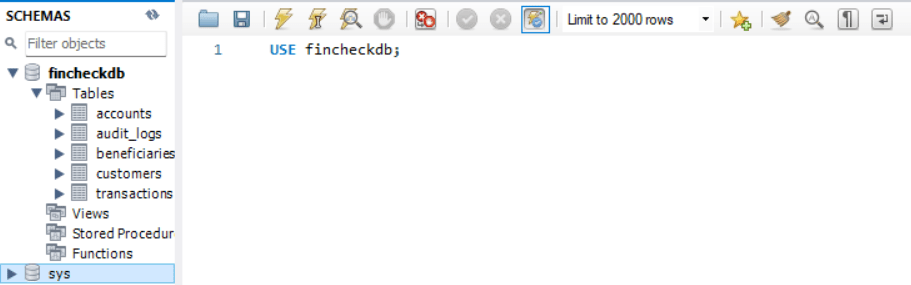
Show all Databases
Use Specific Databases
What is SHOW TABLES?
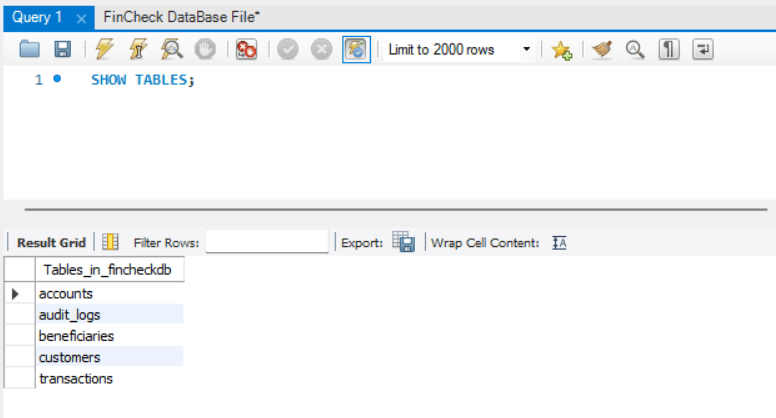
The SHOW TABLES command displays all tables in the selected database.
Database testers use this command to verify required banking tables before validation activities.
Verify Tables inside Database
1
2
Types of Table Verification Commands
SHOW TABLES - Used to retrieve all available tables from the selected database.
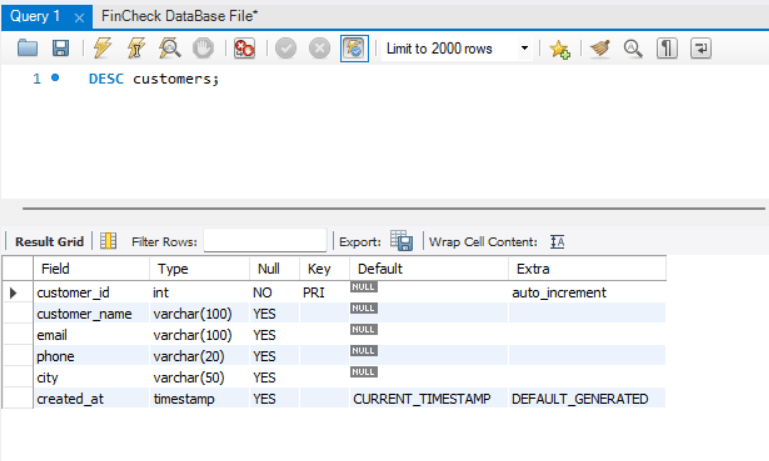
DESCRIBE TABLE - Used to verify table structure and available columns.\
How it Works
When the tester executes the SHOW TABLES command:-
MySQL checks the currently selected database
Available tables are identified
Table names are displayed as a result
Real Life Example
Before validating customer transactions, the tester verifies that the required tables, such as transactions, customers, and accounts, are present in the FinCheck database.
Practical Activity
Show tables
Desc tables for column name and field type.
Understand SELECT Statement
1
3
What is a SELECT Statement?
The SELECT statement is used to retrieve data from database tables.
It helps Database Testers view transaction records, validate stored data, investigate banking issues, and analyse transaction history.
In the FinCheck banking system, testers use SELECT queries daily to verify financial records.
Types of SELECT Queries
Basic SELECT
Column-Based SELECT
Conditional SELECT
How it Works
When the tester executes a SELECT query:-
The database reads the requested table
Matching records are identified
Records are displayed as a result set
Real Life Example
A customer reports:
“I did not receive salary credit.”
The tester checks the transaction table to verify whether the transaction exists in the database.
Database Representation
| Txn_Id | Acount_No | Txn_Type | Amount | Balance_after_txn | txn_timestamp |
|---|---|---|---|---|---|
| TXN1001 | 101001 | Debit | 1000 | 9000 | 2026-05-06 10:30:00 |
| TXN1002 | 101001 | Credit | 5000 | 14000 | 2026-05-06 11:00:00 |
| TXN1003 | 101002 | Debit | 500 | 5500 | 2026-05-06 11:30:00 |
Practical Activity During the Section performed by the Trainer
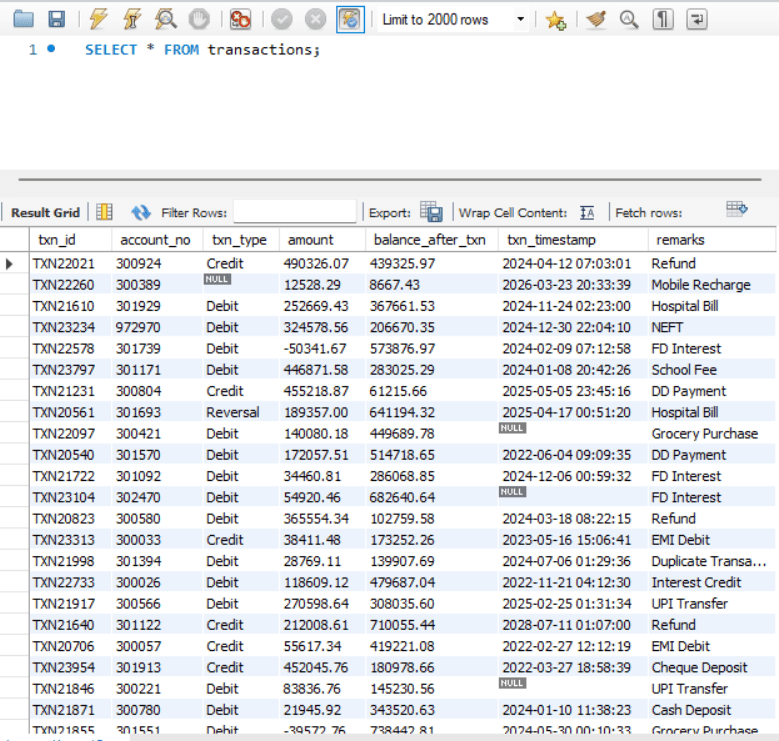
1. Retrieve All Transaction Records
Query:-
SELECT * FROM transactions;
Output:-
Understand WHERE Clause
1
1
Practical Activity Performed by the Student
Retrieve Specific Columns of txn_id , account_no , txn_type , amount and txn_timestamp
Retrieve 3 columns of data only from the customers table, which include customer_name, phone, and city
Retrieve all Account Records from the Accounts tables
Retrieve all column Data from the transaction tables
Task 2: Understand DATABASE , TABLE , SELECT Query
What is a WHERE Clause?
WHERE clause is used to filter records based on specific conditions.
Database Testers use the WHERE clause to identify invalid records, filter customer transactions, investigate banking defects, and validate financial data.
Types of WHERE Conditions
How it Works
The database scans the table and returns only rows that match the specified condition.
Real Life Example
Customer Rahul reports:
“I only want to see my debit transactions.”
Tester filters transaction records for Rahul’s account.
Database Representation
| Txn_Id | Acount_No | Txn_Type | Amount | Balance_after_txn | txn_timestamp |
|---|---|---|---|---|---|
| TXN1001 | 101001 | Debit | 1000 | 9000 | 2026-05-06 10:30:00 |
| TXN1002 | 101001 | Credit | 5000 | 14000 | 2026-05-06 11:00:00 |
| TXN1003 | 101002 | Debit | 500 | 5500 | 2026-05-06 11:30:00 |
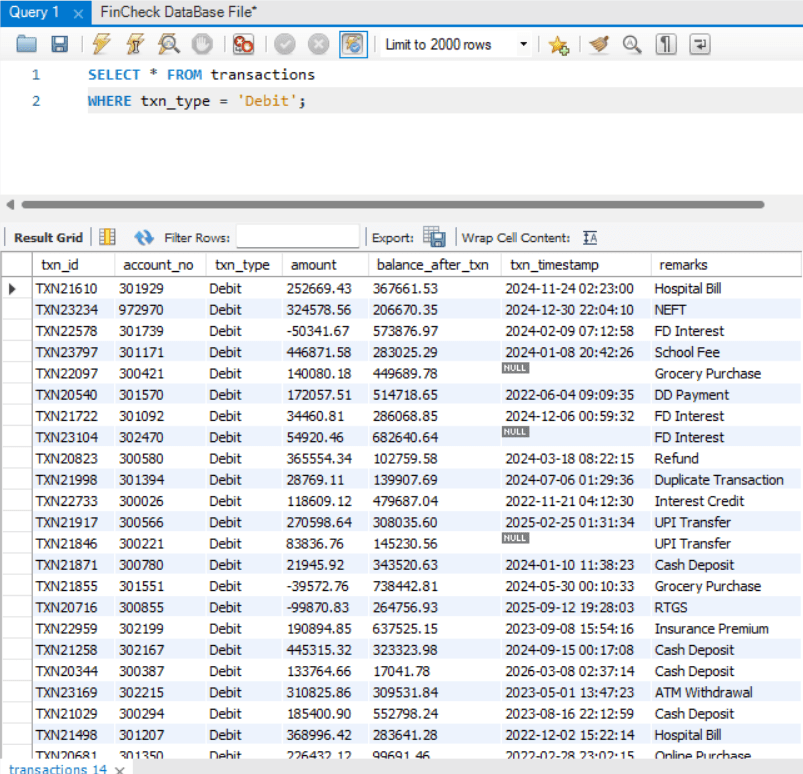
Practical Activity performed by Trainer
1. Find Debit Transaction
Query:-
SELECT * FROM transactions WHERE txn_type = ‘Debit’;
Output:-
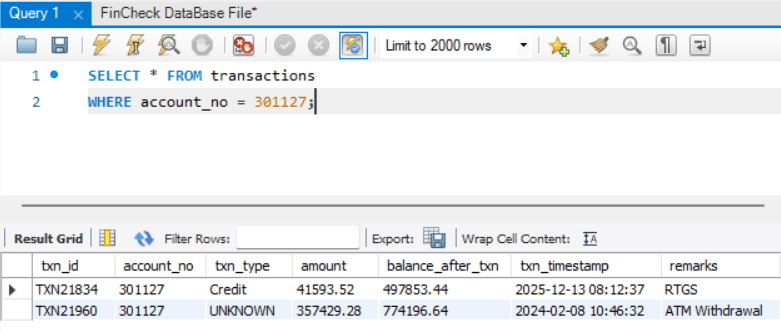
1. Find Transaction for Specific Account
Query:-
SELECT * FROM transactions WHERE account_no = 301127;
Output:-
Practical Activity Performed by the Student
1. Display all records from the customers table where the city is Bangalore using the WHERE clause.
2. Display all records from the transactions table where account_no is 302220, and amount is less than 0, using the WHERE clause.
Task 3: Understand ORDER BY Clause
What is ORDER BY?
ORDER BY is used to sort database records in ascending or descending order.
In banking systems, transaction sequence is very important because balance calculations depend on order: the latest transactions must appear first, and audit investigations depend on proper sequence.
Types of ORDER BY
ASC - Ascending order.
Understand ORDER BY
1
1
DESC - Descending order.
How it Works
The database sorts records based on selected column values.
Common sorting fields include amount, txn_timestamp, and txn_id.
Real Life Example
Customer wants:- “Show latest transactions first.”
The tester sorts the transaction history using the timestamp.
Database Representation
| Txn_Id | Acount_No | Txn_Type | Amount | Balance_after_txn | txn_timestamp |
|---|---|---|---|---|---|
| TXN1001 | 101001 | Debit | 1000 | 9000 | 2026-05-06 10:30:00 |
| TXN1002 | 101001 | Credit | 5000 | 14000 | 2026-05-06 11:00:00 |
| TXN1003 | 101002 | Debit | 500 | 5500 | 2026-05-06 11:30:00 |
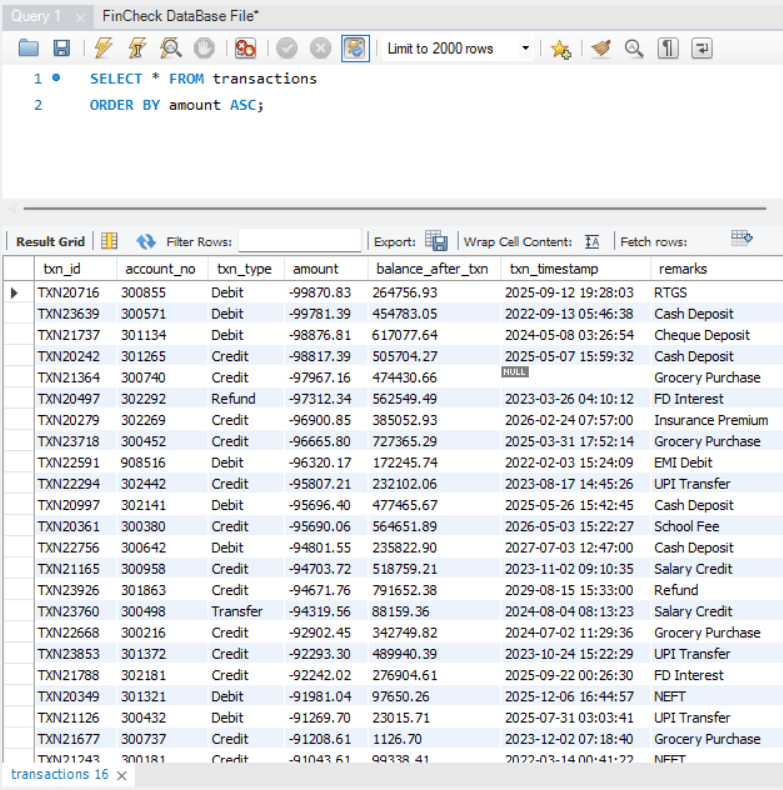
Practical Activity During the Section performed by the Trainer
1.Sort Transactions by Amount in ASC
Query:-
SELECT * FROM transactions ORDER BY amount ASC;
Output:-
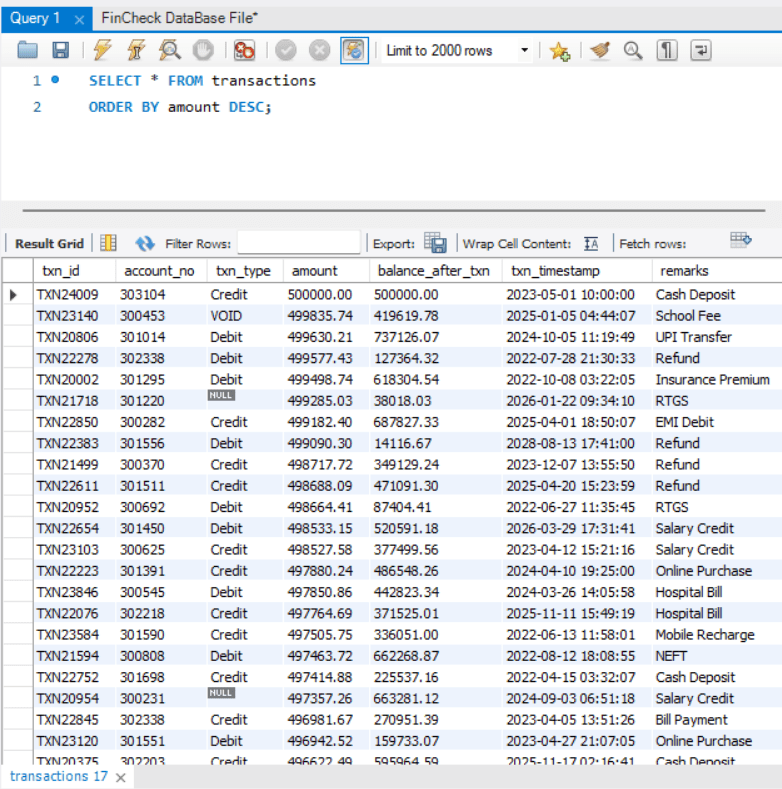
2. Sort Transactions by Amount in DESC
Query:-
SELECT * FROM transactions ORDER BY account_no DESC;
Output:-
Practical Activity Performed by the Student
1. Display all records from the transactions table and sort transaction data using the txn_timestamp column in ascending order using the ORDER BY clause.
2. Display all records from customers table and sort customer data using customer_name column in descending order using ORDER BY clause.
3. Display all records from the beneficiaries table and sort data using the account_no column in descending order and the beneficiary_name column in ascending order using the ORDER BY clause.
Task 4: Validate Transaction Record
Validate Banking Transactions
1
1
What is Transaction Validation?
Transaction validation means checking whether banking records are accurate, complete, logically correct, and compliant with banking rules.
Types of Transaction Validation
Transaction Type Validation: Verify Debit/Credit values.
Timestamp Validation: Verify transaction time.
How it Works
Tester executes SQL queries to identify invalid records and compare transaction data with expected business rules.
Real Life Example
Customer complains:-
“Money was deducted twice from my account.”
The tester validates the transaction table to identify duplicate debit entries.
Database Representation
Transaction Type Validation: Verify Debit/Credit values.
Timestamp Validation: Verify transaction time.
How it Works
Tester executes SQL queries to identify invalid records and compare transaction data with expected business rules.
Real Life Example
Customer complains:-
“Money was deducted twice from my account.”
The tester validates the transaction table to identify duplicate debit entries.
Database Representation
Practical Activity During the Section performed by the Trainer
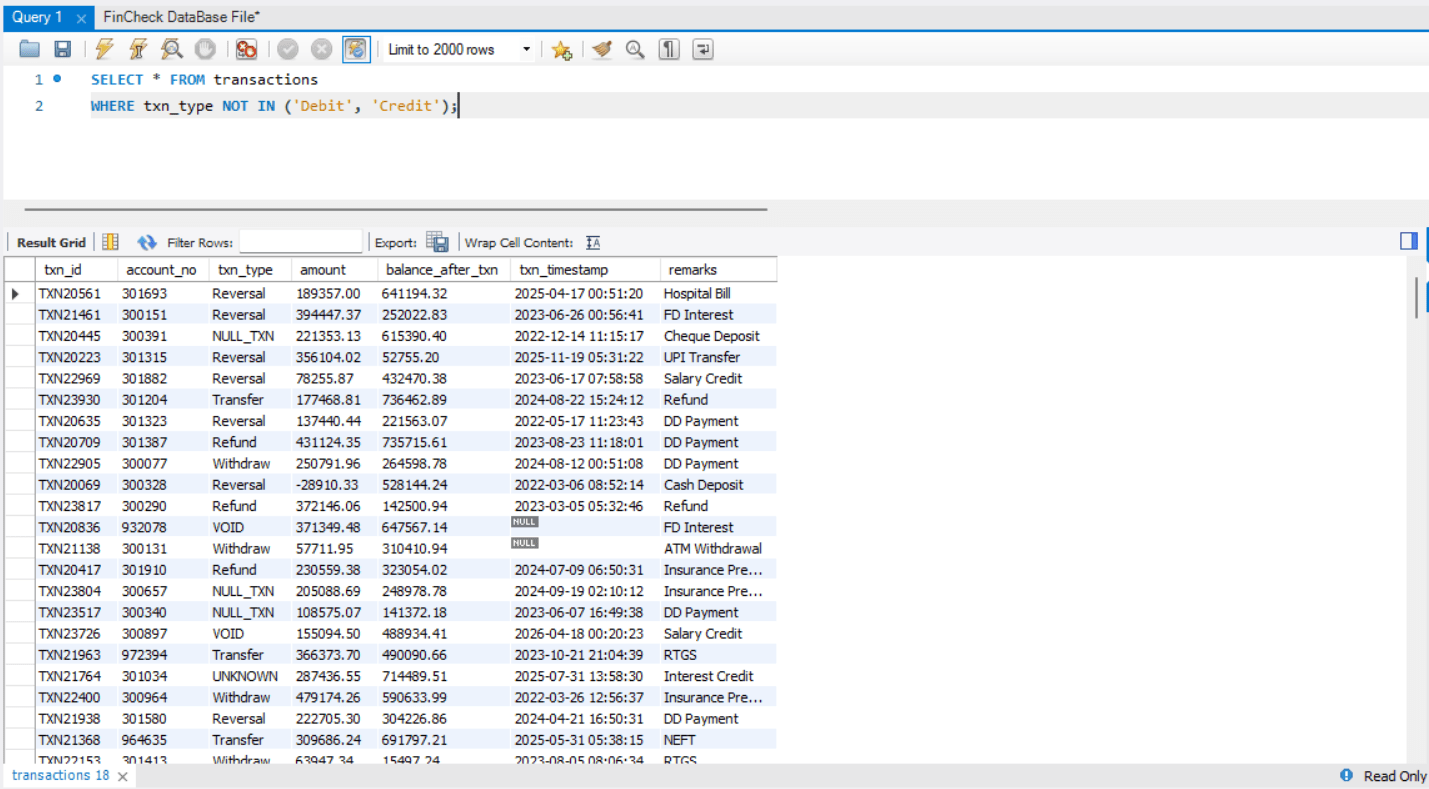
1. Find Invalid Transaction Types
Query:-
SELECT * FROM transactions WHERE txn_type NOT IN ('Debit', 'Credit');
Output:-
| Txn_Id | Acount_No | Txn_Type | Amount | Balance_after_txn | txn_timestamp |
|---|---|---|---|---|---|
| TXN1001 | 101001 | Debit | 1000 | 1000 | 2026-05-06 10:30:00 |
| TXN1002 | 101001 | Debit | 1000 | 1000 | 2026-05-06 10:30:05 |
| TXN1003 | 101003 | Withdraw | 2000 | 2000 | Null |
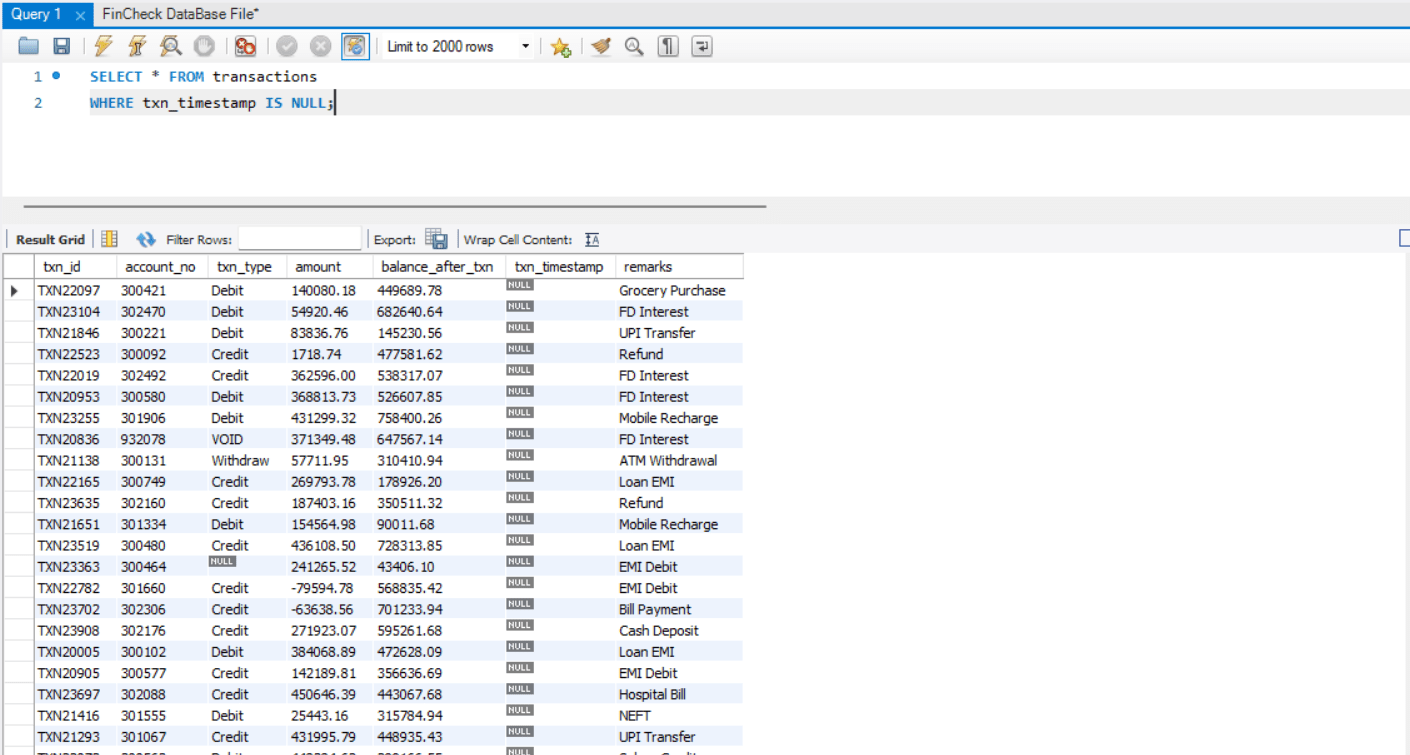
2. Find NULL Timestamps
Query:-
SELECT * FROM transactions WHERE txn_timestamp IS NULL;
Practical Activity Performed by the Student
1. Display all records from the transactions table where txn_type contains NULL values using the WHERE clause and the IS NULL condition
2. Display all records from the transactions table where txn_type contains unknown values other than Debit and Credit using the WHERE clause and NOT IN condition.
Great job!
You have successfully completed the FinCheck SQL Basics for Transaction Validation session.
Learned how to write SELECT queries, apply WHERE conditions, use ORDER BY, and validate banking transaction records for accurate data analysis and testing.
Checkpoint
Next-Lab Preparation
Git Push
git push origin branchNameTopic: SQL for Testers
1)Database Basics, DDL/DML Commands
2)Joins, Aggregates, and Data Validation with SQL
By Content ITV