

















Content ITV PRO
This is Itvedant Content department
Learning Outcome
5
The importance of IP addressing in networks
4
How errors can be identified using layers
3
The role of each layer in communication
2
Why networking is divided into 7 layers
1
How data travels from one device to another step-by-step
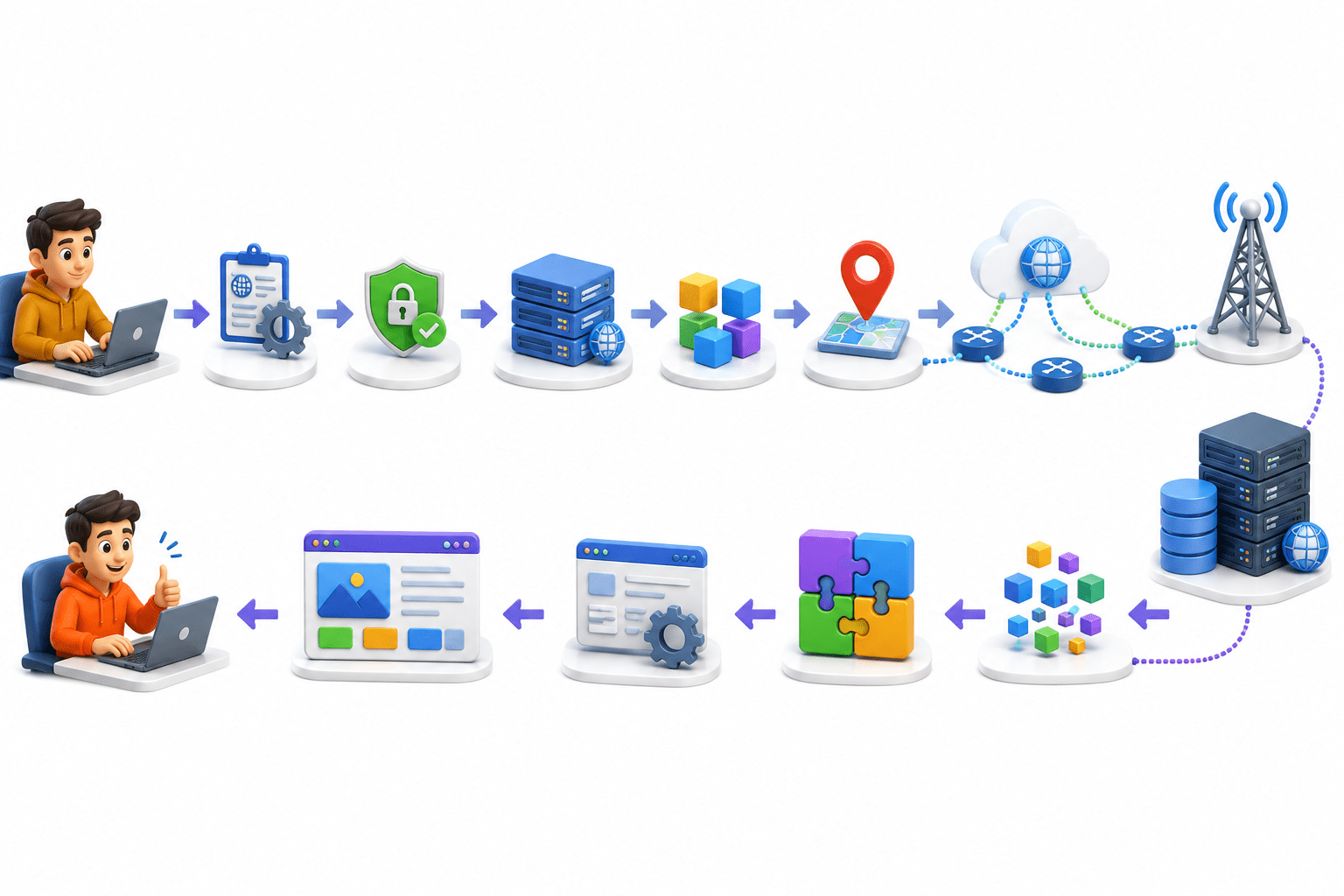
“Ever wondered what happens in a few seconds when you open a website?”
Your request is prepared for the system
It is secured for safe transfer
The connection with the website is managed
Data is split into smaller parts
An address is added for delivery
The best internet path is selected
It travels through Wi-Fi or cables
All parts are collected
Combined back together
Processed by the website
Finally displayed as a webpage
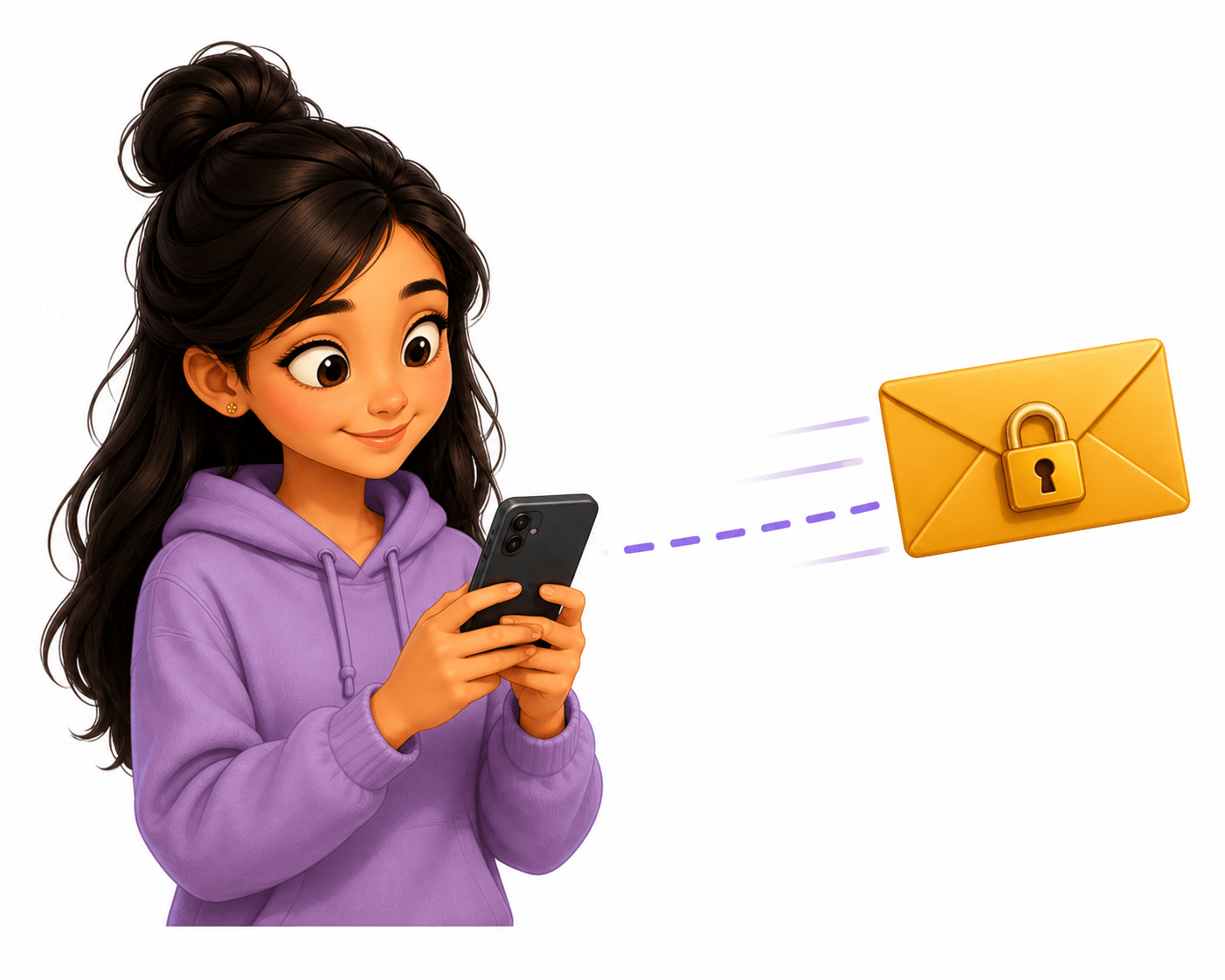
Suppose you are sending a message to friend
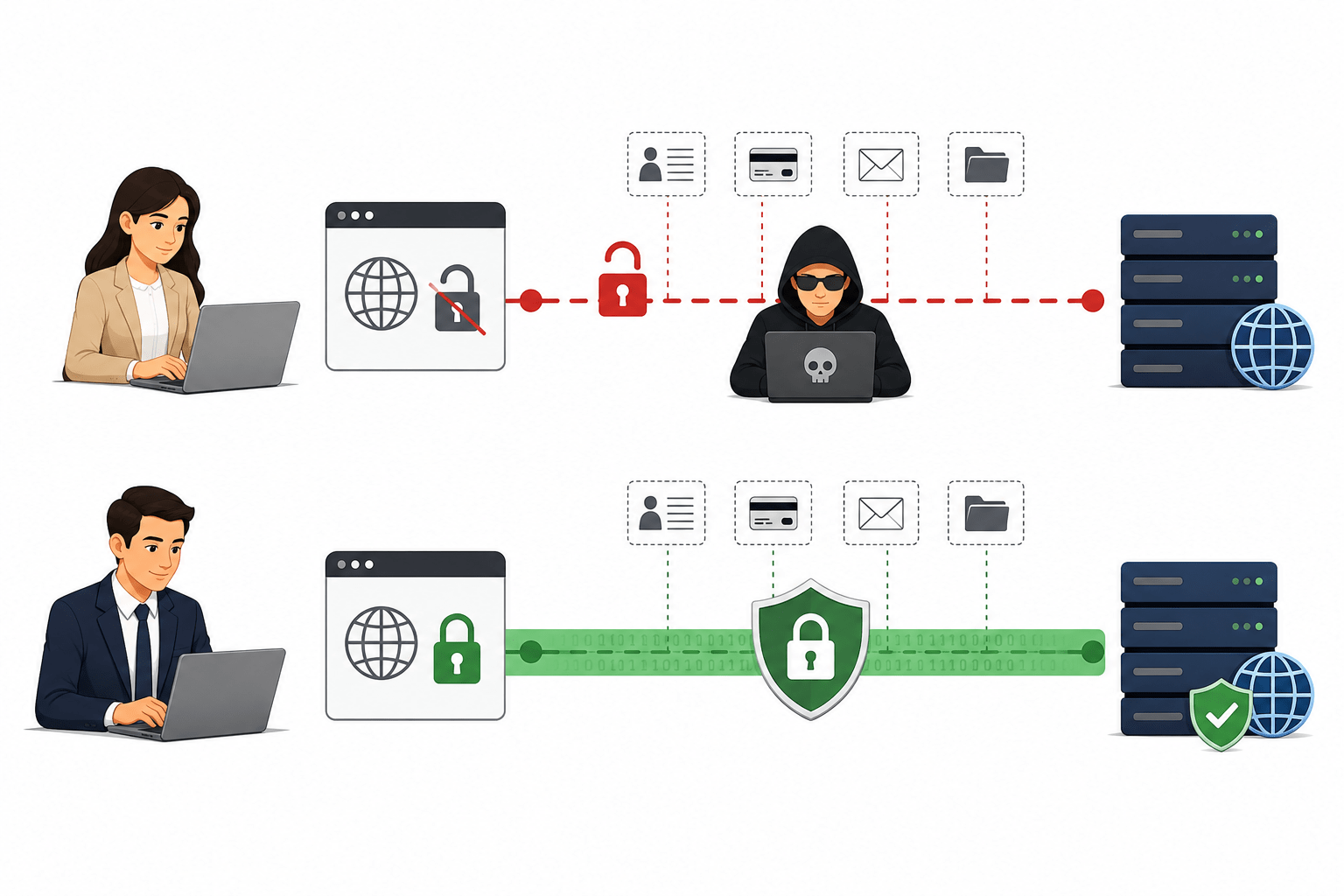
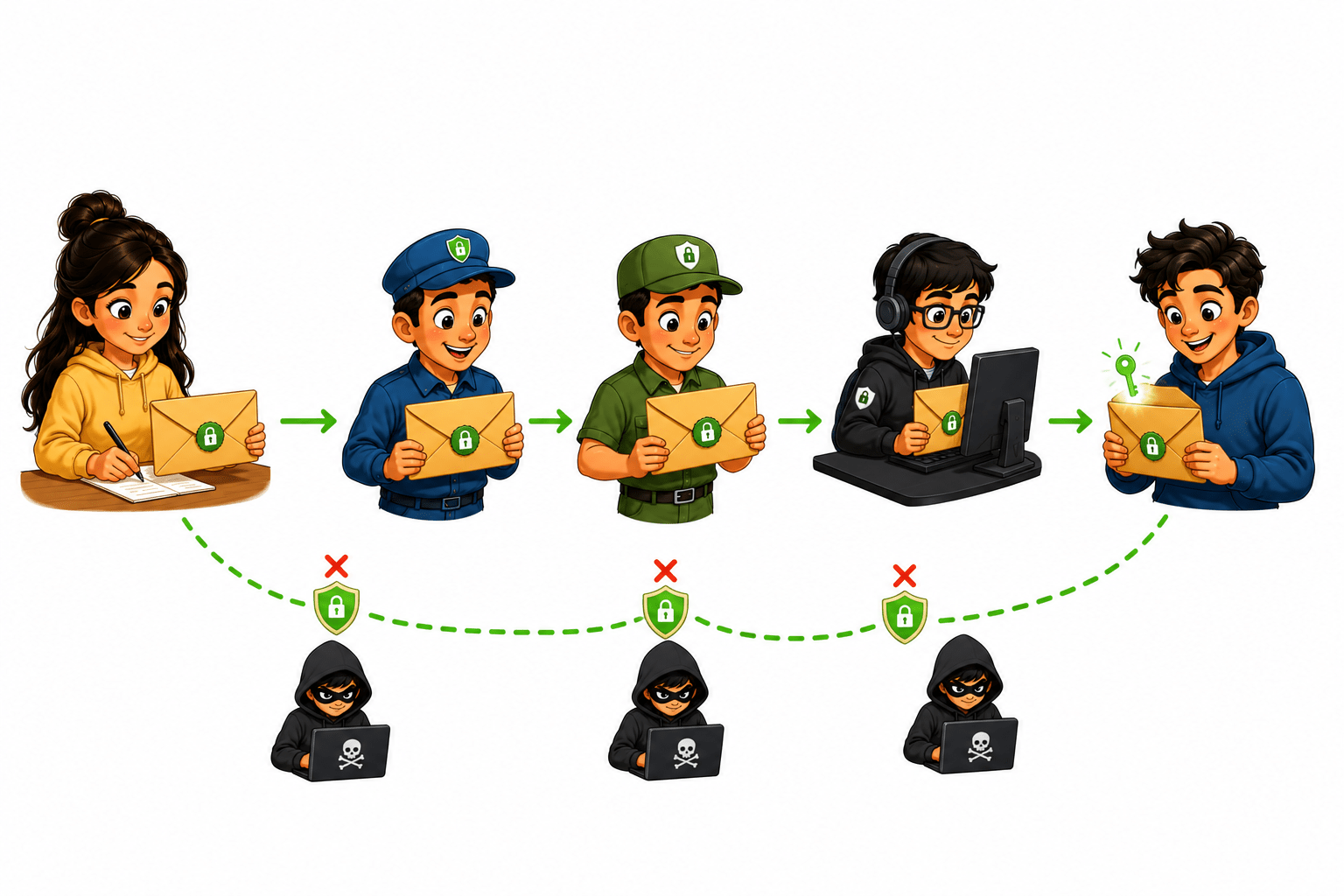
Scene 2: Using HTTPS (Secure)
Riya sends a message in a locked envelope
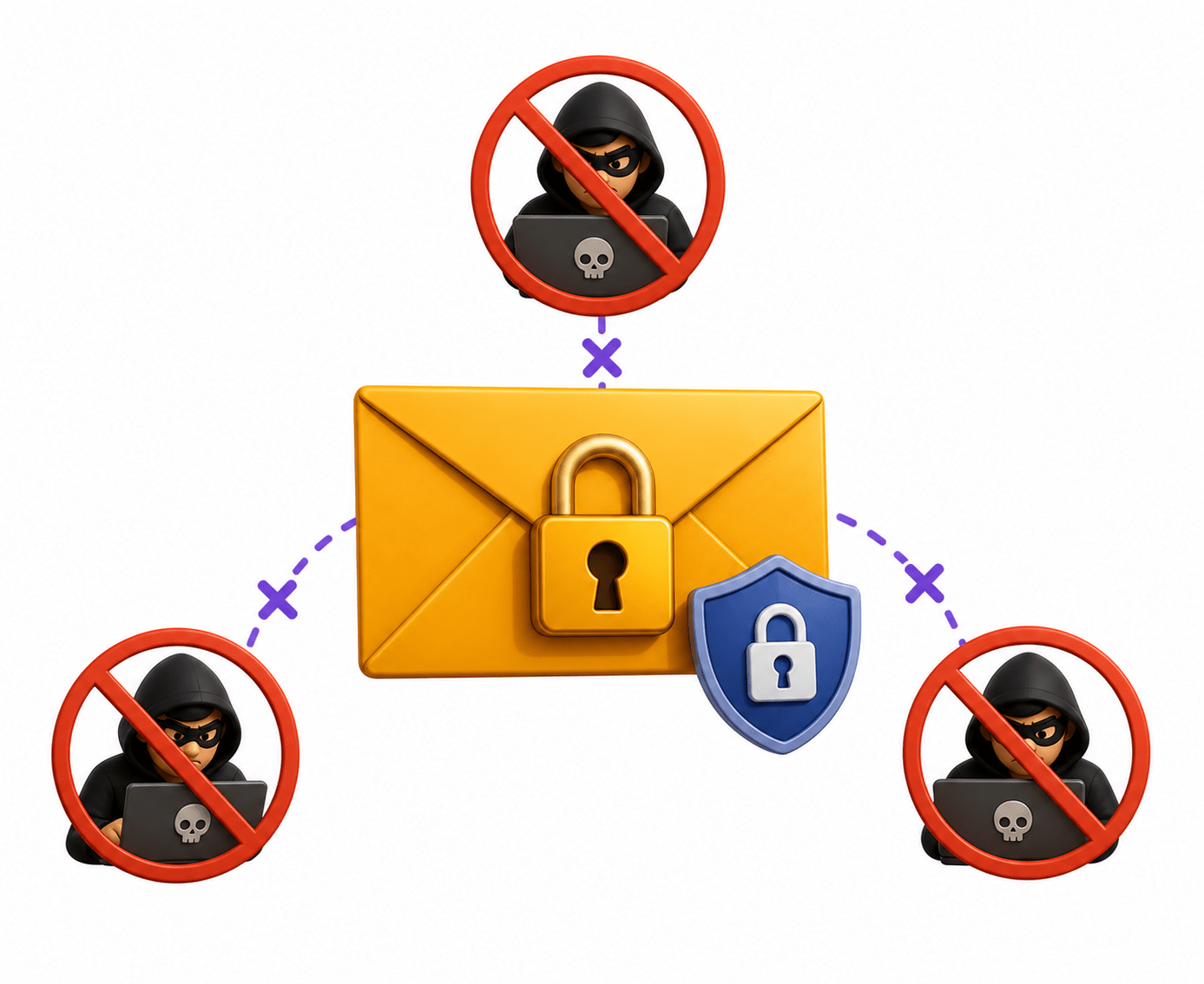
Message travels securely (encrypted)
No one can read or change it
HTTPS = SECURE & ENCRYPTED✅
Arjun receives the message safely
Use of OSI Model
Helps understand how data moves between devices step by step
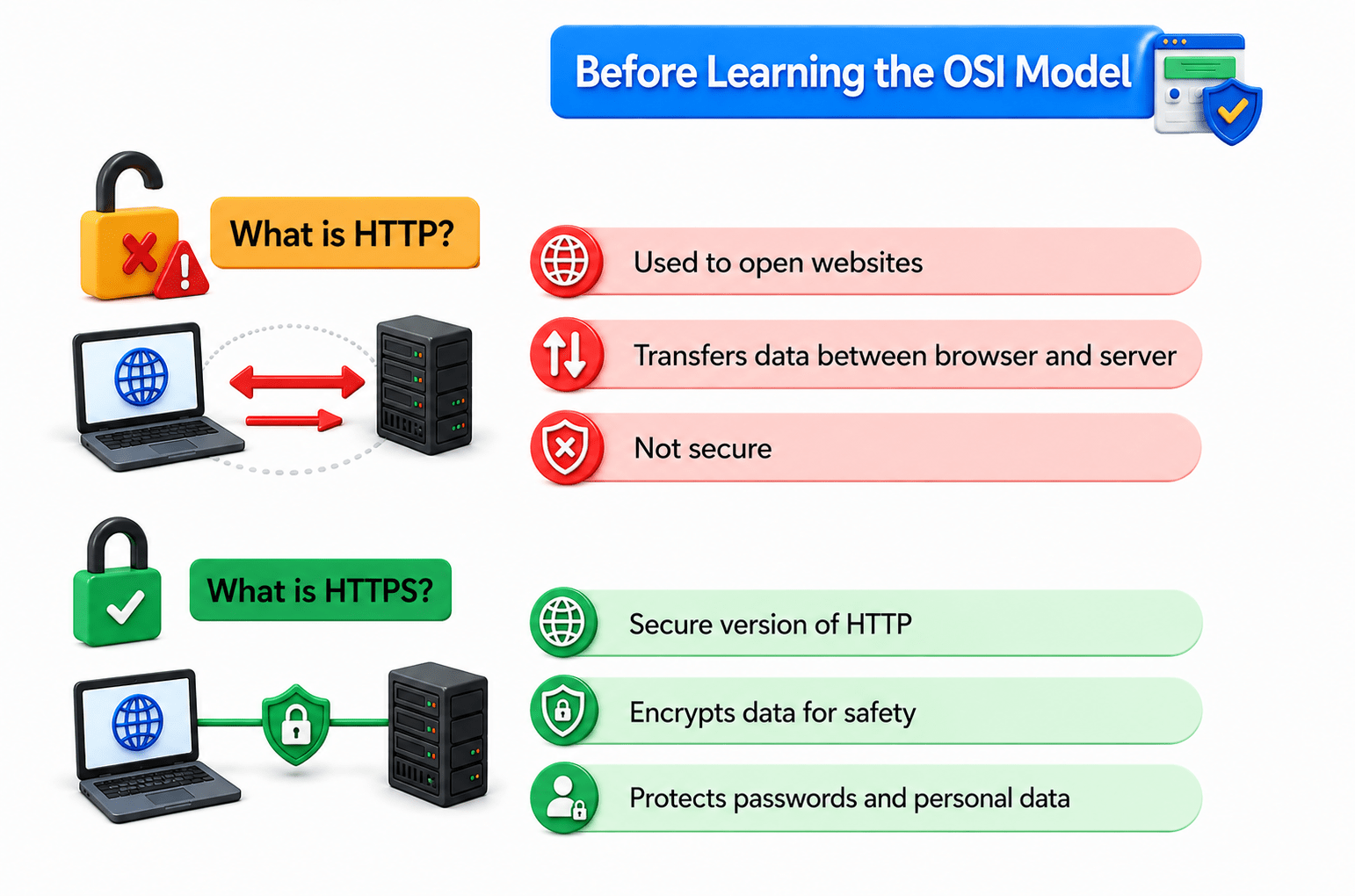
HTTP stands for HyperText Transfer Protocol.
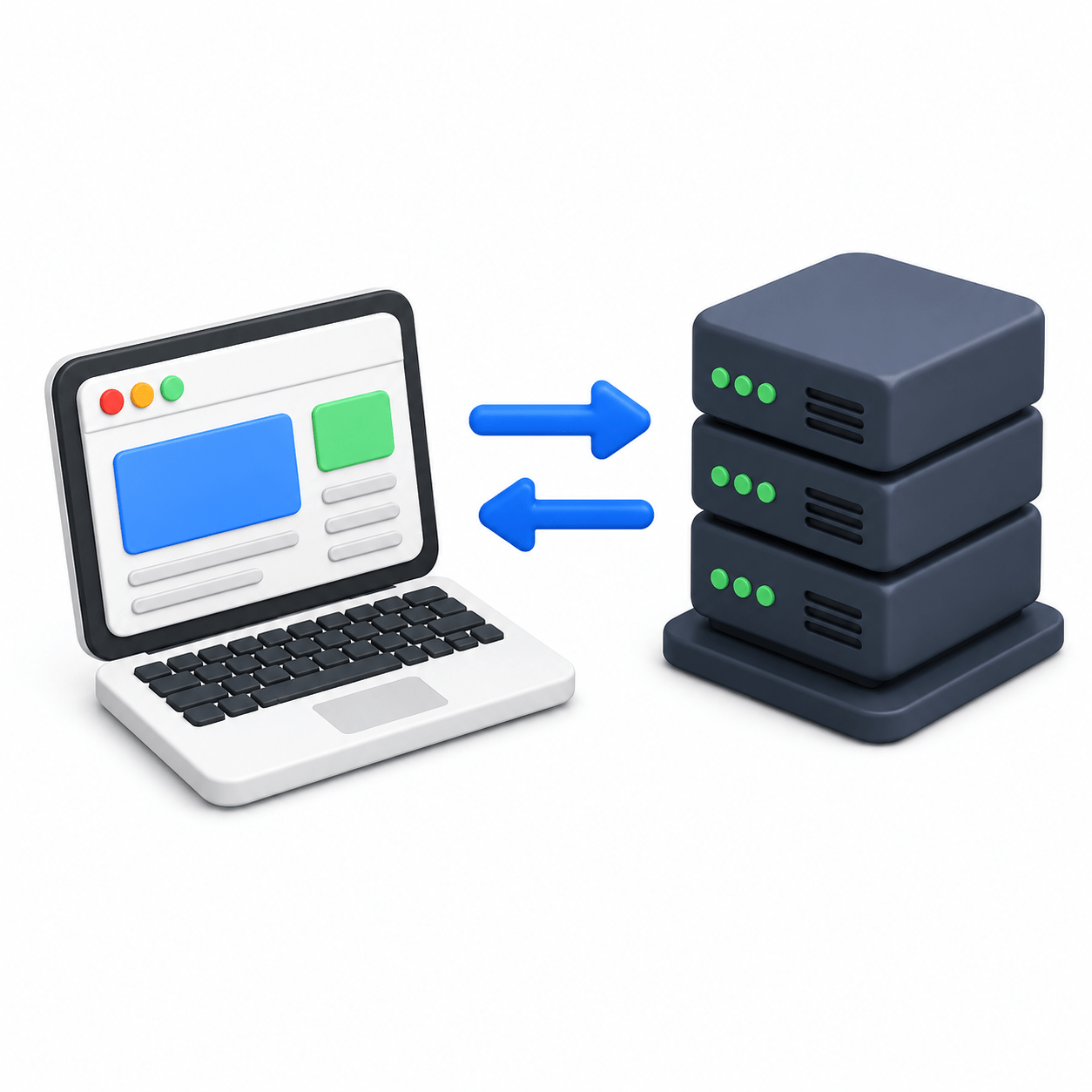
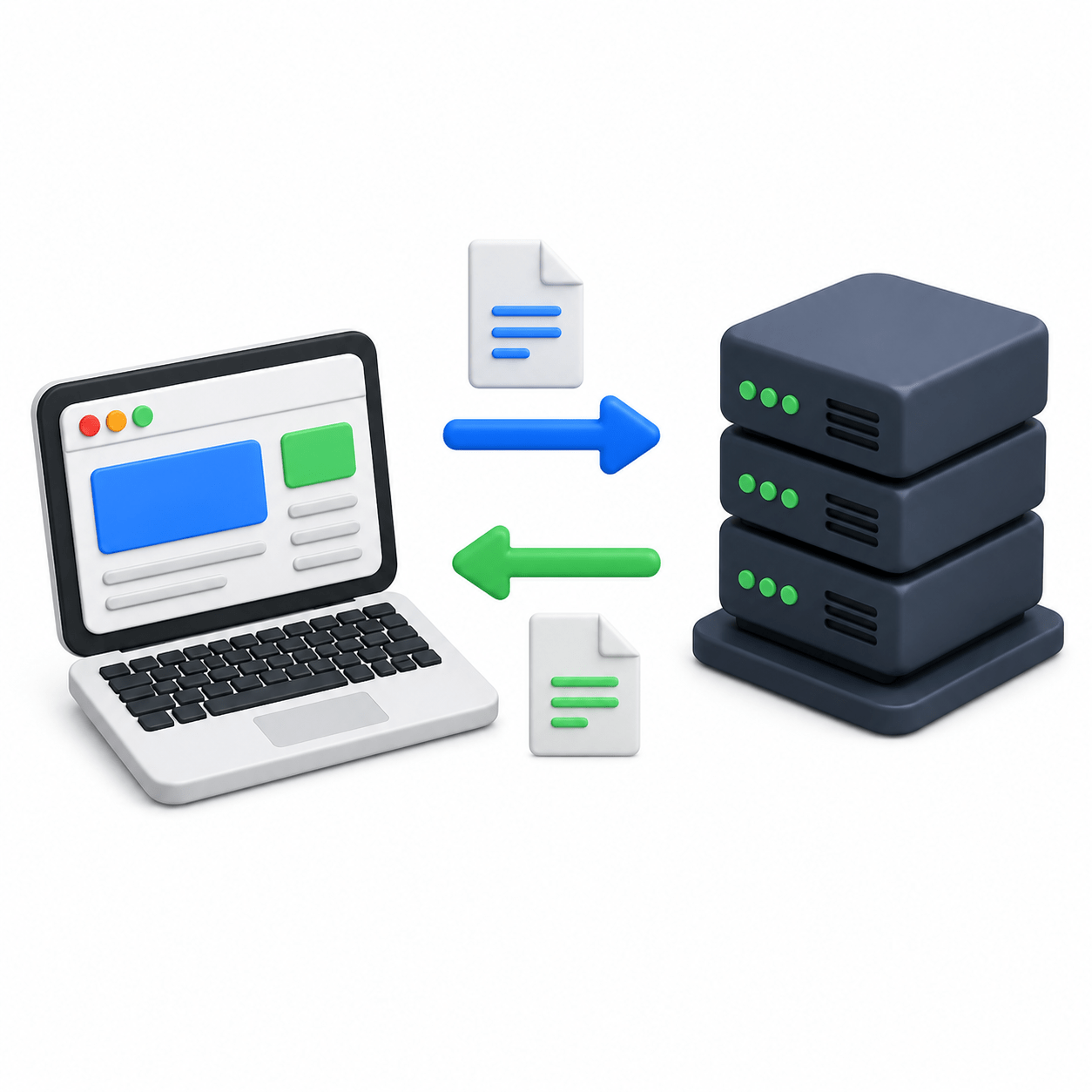
HTTP (HyperText Transfer Protocol) is a communication protocol used on the web that defines how data is transferred between a browser and a server.
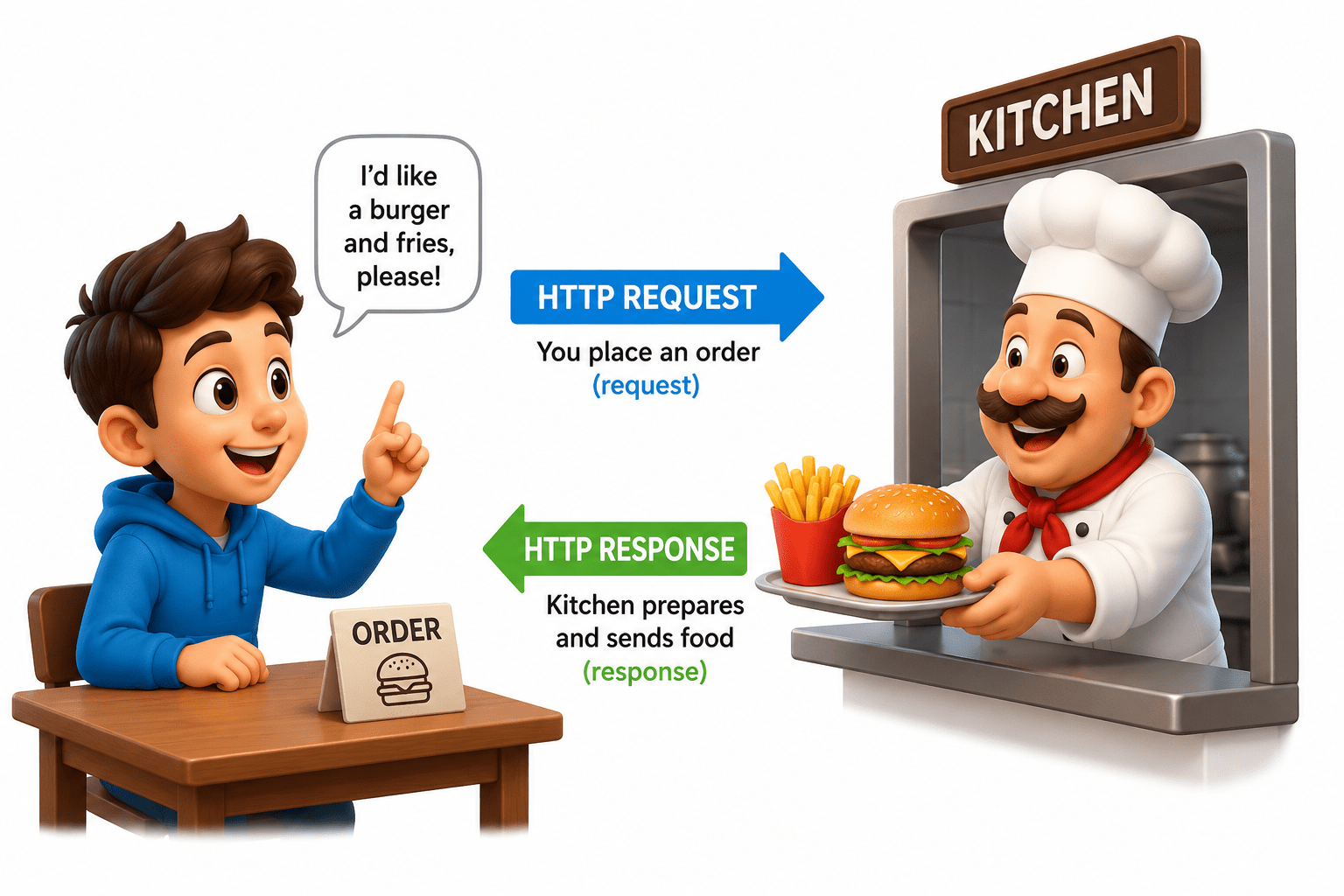
When you enter a website URL, your browser sends an HTTP request to the server, and the server responds with the required webpage or data.
Example :- It’s like ordering food from a restaurant:
You place an order (request)
Kitchen prepares and sends food (response)
What is HTTP?
HTTPS stands for HyperText Transfer Protocol Secure
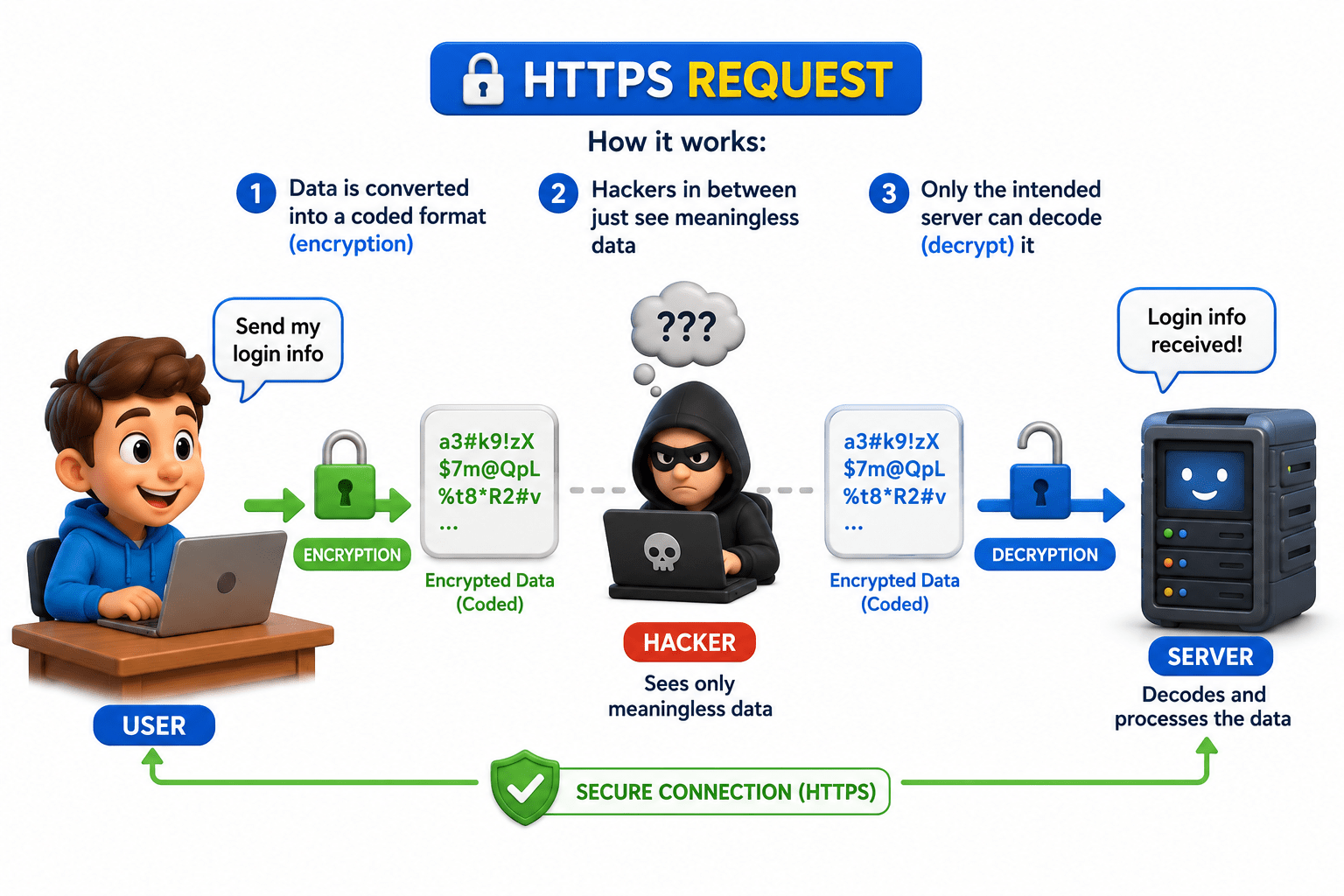
HTTPS is a secure communication protocol that protects data using encryption while it travels between your browser and a website.
What is HTTPS?
EXAMPLE
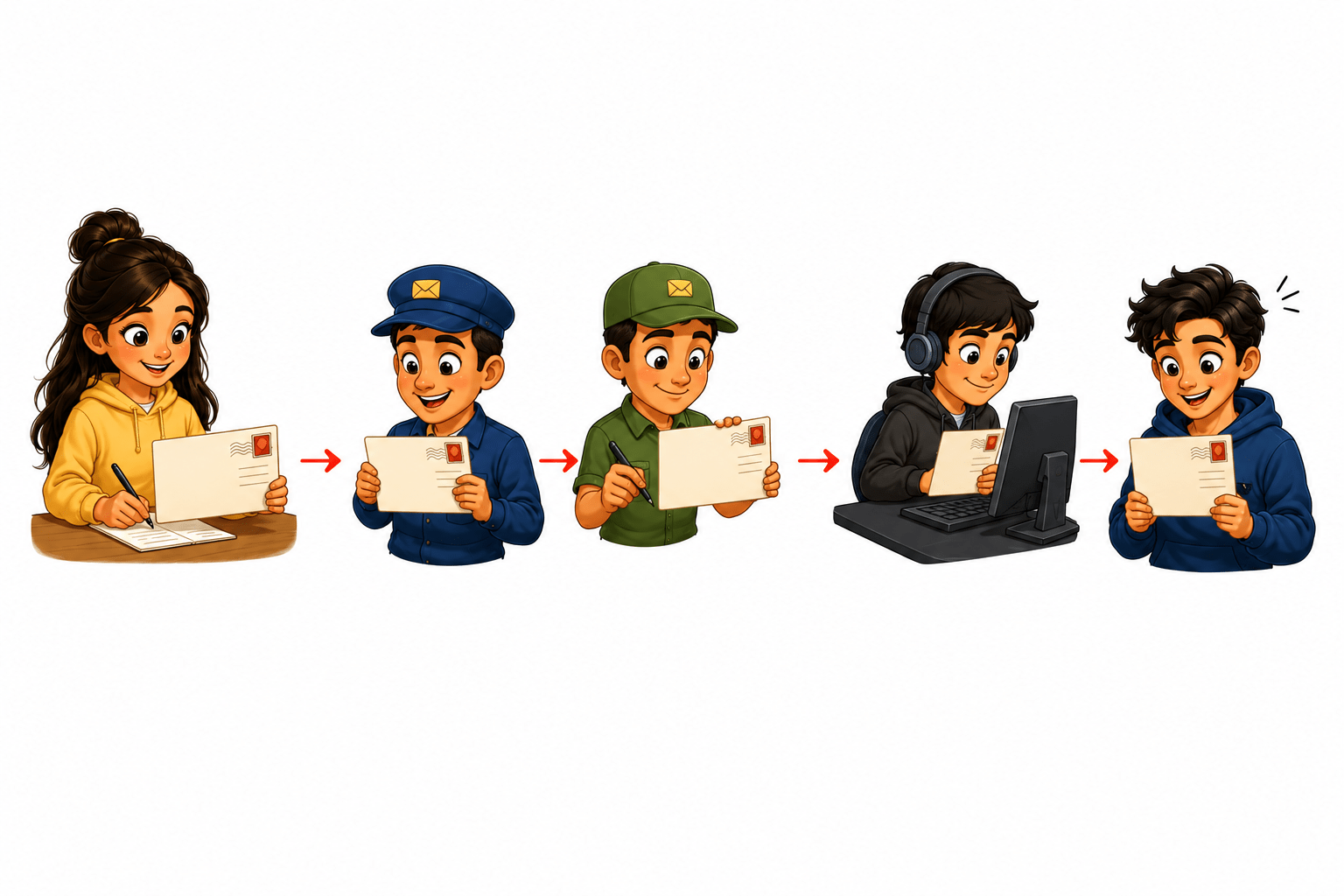
HTTP can be compared to sending a postcard, where you write your message openly without any protection. As it travels from you to the destination, it passes through multiple systems and networks, and anyone handling it along the way can easily read or even modify the information.
HTTPS can be compared to sending a message in a sealed and locked envelope, where your information is protected before it is sent. As it travels from you to the destination through multiple systems and networks, even if someone handles it along the way, they cannot read or modify the contents because it is locked. Only the intended receiver, who has the correct key, can open the envelope and access the original message.
HTTP – Not Secure
HTTPS – Secure
Enable communication between a client (browser) and a server to request and receive web resources
Define how data is sent and received using the request–response model
HTTPS ensures secure communication by encrypting data and protecting it from interception
Use of HTTP and HTTPS Protocols
Difference between HTTP and HTTPS
| HTTP (Not Secure) | HTTPS (Secure) |
|---|---|
| HTTP is like sending a postcard. The message is visible to anyone while it travels from you to the website. | HTTPS is like sending a sealed and locked envelope. Only the intended receiver can open and read it. |
| Data is sent in plain text (no encryption). | Data is encrypted before it is sent. |
| Information passes through multiple systems and networks. | It travels through multiple systems and networks safely. |
| Anyone along the way can read the data (hackers, network admins, attackers). | Even if someone intercepts it, they cannot read the data (it looks like random code). |
| Data can be easily modified or tampered with during transmission. | Data cannot be easily modified or tampered with during transmission. |
| No way to verify if the website is real or fake. | The website’s identity is verified using a digital certificate. |
| Ideal for non-sensitive information only. (e.g., reading public news) | Safe for sensitive information like passwords, banking, payments, etc. |
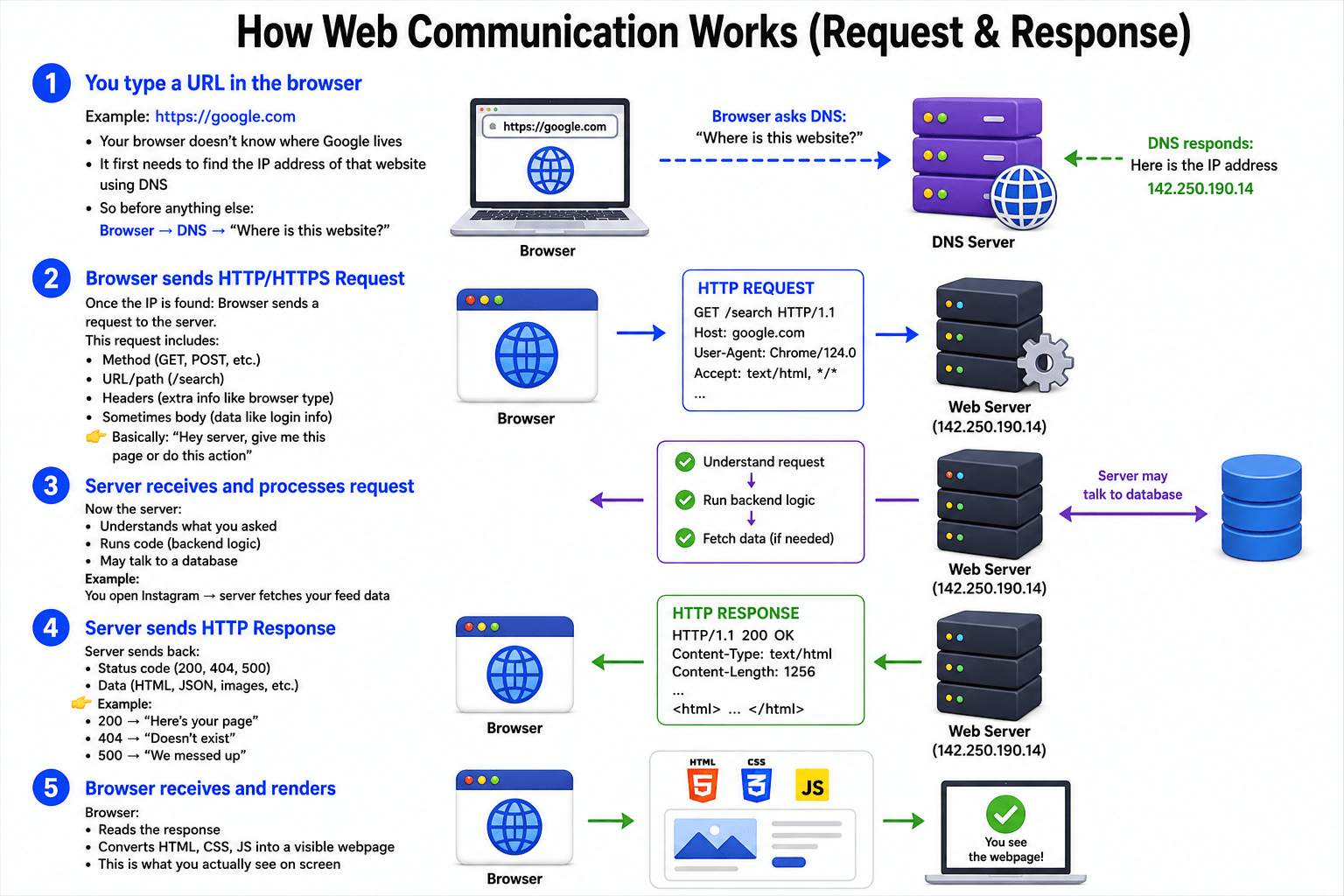
How Web Communication Works (Request & Response)?
Step 1: You type a URL in the browser
Example: https://google.com
Your browser doesn’t know where Google lives
It first needs to find the IP address of that website using DNS
So before anything else: Browser → DNS → “Where is this website?”
Step 2: Browser sends HTTP/HTTPS Request
Once the IP is found: Browser sends a request to the server
This request includes:
Method (GET, POST, etc.)
URL/path (/search)
Headers (extra info like browser type)
Sometimes body (data like login info)
Basically: “Hey server, give me this page or do this action”
Step 3: Server receives and processes request
Now the server: Understands what you asked
Runs code (backend logic)
May talk to a database
Example:
You open Instagram → server fetches your feed data
This is where the “real work” happens
Step 4: Server sends HTTP Response
Server sends back:
Status code (200, 404, 500)
Data (HTML, JSON, images)
Example:
200 → “Here’s your page”
404 → “Doesn’t exist”
500 → “We messed up”
Step 5: Browser receives and renders
Browser: Reads the response
Converts HTML, CSS, JS into a visible webpage
This is what you actually see on screen
We have successfully understood how HTTP and HTTPS communication works, including how data is transmitted securely over the network through encryption and protected connections.
1
HTTP methods tell the server what action you want to perform on data.
HTTP Methods
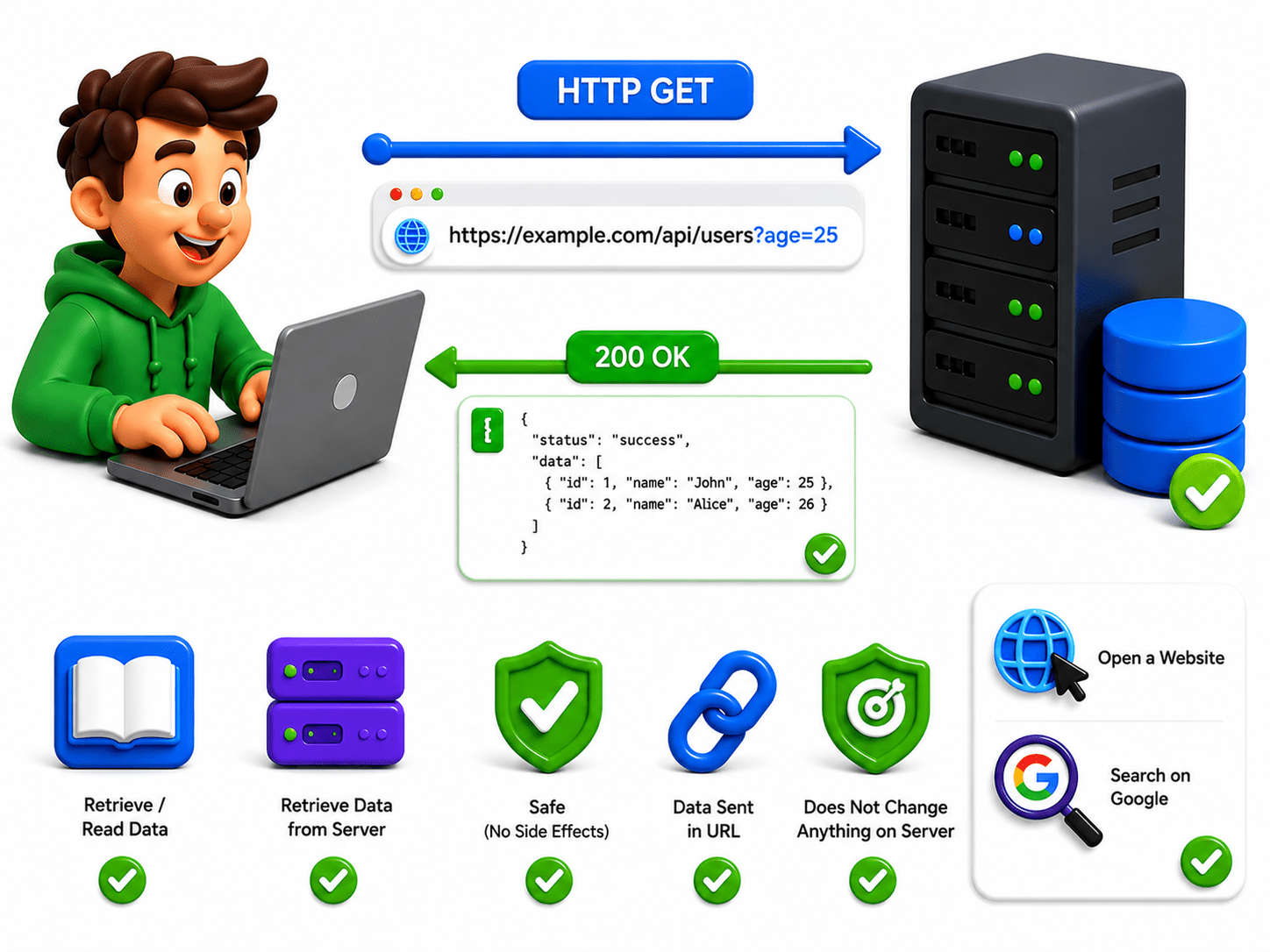
GET (Read / Fetch Data)
Used to retrieve data from the server
Does not change anything on the server
Data is usually sent in the URL
Example:
Opening a website
Searching on Google
Important: Should be safe (no side effects)
2
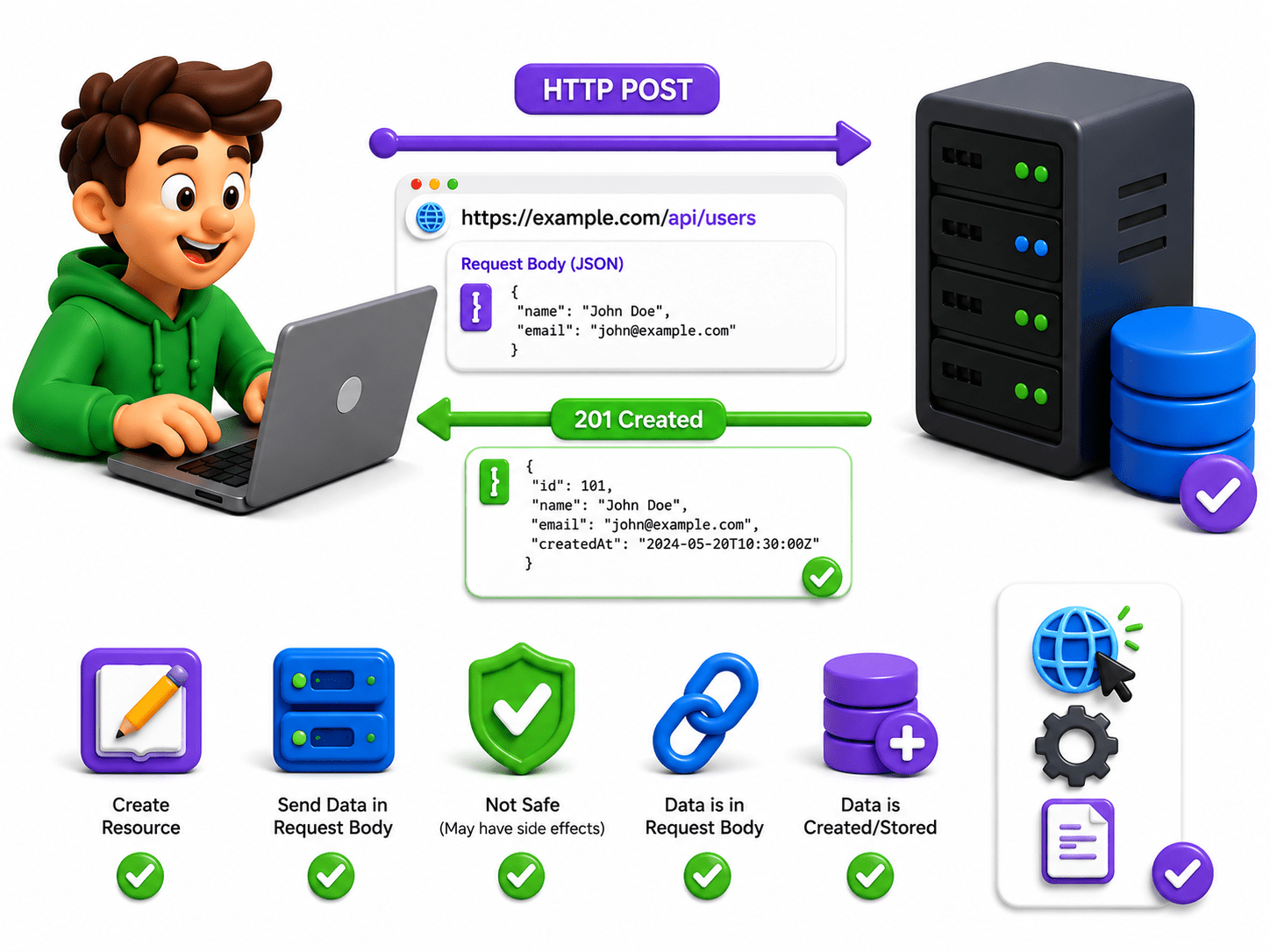
POST (Create / Send Data)
Used to send data to the server
Usually creates new data
Data is sent in the body (hidden from URL)
Example:
Signup form
Uploading a file
Important: Used when data is sensitive or large
3
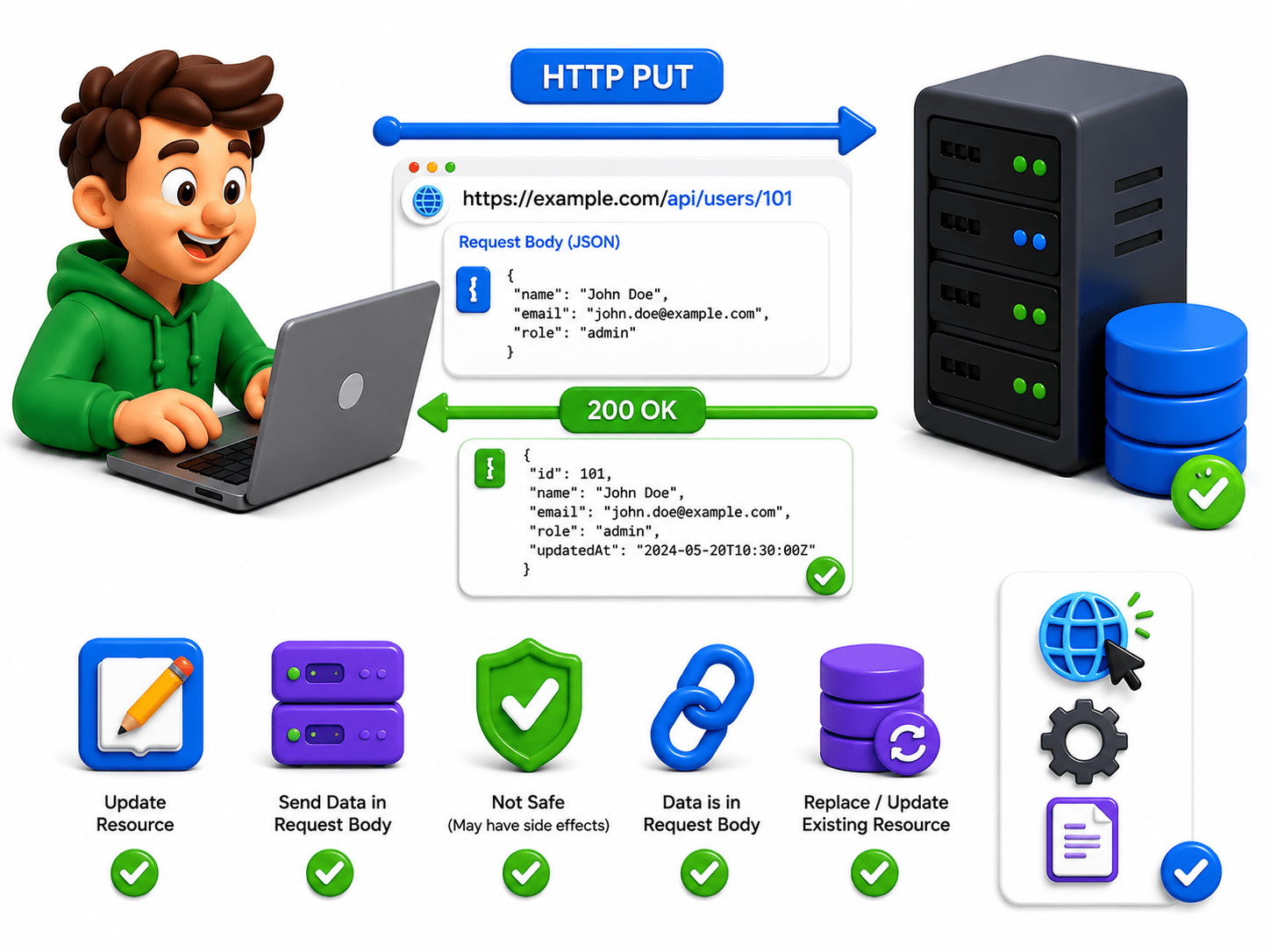
PUT (Update Completely)
Used to update an existing resource fully
Replaces the entire data
Example:
Updating full user profile
Replacing a document
Important: If data doesn’t exist, sometimes it can create it
4
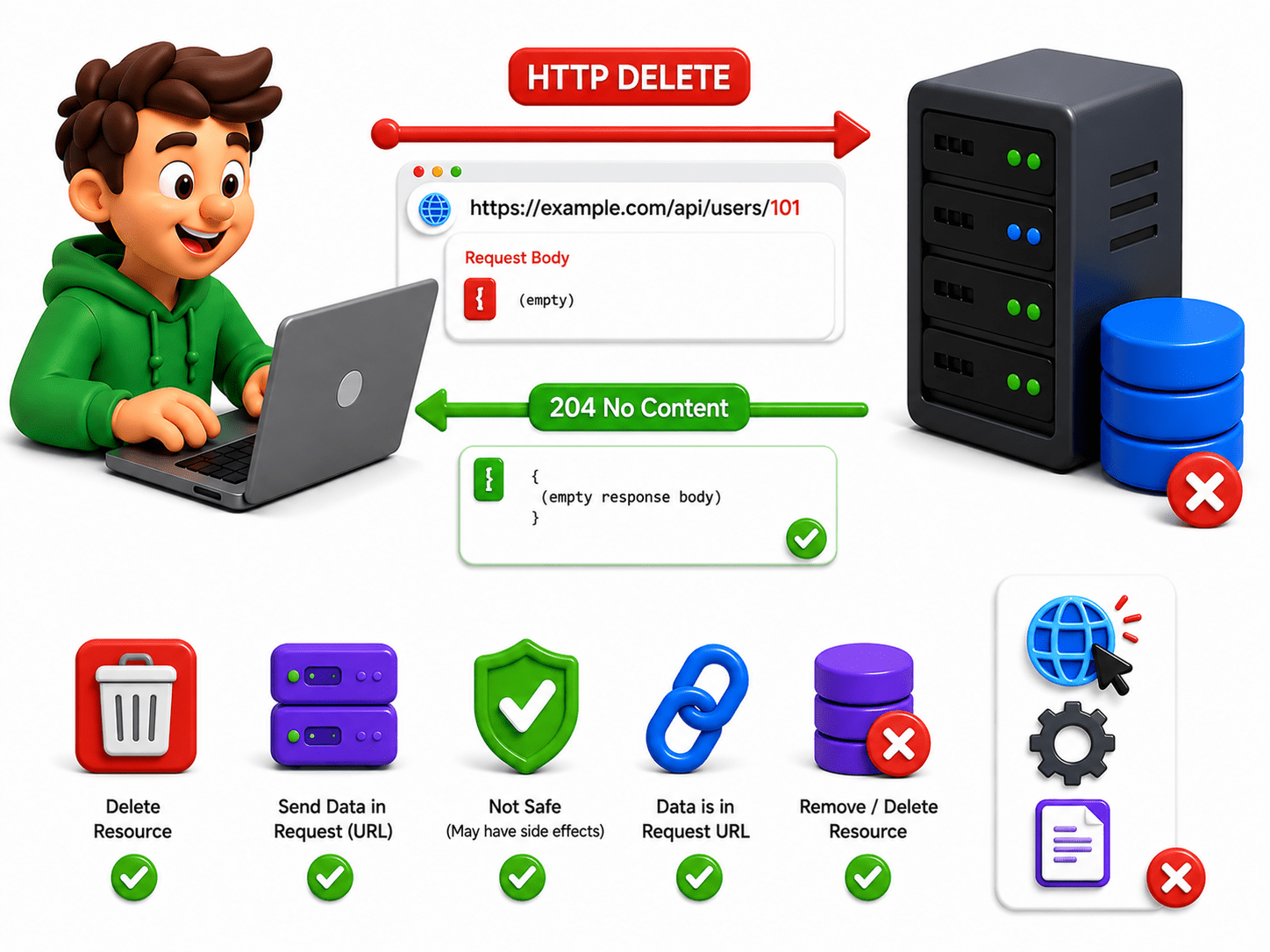
DELETE (Remove Data)
Used to delete a resource from the server
Example:
Deleting a post
Removing an account
Important: Action is permanent (usually no undo)
HTTP Status Codes
A status code is a number sent by the server that tells the result of the request, such as success (200), not found (404), or server error (500).
| Status Code | Status Text | Use / Description |
|---|---|---|
| 100 | Continue | The server has received the request headers; the client should proceed to send the request. |
| 101 | Switching Protocols | The server is switching protocols as requested by the client. |
| 102 | Processing | The server has received and is processing the request, but no response is available yet. |
| 103 | Early Hints | The server is likely to send a final response; used to return some response headers early. |
1XX Informational Status Codes
| Status Code | Status Text | Use / Description |
|---|---|---|
| 200 | OK | The request was successful, and the server returned the requested resource. |
| 201 | Created | The request was successful, and a new resource was created. |
| 202 | Accepted | The request has been accepted for processing, but the processing is not complete. |
| 203 | Non-Authoritative Information | The request was successful, but the returned information is from another source. |
| 204 | No Content | The request was successful, but there is no content to return. |
| 205 | Reset Content | The request was successful, and the client should reset the document view. |
| 206 | Partial Content | The server is delivering only part of the resource due to a range header. |
| 207 | Multi-Status | The response contains multiple status codes for multiple operations. |
| 208 | Already Reported | The members of a DAV binding have already been enumerated in a previous response. |
| 226 | IM Used | The server has fulfilled the request using instance manipulation. |
2XX Success Codes Complete Guide
| Status Code | Status Text | Use / Description |
|---|---|---|
| 300 | Multiple Choices | The request has multiple possible responses; the user can choose one. |
| 301 | Moved Permanently | The requested resource has been permanently moved to a new URL. |
| 302 | Found | The requested resource is temporarily located at a different URL. |
| 303 | See Other | The server is redirecting to a different URL, typically with a GET request. |
| 304 | Not Modified | The resource has not been modified since the last request. |
| 307 | Temporary Redirect | The requested resource is temporarily located at a different URL; method should not change. |
| 308 | Permanent Redirect | The requested resource has been permanently moved; method should not change. |
3XX Redirect Codes and Their Uses
| Status Code | Status Text | Use / Description |
|---|---|---|
| 400 | Bad Request | The server could not understand the request due to invalid syntax. |
| 401 | Unauthorized | Authentication is required, and the client has not provided valid credentials. |
| 402 | Payment Required | Reserved for future use; payment is required to access the resource. |
| 403 | Forbidden | The server understood the request but refuses to authorize it. |
| 404 | Not Found | The requested resource could not be found on the server. |
| 405 | Method Not Allowed | The requested method is not supported for the requested resource. |
| 406 | Not Acceptable | The server cannot produce a response matching the client’s acceptable content. |
| 407 | Proxy Authentication Required | Authentication with a proxy is required to complete the request. |
| 408 | Request Timeout | The server timed out waiting for the client’s request. |
| 409 | Conflict | The request could not be completed due to a conflict with the current state. |
| 410 | Gone | The requested resource is no longer available and will not be available again. |
4XX Client Error Codes Reference
| Status Code | Status Text | Use / Description |
|---|---|---|
| 411 | Length Required | The server requires the request to specify the Content-Length header. |
| 412 | Precondition Failed | The request’s precondition headers are not met by the server. |
| 413 | Payload Too Large | The request payload is larger than the server is willing or able to process. |
| 414 | URI Too Long | The request URI is longer than the server is willing to interpret. |
| 415 | Unsupported Media Type | The server does not support the media type in the request. |
| 416 | Range Not Satisfiable | The requested range is not satisfiable. |
| 417 | Expectation Failed | The server cannot meet the requirements of the Expect request-header field. |
| 418 | I’m a Teapot | A playful error code defined in RFC 2324; the server refuses to brew coffee. |
| 421 | Misdirected Request | The request was directed at a server that is not able to produce a response. |
| 422 | Unproccessable Entity | The server understands the request but cannot process it. |
| 423 | Locked | The resource is locked and cannot be accessed. |
| 424 | Failed Dependency | The request failed due to the failure of a previous request. |
| Status Code | Status Text | Use / Description |
|---|---|---|
| 425 | Too Early | The server is unwilling to risk processing a request that might be replayed. |
| 426 | Upgrade Required | The client must upgrade to a different protocol. |
| 428 | Precondition Required | The server requires the request to be conditional. |
| 429 | Too Many Requests | The client has sent too many requests in a given amount of time. |
| 431 | Request Header Fields Too Large | The server is unwilling to process the request because header fields are too large. |
| 451 | Unavailable For Legal Reasons | The resource is unavailable due to legal reasons. |
| Status Code | Status Text | Use / Description |
|---|---|---|
| 500 | Internal Server Error | The server encountered an unexpected condition that prevented it from fulfilling the request. |
| 501 | Not Implemented | The server does not support the functionality required to fulfill the request. |
| 502 | Bad Gateway | The server, while acting as a gateway or proxy, received an invalid response. |
| 503 | Service Unavailable | The server is currently unable to handle the request due to overload or maintenance. |
| 504 | Gateway Timeout | The server, while acting as a gateway or proxy, did not receive a timely response. |
| 505 | HTTP Version Not Supported | The server does not support the HTTP protocol version used in the request. |
| 506 | Variant Also Negotiates | The server has an internal configuration error: variant negotiation loop. |
| 507 | Insufficient Storage | The server is unable to store the representation needed to complete the request. |
| 508 | Loop Detected | The server detected an infinite loop while processing the request. |
| 510 | Not Extended | Further extensions to the request are required for the server to fulfill it. |
| 511 | Network Authentication Required | The client needs to authenticate to gain network access. |
5XX Server Error Codes Explained
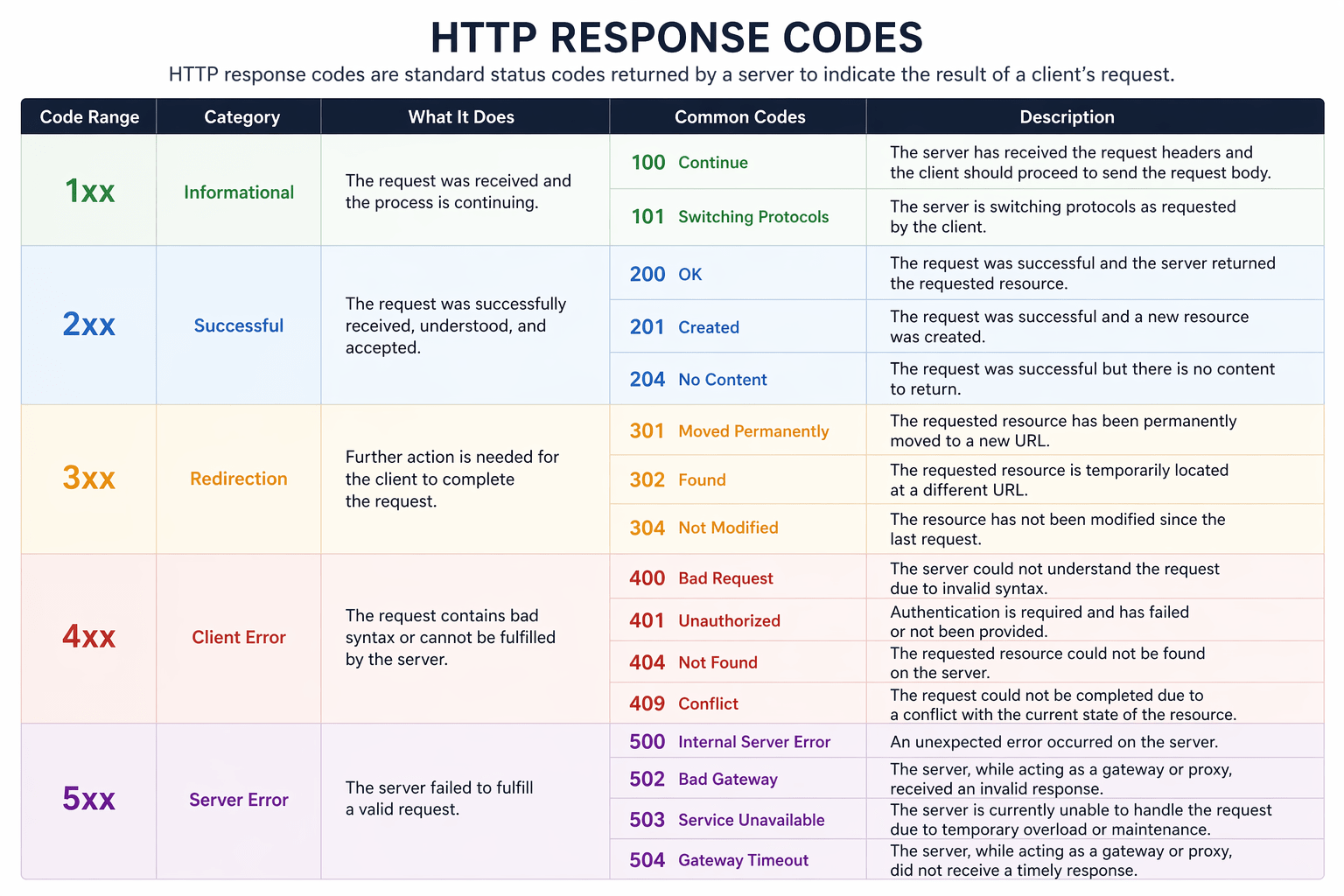
HTTP Response code
HTTP response code are standard status codes returned by a server to indicate the result of client request
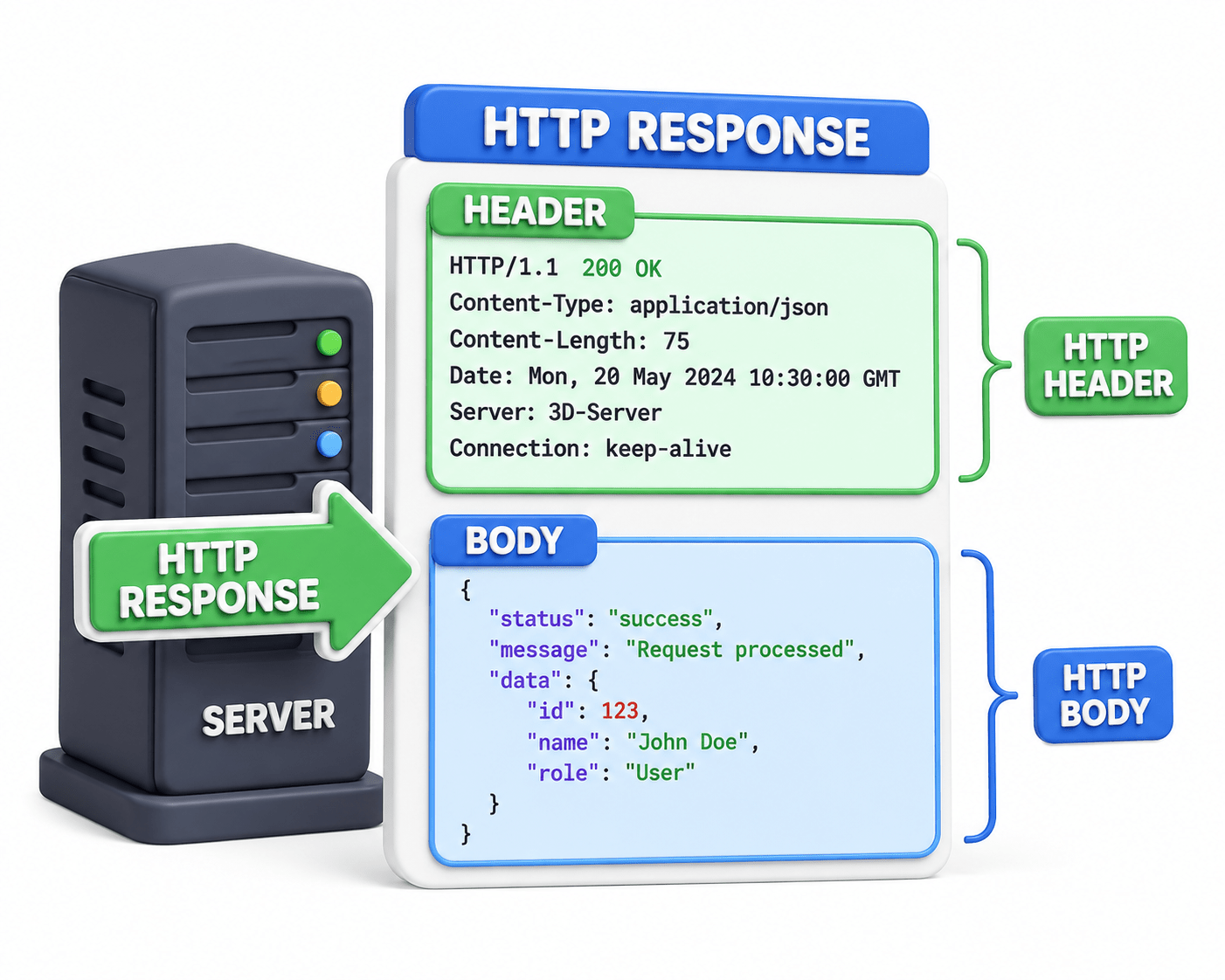
Headers (info about the response)
Headers are additional pieces of information sent with the request or response that describe details like content type, browser info, or how the data should be handled.
Headers give more context about the request.
Body (actual data: webpage, JSON, images)
The body is the actual data being sent in the request or response, such as a webpage (HTML), JSON data, images, or form inputs.
Used mainly in POST, PUT requests.
This is actual data you are sending to the server (login forms, signup data, etc.)
HTTP response also includes
HTTP response also includes
SSL/TLS Basics (Encryption concept)
What is SSL/TLS? (Basics)
SSL (Secure Sockets Layer) and TLS (Transport Layer Security) are protocols used to secure communication over the internet by encrypting data.
SSL is the older version
TLS is the newer, more secure version (what we actually use today)
Provide Security through Encryption:- They encrypt data so no one can read it while it’s being transmitted.
Ensure Data Integrity:- They make sure data is not modified or tampered with during transfer.
Authenticate the Website :- They verify that you are connecting to the real server using digital certificates.
| Feature | SSL (Secure Sockets Layer) | TLS (Transport Layer Security) |
|---|---|---|
| Version | Older protocol | Newer, improved version |
| Security | Less secure (has vulnerabilities) | More secure and stronger encryption |
| Usage Today | Deprecated (not used anymore) | Widely used in HTTPS |
| Performance | Slower | Faster and more efficient |
| Support | Not supported by modern browsers | Fully supported |
Importance of HTTPS in Security
HTTPS isn’t just a “nice to have.” It’s the minimum requirement for anything remotely secure online.
Protects Data with Encryption
HTTPS encrypts data while it’s being transferred.
Passwords, payment details, personal info → all scrambled
Even if someone intercepts it, they can’t read it
Prevents Data Tampering
It ensures data is not modified during transmission
Hackers can’t inject malicious code easily
What you send = what the server receives
Verifies Website Identity (Authentication)
HTTPS uses digital certificates to confirm the website is real
Prevents connecting to fake servers
Helps avoid man-in-the-middle attacks
Builds User Trust
Browsers show: Padlock for HTTPS
“Not Secure” warning for HTTP
Essential for Modern Web (SEO & Browsers)
Search engines prefer HTTPS websites
Browsers may block or warn against HTTP sites
Summary
5
Understood HTTPS for security, integrity, authentication, and trust
4
Learned headers store metadata and body stores data
3
Studied status codes like 200, 404, and 500
2
Explored GET, POST, PUT, and DELETE methods
1
Learned HTTP communication and HTTPS security using SSL/TLS
Quiz
Which of the following best describes HTTPS?
A. Faster version of HTTP
B. Protocol that compresses web data
C. Secure version of HTTP that encrypts data
D. Protocol only used for file transfers
Quiz-Answer
Which of the following best describes HTTPS?
A. Faster version of HTTP
B. Protocol that compresses web data
C. Secure version of HTTP that encrypts data
D. Protocol only used for file transfers
By Content ITV