Loan Risk Ranking

Business Scenario
Welcome!
Today is your seventh day as a Data Analyst at our company.
The client wants us to build a Loan Risk Ranking System to analyze customer loan applications and identify high-risk borrowers based on credit score, loan amount, income, and repayment history.

Pre-Lab Preparation
In This System, Loan Managers Should Be Able To:
-
Rank customers based on loan risk score.
-
Assign row numbers to applications within each loan category.
-
Calculate cumulative loan exposure.
-
Compare each applicant’s risk with previous and next applicants.
Topic : Mastering SQL Window Functions
1) Understanding OVER()
2)Using RANK(), DENSE_RANK(), and ROW_NUMBER()
3)Calculating Running Totals with SUM() OVER()
4)Comparing Rows with LAG() and LEAD()
5)Partitioning Data with PARTITION BY

Git Pull
git pull origin branchNameTask 1: Rank Loan Applications by Risk Score
Before approving any loan, the bank wants to identify which applicants pose the highest level of financial risk. By ranking customers according to their risk score, loan officers can quickly determine which applications require stricter review and additional verification.
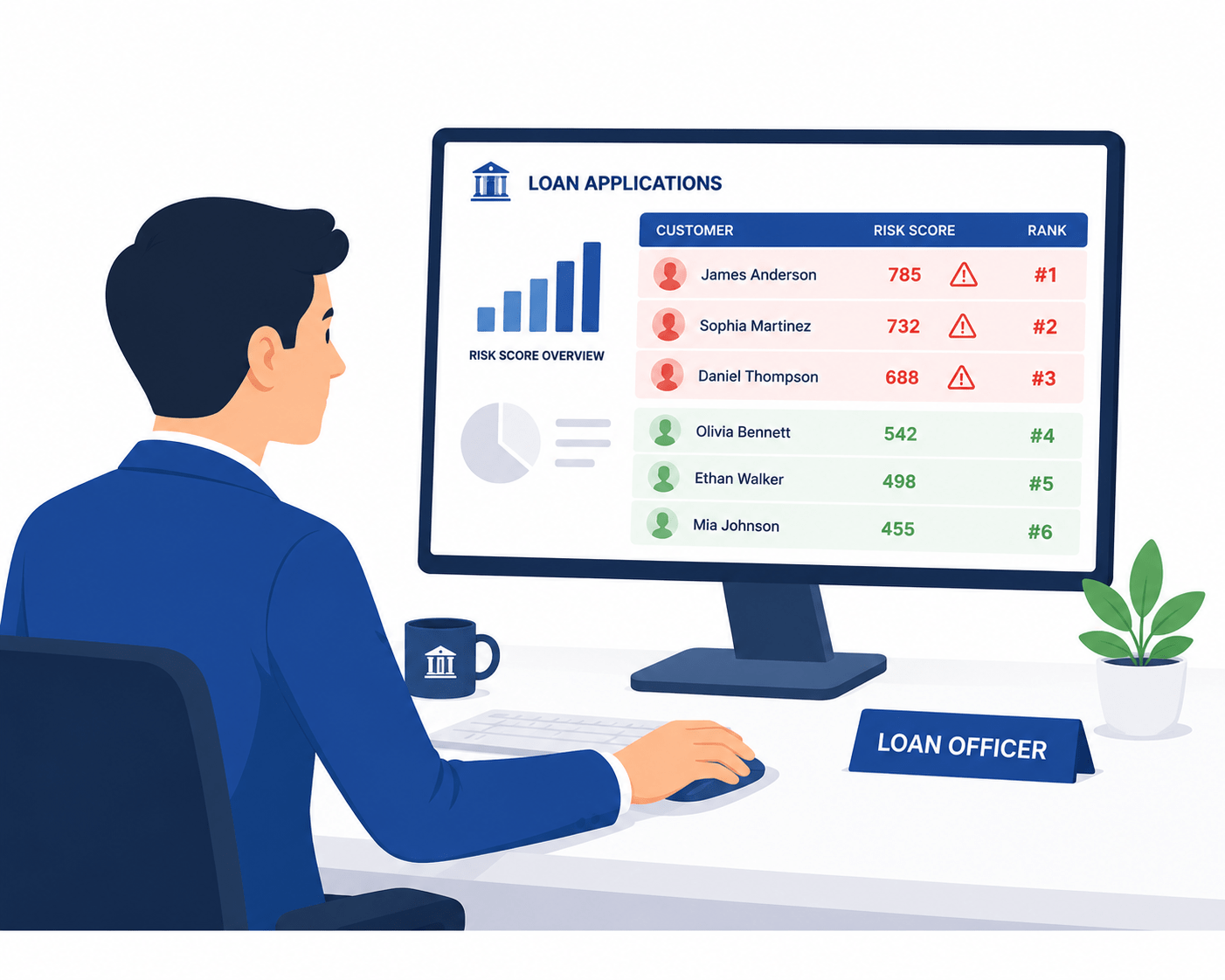
Applicants with higher risk scores are considered more likely to default, so they receive higher priority during risk assessment.
To perform this analysis, we use the RANK() window function, which assigns a rank to each applicant based on their risk score in descending order.
Table: loan_applications
| application_id | customer_name | loan_type | loan_amount | annual_income | credit_score | risk_score |
|---|---|---|---|---|---|---|
| 1001 | Amit Sharma | Personal Loan | 500000 | 600000 | 680 | 82 |
| 1002 | Priya Patel | Home Loan | 3500000 | 1200000 | 750 | 45 |
| 1003 | Rahul Verma | Auto Loan | 800000 | 700000 | 690 | 70 |
| 1004 | Sneha Joshi | Personal Loan | 300000 | 400000 | 620 | 90 |
| 1005 | Nitin Jain | Business Loan | 1500000 | 1800000 | 710 | 55 |
SELECT application_id,
       customer_name,
       risk_score,
       RANK() OVER (ORDER BY risk_score DESC) AS risk_rank
FROM loan_applications;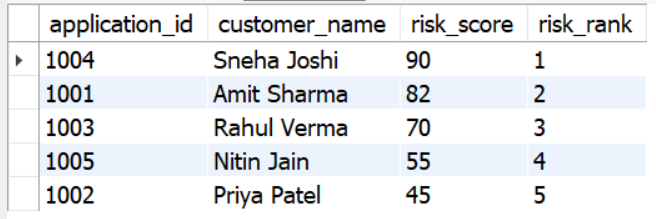
Task 2: Assign Row Numbers Within Each Loan Type
The bank wants to organize loan applications by assigning a unique sequence number within each loan category.
This makes it easier to compare applicants applying for the same type of loan, such as Home Loan or Personal Loan.
The numbering restarts for each loan type, ensuring that every category is analyzed independently
Table: loan_applications
| application_id | customer_name | loan_type | loan_amount | annual_income | credit_score | risk_score |
|---|---|---|---|---|---|---|
| 1001 | Amit Sharma | Personal Loan | 500000 | 600000 | 680 | 82 |
| 1002 | Priya Patel | Home Loan | 3500000 | 1200000 | 750 | 45 |
| 1003 | Rahul Verma | Auto Loan | 800000 | 700000 | 690 | 70 |
| 1004 | Sneha Joshi | Personal Loan | 300000 | 400000 | 620 | 90 |
| 1005 | Nitin Jain | Business Loan | 1500000 | 1800000 | 710 | 55 |
SELECT application_id,
       customer_name,
       loan_type,
       risk_score,
       ROW_NUMBER() OVER (
           PARTITION BY loan_type
           ORDER BY risk_score DESC
       ) AS row_num
FROM loan_applications;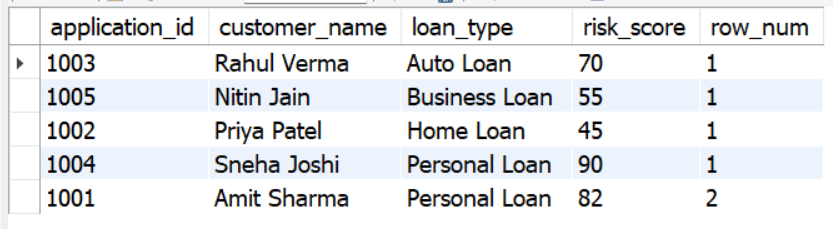
Task 3: Analyze Running Total of Loan Amounts
After ranking loan applications by risk score, the bank wants to understand how its total loan exposure increases as each application is considered.
By arranging applicants from highest to lowest risk and calculating a running total of loan amounts, loan officers can see the cumulative amount at risk at every step. This helps management assess how much capital is exposed to borrowers with varying risk levels.
Table: loan_applications
| application_id | customer_name | loan_type | loan_amount | annual_income | credit_score | risk_score |
|---|---|---|---|---|---|---|
| 1001 | Amit Sharma | Personal Loan | 500000 | 600000 | 680 | 82 |
| 1002 | Priya Patel | Home Loan | 3500000 | 1200000 | 750 | 45 |
| ... | ... | ... | ... | ... | ... | ... |
| 1005 | Nitin Jain | Business Loan | 1500000 | 1800000 | 710 | 55 |
SELECT application_id,
       customer_name,
       loan_amount,
       risk_score,
       SUM(loan_amount) OVER (
           ORDER BY risk_score DESC
       ) AS running_total
FROM loan_applications;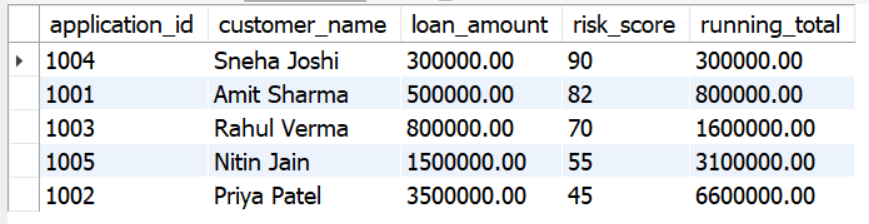
Task 4: Compare rows using analytical functions
Once the loan applications have been ranked and organized, the risk assessment team wants to look deeper into how each applicant compares with others in the list.
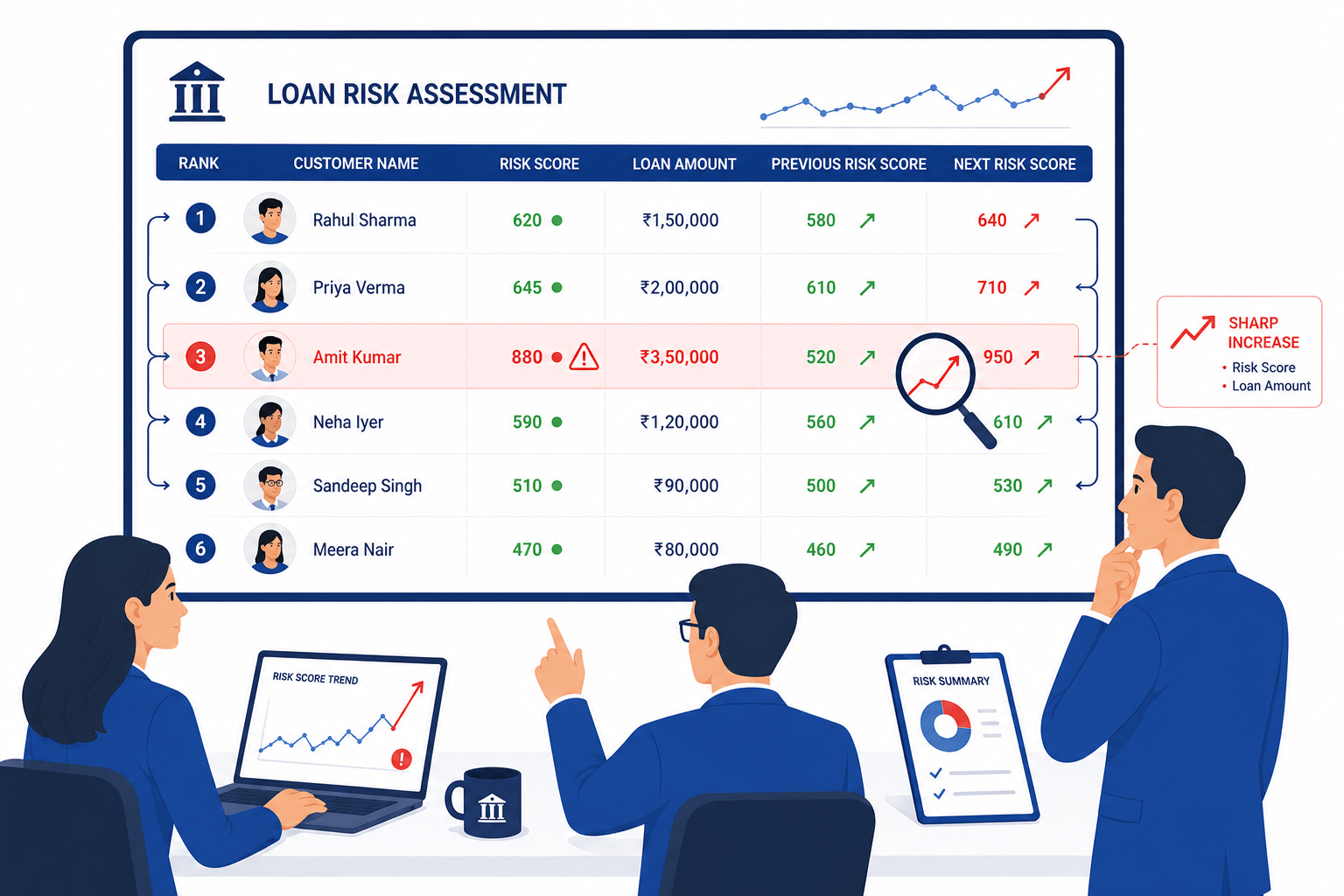
As they review the report, they compare every customer’s risk score and loan amount with the applicants listed immediately before and after them.
To perform this step-by-step comparison, we use analytical functions
If they notice a sudden jump in risk score or a significant increase in loan amount, that application is flagged for additional scrutiny.
1
Compare with the Previous Applicant Using LAG()
| application_id | customer_ name | loan_ type | loan_ amount | annual_ income | credit_ score | risk_ score |
|---|---|---|---|---|---|---|
| 1001 | Amit Sharma | Personal Loan | 500000 | 600000 | 680 | 82 |
| 1002 | Priya Patel | Home Loan | 3500000 | 1200000 | 750 | 45 |
| 1003 | Rahul Verma | Auto Loan | 800000 | 700000 | 690 | 70 |
| 1004 | Sneha Joshi | Personal Loan | 300000 | 400000 | 620 | 90 |
| ... | ... | ... | ... | ... | ... | ... |
| 1015 | Karan Malhotra | Business Loan | 1750000 | 1900000 | 720 | 53 |
SELECT application_id,
       customer_name,
       risk_score,
       LAG(risk_score) OVER (ORDER BY risk_score DESC) AS previous_risk_score
FROM loan_applications;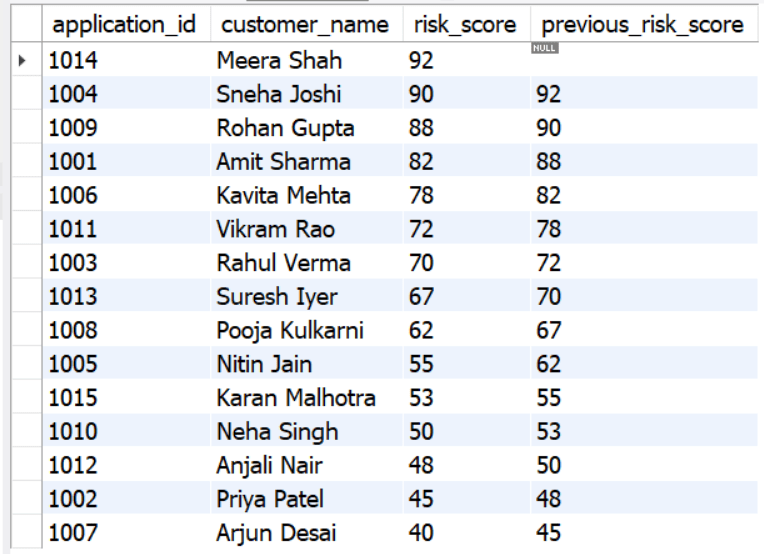
2
Compare with the Next Applicant Using LEAD()
| application_id | customer_ name | loan_ type | loan_ amount | annual_ income | credit_ score | risk_ score |
|---|---|---|---|---|---|---|
| 1001 | Amit Sharma | Personal Loan | 500000 | 600000 | 680 | 82 |
| 1002 | Priya Patel | Home Loan | 3500000 | 1200000 | 750 | 45 |
| 1003 | Rahul Verma | Auto Loan | 800000 | 700000 | 690 | 70 |
| 1004 | Sneha Joshi | Personal Loan | 300000 | 400000 | 620 | 90 |
| ... | ... | ... | ... | ... | ... | ... |
| 1015 | Karan Malhotra | Business Loan | 1750000 | 1900000 | 720 | 53 |
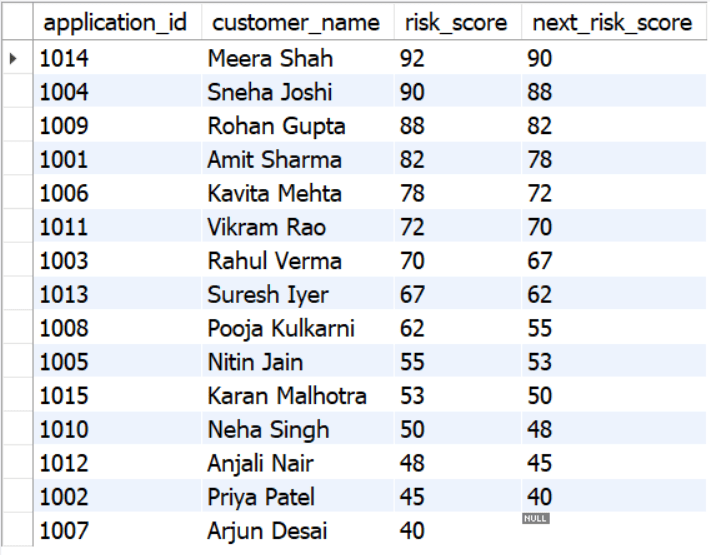
SELECT application_id,
       customer_name,
       risk_score,
       LEAD(risk_score) OVER
       (ORDER BY risk_score DESC)
       AS next_risk_score
FROM loan_applications;
Great job!
You have successfully completed your first lab on BiteBox Project Onboarding.
In this lab, you have: Understood the BRD, Created a wireframe, Set up your development environment, Organised your project structure, Run your first program
You are now ready to move to the next stage of development
Checkpoint
Next-Lab Preparation
Git Push
git push origin branchNameTopic : Working with a Text and Listin HTML
1) Power of HTML text tags
2) Customizing your style with CSS
3) Listing it right using HTML
4) HTML Link up , attributes of tag, block vs inline elements
Text box Width : 887
Business Scenario, Pre-lab Preparation, Next-lab Preparation, Task, Activity, Checkpoint : 90%.
Steps : 1,2,3 [Sub Steps - a,b,c]
Normal Text, Topic Name : 80%
Subtopic : 70%
Code Box font Size : 16px